Signed webhooks for PrestaShop 8.2 and 9.x: 12 store events (orders created, status changed, paid, shipped, canceled, credit slips, returns, customers, products, low and out of stock) to Zapier, Make, n8n, Google Sheets or your own server, as full JSON or a flat spreadsheet row. Sent right after the page, retried with backoff, paused after repeated failures, with a delivery log, send again and test sends. No overrides.
Tested on 9.2.0 & 8.2.8Updated Nov 4, 2026Version 1.0.0Compatible with PrestaShop 8.2 – 9.x No core file edits
Built forPrestaShop
Your store, in every tool (sample data)1 of 7
What it does
Signed webhooks for PrestaShop 8.2 and 9.x: 12 store events (orders created, status changed, paid, shipped, canceled, credit slips, returns, customers, products, low and out of stock) to Zapier, Make, n8n, Google Sheets or your own server, as full JSON or a flat spreadsheet row. Sent right after the page, retried with backoff, paused after repeated failures, with a delivery log, send again and test sends. No overrides.
Your store, live in every tool. PrestaShop has no outgoing webhooks, so automation tools poll your store every few minutes and miss what happened in between. Webhooks Hub sends each event the moment it happens.
Features
12 events
Orders: created, status changed (optionally for chosen statuses), paid, shipped, canceled
Credit slips, return requests, new customers and guests
Products created and updated, low stock and out of stock
Endpoints your way
Any http or https URL: Zapier, Make, n8n, Google Apps Script, your ERP or server
Full JSON, or a flat spreadsheet row with the fields you pick
Extra headers for API keys, events per endpoint, on/off
Never lost
Sent right after the page that created the event
Retried after 1, 5, 30 minutes, 2, 6 and 12 hours; endpoints that keep failing are paused until you resume
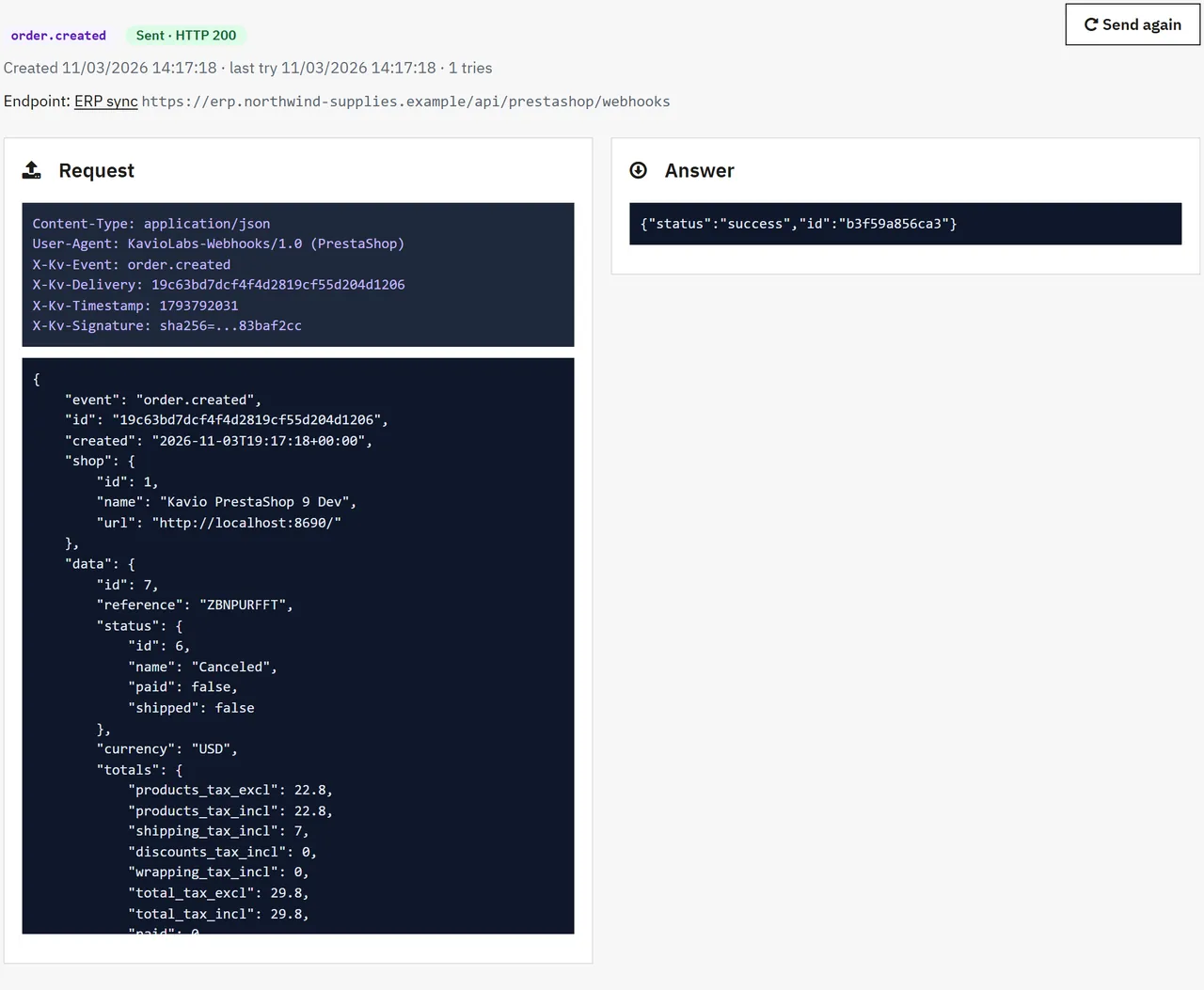
Delivery log with the exact request and answer, Send again, test sends with your real data
Signed and safe
HMAC-SHA256 signature, timestamp and event id on every request
Private networks refused unless allowed, no redirects, pinned address
What you get
Download & installOne module .zip for PrestaShop 8.2 and 9.x, installed in Modules > Module Manager > Upload a module. Download it from My licenses right after payment.
12 months of updates & supportNew versions and help for 12 months (24 or 36 months at checkout). After that the module keeps working; renew anytime at 50%.
License for your storeOne production domain with all its subdomains; staging and local development hosts are free. How licensing works
30-day refundFull refund within 30 days of your first purchase, no reason needed. Refund policy
Tested buildsPrestaShop 8.2 – 9.x. Tested on PrestaShop 9.2.0 and PrestaShop 8.2.8.
Documentation & supportFull guide (Installation, Configuration, Usage, FAQ) on this page. Tickets from your account, first reply within 1 business day.
Compatibility
Webhooks Hub works with PrestaShop 8.2 – 9.x.
We list the builds we install and test on. “Tested” means the test plan ran on that build; “Supported” means the build is inside the supported range.
Compatibility
Version
Range
Runs on
Status
PrestaShop 9
9.0 – 9.2
PHP 8.1 – 8.4
Tested on 9.2.0
PrestaShop 8.2
8.2.0 – 8.2.x
PHP 7.2.5 – 8.1
Tested on 8.2.8
1.0.0
Nov 4, 2026
Latest
First release for PrestaShop 8.2 and 9.x.
12 events: order created, status changed (optional status filter), paid, shipped, canceled; credit slip created; return requested; customer created; product created and updated; low stock and out of stock (once until the stock goes back up).
Endpoints with any http or https URL, events per endpoint, full JSON or a flat "spreadsheet row" with chosen fields, extra headers, on/off.
Every request signed: X-Kv-Signature (HMAC-SHA256 of "timestamp.body"), X-Kv-Timestamp, X-Kv-Event, X-Kv-Delivery.
Sent right after the page (the visitor does not wait), retried after 1, 5, 30 minutes, 2, 6 and 12 hours, endpoint paused after repeated failures; cron address; "Send queued now".
Delivery log with filters, the exact request and the answer, "Send again" with the same event id, test sends with real store data, retention period.
Private and local network addresses refused unless allowed; the checked address is pinned for the request.
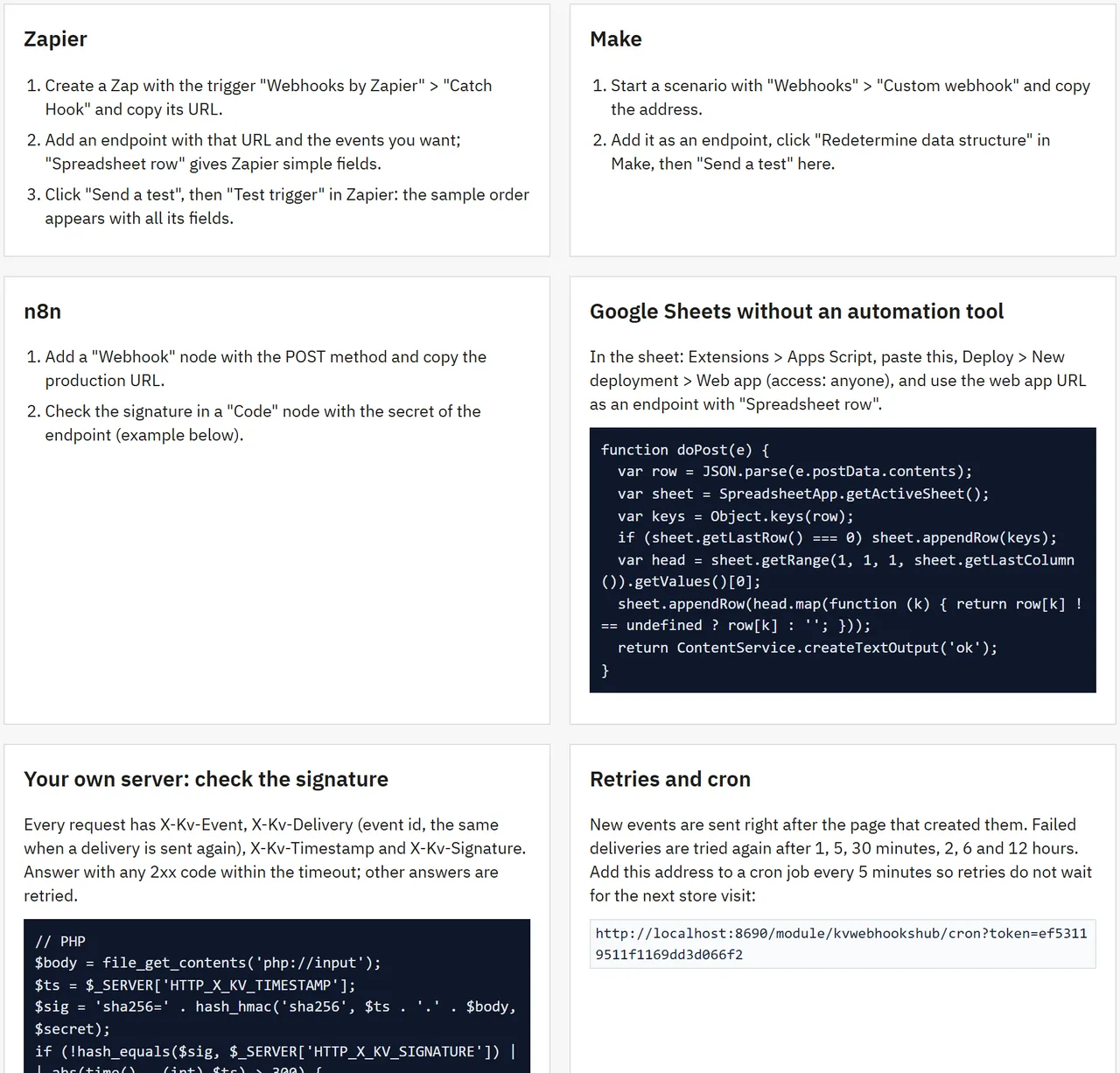
Recipes: Zapier, Make, n8n, Google Sheets with Apps Script, signature check in PHP and Node.js.
How do I install the module?
Upload. Modules > Module Manager > Upload a module: drop the .zip from My licenses. One package for PrestaShop 8.2 and 9.x.
Configure. Click Configure. Settings follow the shop context, so in a multistore you set them for all shops or per shop.
Enter the license key. Paste the key from My licenses in the License panel and save. You have 14 days to do it; local and staging addresses are included.
PrestaShop 8.2 – 9.x. Tested on PrestaShop 9.2.0 and PrestaShop 8.2.8. The Compatibility tab lists every version range.
Do the modules use overrides?
No. They work through PrestaShop hooks, widgets and the core product customization system. Nothing is written to /override and no core file is changed, so PrestaShop updates and other modules keep working.
Which themes do they work with?
They are tested on Classic and Hummingbird, the two themes PrestaShop ships. Themes based on them work; a theme that removes the standard product page containers may need a small CSS adjustment, and support helps with that.
Do they work with multistore?
Yes. Settings follow the shop context, like PrestaShop's own modules. A license covers one production domain with its subdomains, so shops on other domains need a license each.
What does the license cover?
One production store domain with every subdomain (www, shop., staging.), plus local development hosts such as localhost, *.local and *.test. A store on another domain needs its own license; a second-store license is 40% off. You have 14 days after installing to enter the key. 12 months of updates and support are included; after that the module keeps working and renewals are 50% off. How licensing works
Can I get a refund?
Yes. Ask for a full refund within 30 days of your first purchase, no reason needed: open a ticket or write to [email protected] with your order number. The money goes back to the card or bank account you paid with within 5 business days of approval. Refund policy
How do I get help?
Open a ticket from your account, so your license details are attached. We answer Monday to Friday: bug reports within 1 business day, how-to questions within 2. Support policy. Not a customer yet? Ask a pre-sales question.
PrestaShop 8 and 9 have no outgoing webhooks: tools like Zapier or Make can only poll the webservice every few minutes. Webhooks Hub sends store events the moment they happen, signed, to any URL you choose, and keeps a log of every request.
12 events: order created, order status changed (optionally only for chosen statuses), order paid, shipped and canceled; credit slip created; return requested; customer created; product created and updated; low stock and out of stock.
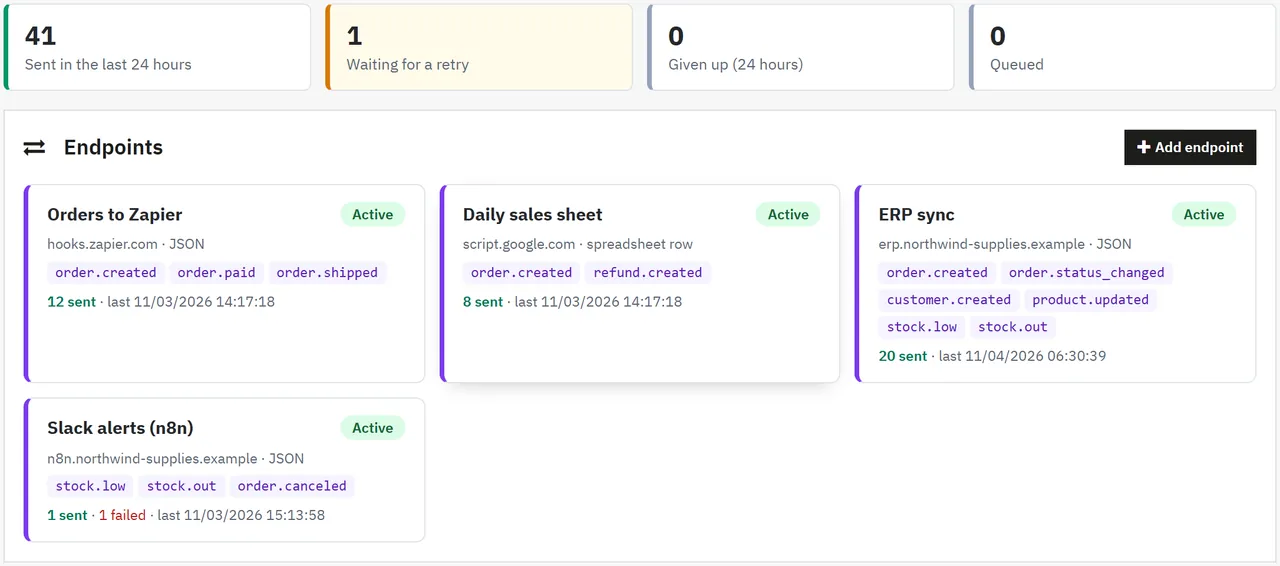
Endpoints: any http or https URL (a Zapier or Make webhook, an n8n workflow, a Google Apps Script, your ERP or your own server), with the events it should receive, full JSON or a flat "spreadsheet row" with the fields you choose, and extra headers such as an API key.
Signed: every request carries X-Kv-Event, X-Kv-Delivery (event id), X-Kv-Timestamp and X-Kv-Signature (HMAC-SHA256 of timestamp.body with the endpoint secret).
Reliable: events are queued and sent right after the page that created them; failed deliveries are tried again after 1, 5 and 30 minutes, 2, 6 and 12 hours; an endpoint that keeps failing is paused until you resume it. A cron address sends the retries on time.
Delivery log: every request with its headers, body, answer and timing; filters; Send again with the same event id; Send a test with your latest real order, customer or product.
Safe by default: private and local network addresses are refused unless you allow them, redirects are not followed and the checked address is pinned for the request.
Recipes for Zapier, Make, n8n, Google Sheets without an automation tool, and signature checks in PHP and Node.js.
No overrides. The module only sends data to the URLs you add.
Tested on
PrestaShop
9.2.0 and 8.2.8
Checkout
Hummingbird (9.2) and Classic (8.2)
Back office
PrestaShop 9 and 8 admin themes
Endpoints
Installation
Requirements
PrestaShop 8.2.0 to 9.x, PHP 7.2.5 to 8.5 (as your PrestaShop version needs)
PHP cURL extension (standard on PrestaShop hosting; without it the module uses PHP streams)
Optional: a cron job every 5 minutes for retries
Install
Modules > Module Manager > Upload a module: drop kvwebhookshub-1.0.0.zip.
Open Advanced Parameters > Webhooks.
Click Add endpoint, paste the URL of your receiver, choose the events and save.
Click Send a test and check that your tool received it.
Optional: add the cron address from the Settings tab to your server's cron, every 5 minutes.
Own-site edition: enter your licence key on the Settings tab.
Update
Upload the new zip the same way. Endpoints, secrets, the log and settings stay.
Uninstall
Uninstalling deletes the endpoints, the delivery log and the settings, and removes the Advanced Parameters > Webhooks tab. Nothing is sent any more.
Configuration
Endpoints
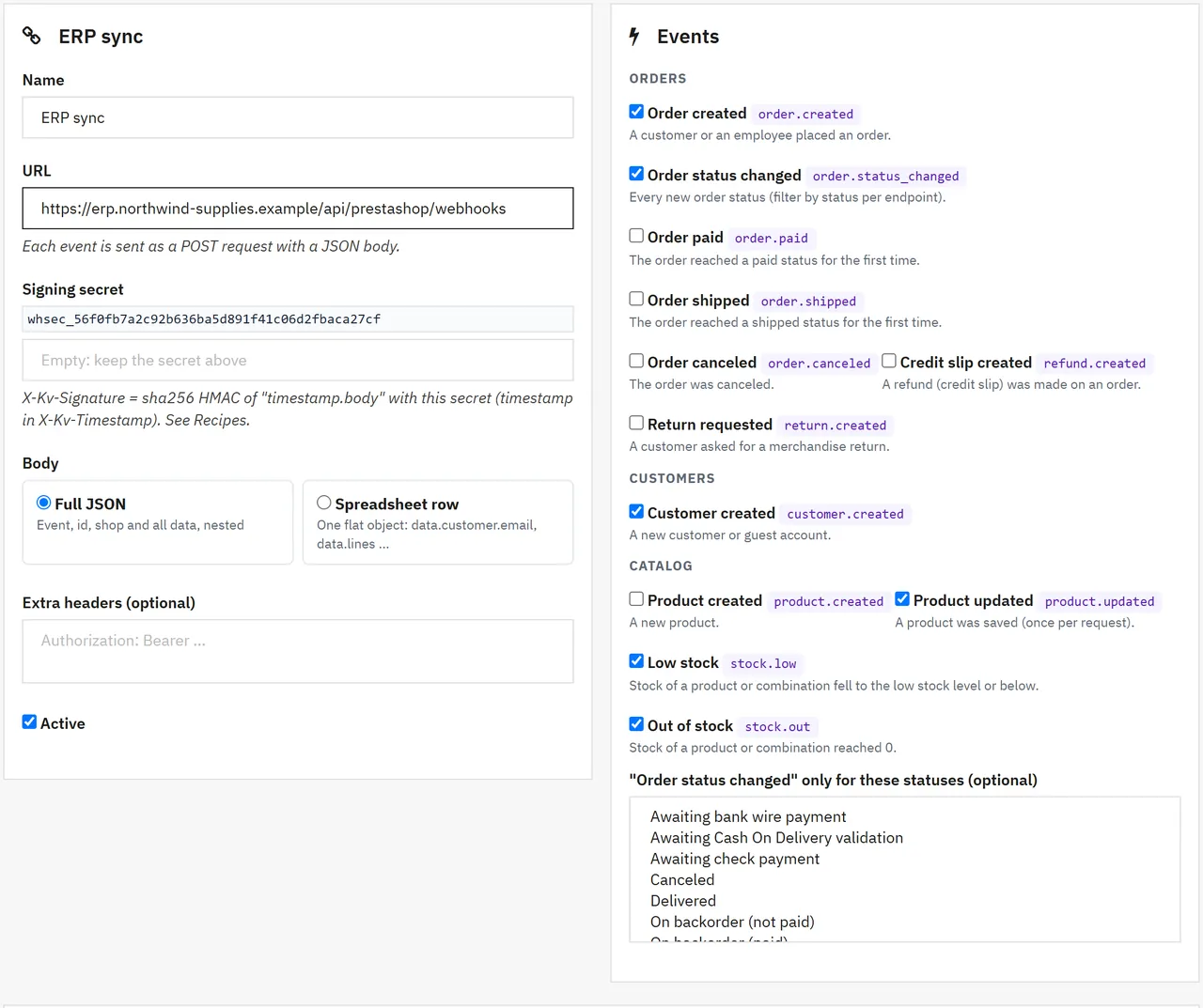
Advanced Parameters > Webhooks > Add endpoint
Endpoint
Field
What it does
Name
Your label, shown in the log.
URL
Where the POST requests go. http or https only.
Signing secret
Used for X-Kv-Signature. Left empty on a new endpoint, a random secret is created; on an existing endpoint, empty keeps the current secret.
Body
Full JSON: {event, id, created, shop, data} with nested data. Spreadsheet row: one flat object (data.customer.email, data.totals.total_tax_incl, data.lines as "2 x Product (REF); ...").
Fields of the row
Only for "Spreadsheet row": the keys to send, comma or line separated. Empty: all.
Extra headers
One Name: value per line, for example an API key. Host, Content-Type, Content-Length and X-Kv-* are set by the module.
Events
The events this endpoint receives. "Order status changed" can be limited to chosen statuses.
Active
Off: no new deliveries for this endpoint.
Saving an endpoint again also resumes it if it was paused.
Settings
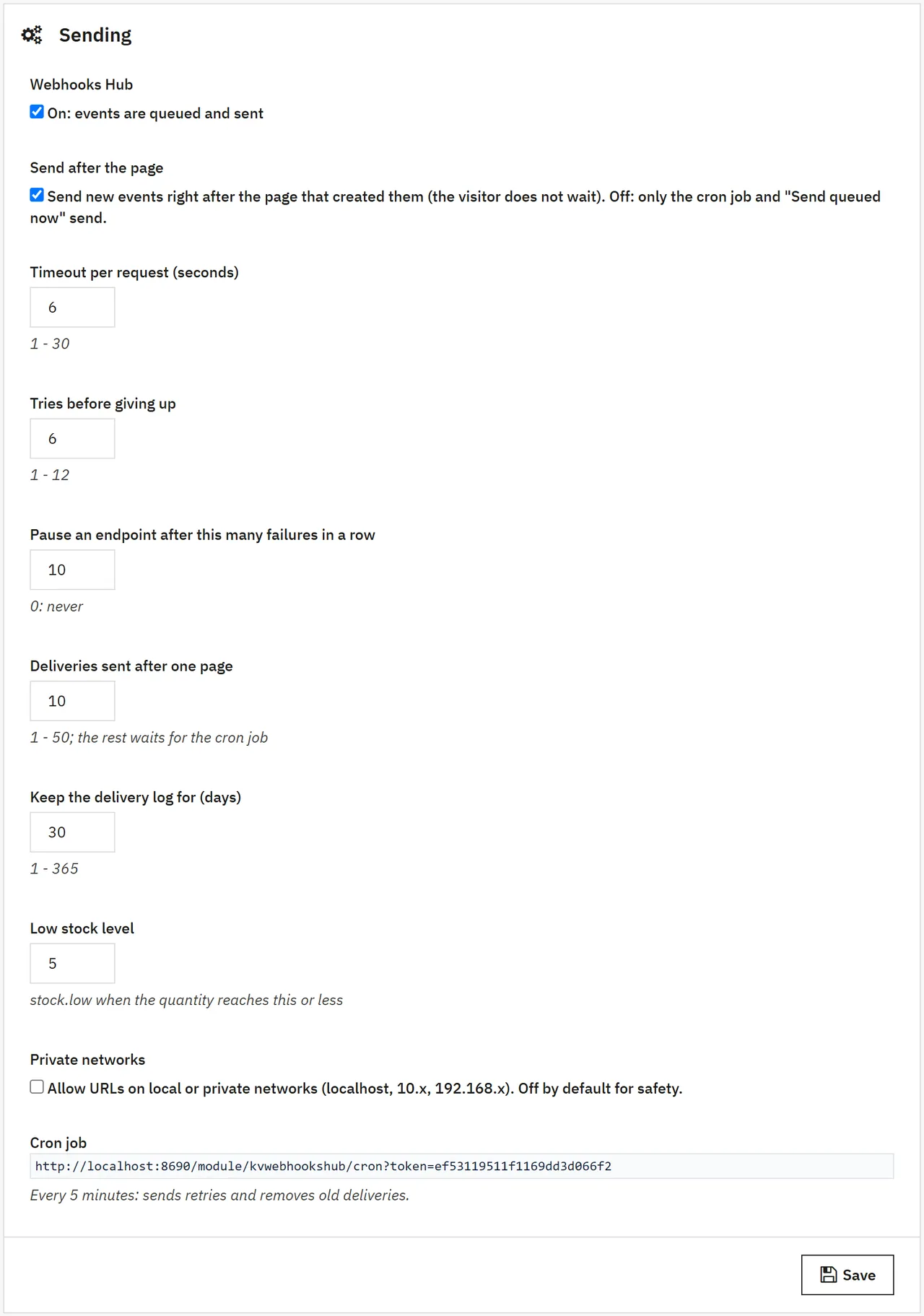
Settings
Setting
Default
What it does
Webhooks Hub
On
Off: no events are queued or sent.
Send after the page
On
New events are sent right after the page that created them. With PHP-FPM the visitor does not wait; on other PHP setups the requests run at the end of the request. Off: only the cron job and "Send queued now" send.
Timeout per request
6 s
1 to 30 seconds.
Tries before giving up
6
Retries after 1, 5, 30 minutes, 2, 6, 12 hours, then every 24 hours.
Pause an endpoint after
10
Failures in a row before an endpoint is paused. 0: never.
Deliveries sent after one page
10
The rest waits for the cron job.
Keep the delivery log for
30 days
Sent and given-up deliveries older than this are removed.
Low stock level
5
stock.low when a product or combination reaches this quantity or less.
Private networks
Off
On: URLs on localhost and private networks are allowed (for example an ERP inside your network).
Cron job
-
A secret address that sends due retries and removes old deliveries.
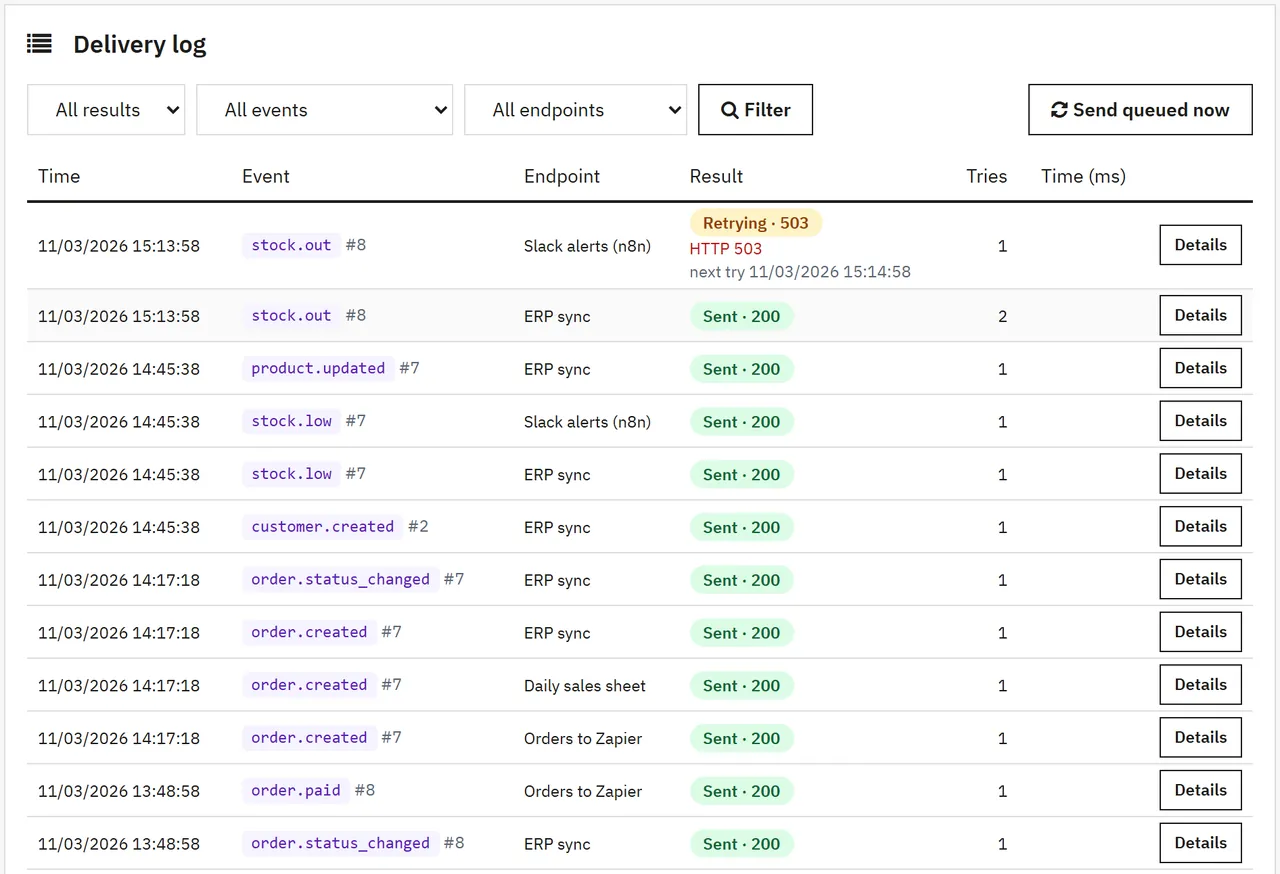
Delivery log lists every request: time, event, endpoint, result (Sent, Retrying, Failed, Queued), tries and time. Filter by result, event or endpoint.
Delivery log
Open a delivery to see the exact headers and body that were sent and the answer of the receiver. Send again sends a copy with the same event id, so a receiver that stores event ids can skip duplicates.
Delivery
Failures
A delivery succeeds when the receiver answers with a 2xx code within the timeout. Anything else (an error code, a timeout, a refused connection) is retried later. After the set number of failures in a row the endpoint is paused: fix the receiver, then click Resume on the endpoint page; the waiting deliveries are sent at once.
Connecting your tools
The Recipes tab has step-by-step notes for Zapier, Make and n8n, a Google Apps Script that appends every event to a sheet, and signature checks in PHP and Node.js.
Recipes
FAQ
Does it slow down the checkout?
Events are only written to a queue during the checkout. They are sent after the page: with PHP-FPM the customer does not wait at all; on other setups the requests run at the very end of the request, limited by the timeout and the number per page. You can also switch "Send after the page" off and let the cron job send.
Is a paid Zapier or Make plan needed?
Webhooks Hub only sends HTTP requests. What your automation tool allows on its plans is up to that tool. The Google Sheets recipe needs no automation tool at all.
How do I check that a request really came from my store?
Compute sha256= + HMAC-SHA256 of X-Kv-Timestamp + "." + body with the endpoint secret and compare it with X-Kv-Signature; reject old timestamps. Examples are on the Recipes tab.
Can I send to a server inside my network?
Yes, switch on "Private networks" in Settings. It is off by default so that nobody with back-office access can point the store at internal services by mistake.
What happens with events while an endpoint is paused or switched off?
A paused endpoint gets no new events until you resume it; deliveries already waiting are sent on resume. A switched-off endpoint gets nothing.
Will a receiver get the same event twice?
Only when you click Send again or when a receiver answered after the timeout. Use X-Kv-Delivery (the event id) to skip duplicates.
Which data leaves the store?
Only the data of the events you chose, only to the URLs you added. The module has no outside service of its own.
Multistore?
Events of all shops go to the endpoints; the shop id and name are in every body. Not tested on a real multistore setup.
The department store theme for PrestaShop 8.2 and 9.x: colour-coded departments, a department list beside the hero slider with two side promos, a big search with a department picker, tabbed product grids, a 2 + 1 + 2 offer grid, deals of the day with real countdowns, a department showcase, a promotions band and a three-column product page with a sticky buy box. Four styles (Meridian, Harbor, Citrus, Night), every colour editable. A child theme of Classic, no core changes.
Stop AI crawlers, scrapers, vulnerability scanners and unwanted countries before PrestaShop 8.2 or 9.x builds a page. Googlebot and Bingbot are verified by DNS and always allowed; 50+ bots get one switch each; country rules use free GeoIP databases and can close only the checkout; IP and network lists, rate limits for search, filters and forms, honeypots and the add to cart flood fix; a one-second challenge instead of a captcha; learning mode, dashboard, log, IP tester and Cloudflare export. Two hooks, no overrides.
Import and update products from supplier CSV, XML and JSON feeds in PrestaShop 8.2 or 9.x on a schedule: URL, FTP, SFTP or upload; field mapping with real sample values; match by reference, EAN-13, supplier reference or MPN; markup by price band and category with .99 rounding; a price guard that holds back big drops and below-cost prices; combinations from feed rows; stock-only syncs; products missing for N runs set to stock 0 with a safety limit; a dry-run preview with old and new values, run history with a row log and undo. No overrides, no storefront hooks.