Keep the price or the cost of PrestaShop 8.2 and 9.x products and combinations in your supplier's currency: European Central Bank or manual rates with an adjustment, store prices that follow when the rate moves more than your threshold, cost + markup that also fills the cost price, rounding steps and .99 endings, whole categories without changing today's prices, and a log of every price change with CSV. Shoppers see normal store prices. No overrides.
Tested on 9.2.0 & 8.2.8Version 1.0.0Compatible with PrestaShop 8.2 – 9.x No core file edits
Built forPrestaShop
Buy in euros, sell in dollars1 of 6
What it does
Keep the price or the cost of PrestaShop 8.2 and 9.x products and combinations in your supplier's currency: European Central Bank or manual rates with an adjustment, store prices that follow when the rate moves more than your threshold, cost + markup that also fills the cost price, rounding steps and .99 endings, whole categories without changing today's prices, and a log of every price change with CSV. Shoppers see normal store prices. No overrides.
Buy in one currency, sell in another. If your supplier invoices in euros and you sell in dollars, every rate move eats your margin or makes you edit prices by hand. Product Price in Currency keeps the supplier price on the product and turns it into your store price with the rate, by itself.
Features
Price currency per product and combination: the price, or the cost + your markup
Free daily European Central Bank rates or your own, plus an adjustment for bank fees
Prices follow when the rate moves more than your threshold
Rounding to steps and endings like .99
Cost price filled in from the cost in the currency
A whole category at once, without changing today's prices
A log of every price change with CSV export
Panel on the product page
What you get
Download & installOne module .zip for PrestaShop 8.2 and 9.x, installed in Modules > Module Manager > Upload a module. Download it from My licenses right after payment.
12 months of updates & supportNew versions and help for 12 months (24 or 36 months at checkout). After that the module keeps working; renew anytime at 50%.
License for your storeOne production domain with all its subdomains; staging and local development hosts are free. How licensing works
30-day refundFull refund within 30 days of your first purchase, no reason needed. Refund policy
Tested buildsPrestaShop 8.2 – 9.x. Tested on PrestaShop 9.2.0 and PrestaShop 8.2.8.
Documentation & supportFull guide (Installation, Configuration, Usage, FAQ) on this page. Tickets from your account, first reply within 1 business day.
Compatibility
Product Price in Currency works with PrestaShop 8.2 – 9.x.
We list the builds we install and test on. “Tested” means the test plan ran on that build; “Supported” means the build is inside the supported range.
Compatibility
Version
Range
Runs on
Status
PrestaShop 9
9.0 – 9.2
PHP 8.1 – 8.4
Tested on 9.2.0
PrestaShop 8.2
8.2.0 – 8.2.x
PHP 7.2.5 – 8.1
Tested on 8.2.8
1.0.0
Latest
First release: price or cost of products and combinations in a supplier currency, ECB or manual rates with adjustment, threshold, rounding steps and endings, cost price fill-in, bulk assign by category, price log with CSV, daily job and cron.
How do I install the module?
Upload. Modules > Module Manager > Upload a module: drop the .zip from My licenses. One package for PrestaShop 8.2 and 9.x.
Configure. Click Configure. Settings follow the shop context, so in a multistore you set them for all shops or per shop.
Enter the license key. Paste the key from My licenses in the License panel and save. You have 14 days to do it; local and staging addresses are included.
PrestaShop 8.2 – 9.x. Tested on PrestaShop 9.2.0 and PrestaShop 8.2.8. The Compatibility tab lists every version range.
Do the modules use overrides?
No. They work through PrestaShop hooks, widgets and the core product customization system. Nothing is written to /override and no core file is changed, so PrestaShop updates and other modules keep working.
Which themes do they work with?
They are tested on Classic and Hummingbird, the two themes PrestaShop ships. Themes based on them work; a theme that removes the standard product page containers may need a small CSS adjustment, and support helps with that.
Do they work with multistore?
Yes. Settings follow the shop context, like PrestaShop's own modules. A license covers one production domain with its subdomains, so shops on other domains need a license each.
What does the license cover?
One production store domain with every subdomain (www, shop., staging.), plus local development hosts such as localhost, *.local and *.test. A store on another domain needs its own license; a second-store license is 40% off. You have 14 days after installing to enter the key. 12 months of updates and support are included; after that the module keeps working and renewals are 50% off. How licensing works
Can I get a refund?
Yes. Ask for a full refund within 30 days of your first purchase, no reason needed: open a ticket or write to [email protected] with your order number. The money goes back to the card or bank account you paid with within 5 business days of approval. Refund policy
How do I get help?
Open a ticket from your account, so your license details are attached. We answer Monday to Friday: bug reports within 1 business day, how-to questions within 2. Support policy. Not a customer yet? Ask a pre-sales question.
If your supplier invoices in euros and you sell in dollars, every rate move eats your margin or makes you edit prices by hand. PrestaShop's currency rates only change the prices shown in other currencies; the price of the product itself stays fixed in your store currency. Product Price in Currency keeps the supplier price on the product and turns it into your store price with the rate, by itself.
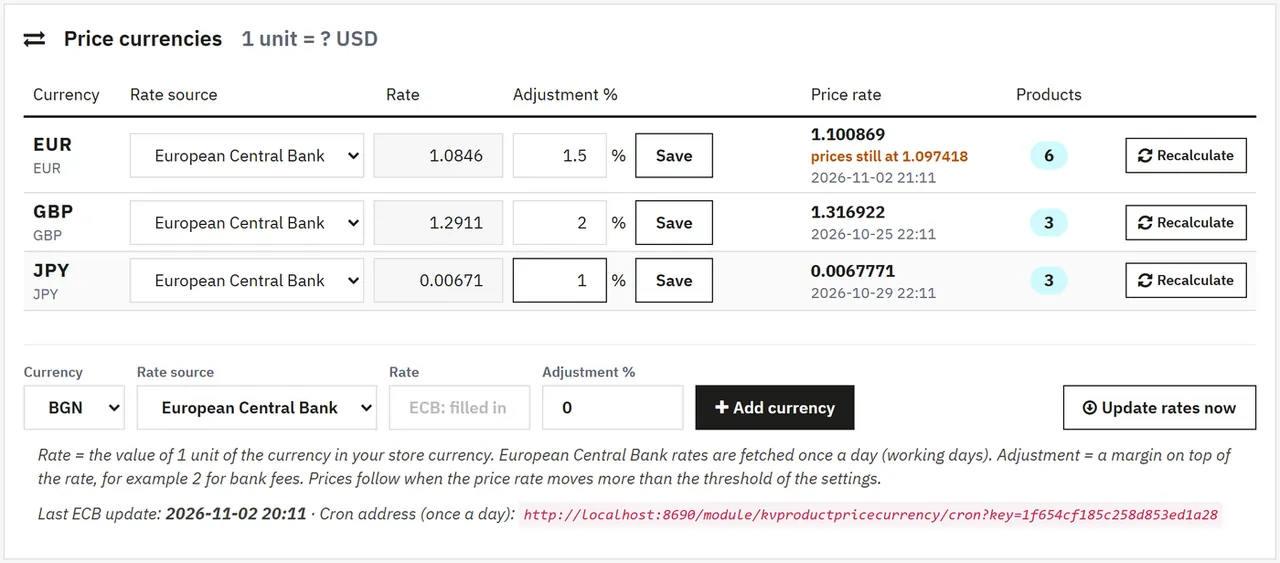
Price currencies: European Central Bank daily rates or your own, plus an adjustment for bank fees
Per product and combination: the price in the currency, or the cost in the currency + your markup (the cost price is filled in too)
Calm prices: prices follow when the rate moves more than your threshold, not on every small daily move
Rounding: to steps (nearest, up, down) and endings like .99
Whole categories: give every product of a category a currency without changing today's prices
Price log: every store price the module changed, with the rate used, CSV export
Daily job: by cron address or when you open the page; "Recalculate" and "Update rates now" any time
Shoppers see your normal store prices: cart, checkout, cart rules, specific prices and taxes work as before. No overrides.
Tested on
PrestaShop
9.2.0 and 8.2.8
Storefront
Hummingbird and Classic
Back office
PrestaShop 9 and 8 admin themes
Exchange rates
Installation
Requirements
PrestaShop 8.2.0 to 9.x, PHP 7.2.5 to 8.5 (as your PrestaShop version needs)
For European Central Bank rates: your store currency must be one of the ECB currencies (USD, GBP, CHF, PLN, SEK, ...) and the server must reach www.ecb.europa.eu. Otherwise use manual rates.
Install
Modules > Module Manager > Upload a module: drop kvproductpricecurrency-1.0.0.zip.
Open Catalog > Price currencies.
Exchange rates tab: add the currency your supplier invoices in (European Central Bank or manual rate) and an adjustment if you want one.
Products tab: give products or combinations their price in that currency, or assign a whole category.
Optional: add the cron address shown on the Exchange rates tab to your server, once a day after 17:00 CET.
Own-site edition: enter your licence key on the Settings tab.
Update
Upload the new zip the same way. Rates, product currencies, the log and the settings stay.
Uninstall
Uninstalling deletes the rates, the product currencies and the log. Your store prices and cost prices stay as they are.
Configuration
Exchange rates (Catalog > Price currencies)
One row per currency:
Column
Meaning
Rate source
European Central Bank (daily reference rate, working days) or Manual
Rate
Value of 1 unit of the currency in your store currency. Editable for manual rates
Adjustment %
Added on top of the rate, for example 2 for bank fees. Negative values are allowed
Price rate
Rate + adjustment: the rate prices are calculated with. "prices still at ..." shows the rate the products use while the move is below the threshold
Products
Products and combinations in this currency (opens the filtered list)
Save stores the row; when the price rate moved more than the threshold, the products of that currency are recalculated at once. Recalculate does it now whatever the threshold. Remove is offered only when no product uses the currency. Update rates now fetches the ECB rates at once.
Exchange rates
Settings
Setting
Default
What it does
Automatic rates and prices
on
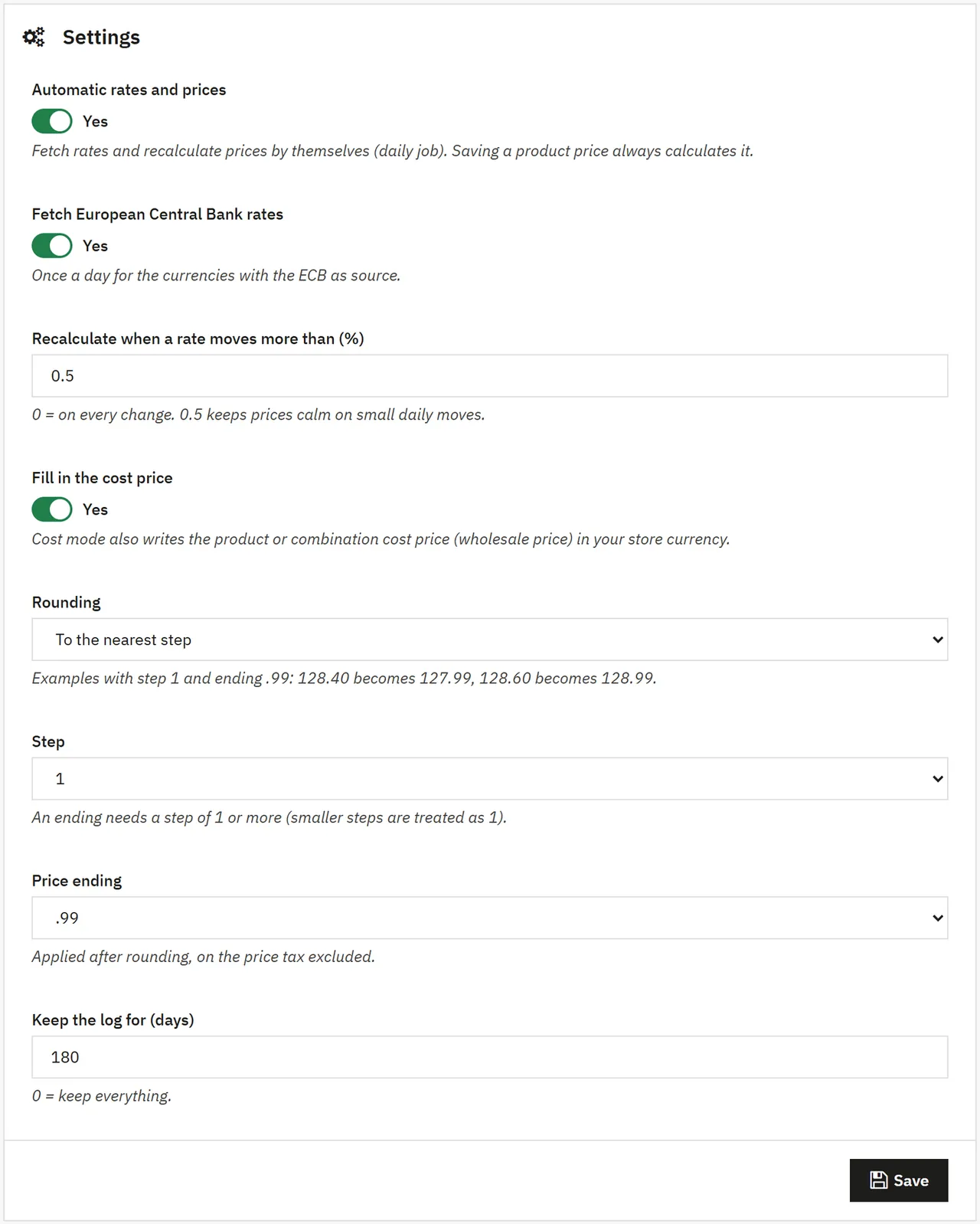
Fetch rates and recalculate prices by themselves (daily job). Saving a product price always calculates it
Fetch European Central Bank rates
on
Once a day for the currencies with the ECB as source
Recalculate when a rate moves more than (%)
0.5
0 = every change
Fill in the cost price
on
Cost mode also writes the cost price (wholesale price) of the product or combination
Rounding
To the nearest step
Nearest, up, down, or only to the price decimals
Step
0.01
0.01, 0.05, 0.10, 0.50, 1, 5, 10
Price ending
None
.99, .95, .90, .49, .00 (needs a step of 1 or more)
Keep the log for (days)
180
Older log rows are deleted by the daily job. 0 = keep everything
Rounding examples (nearest, step 1, ending .99): 128.40 becomes 127.99, 128.60 becomes 128.99. With step 5: 128.40 becomes 129.99, 126.00 becomes 124.99. Prices are tax excluded, as on the PrestaShop product page.
Settings
Licence
Own-site edition: enter the licence key at the bottom of the settings. Without an active licence, rates are not fetched and prices do not follow the rates by themselves; prices you save on the Products tab are still calculated and nothing else changes.
Usage
Give a product a price currency
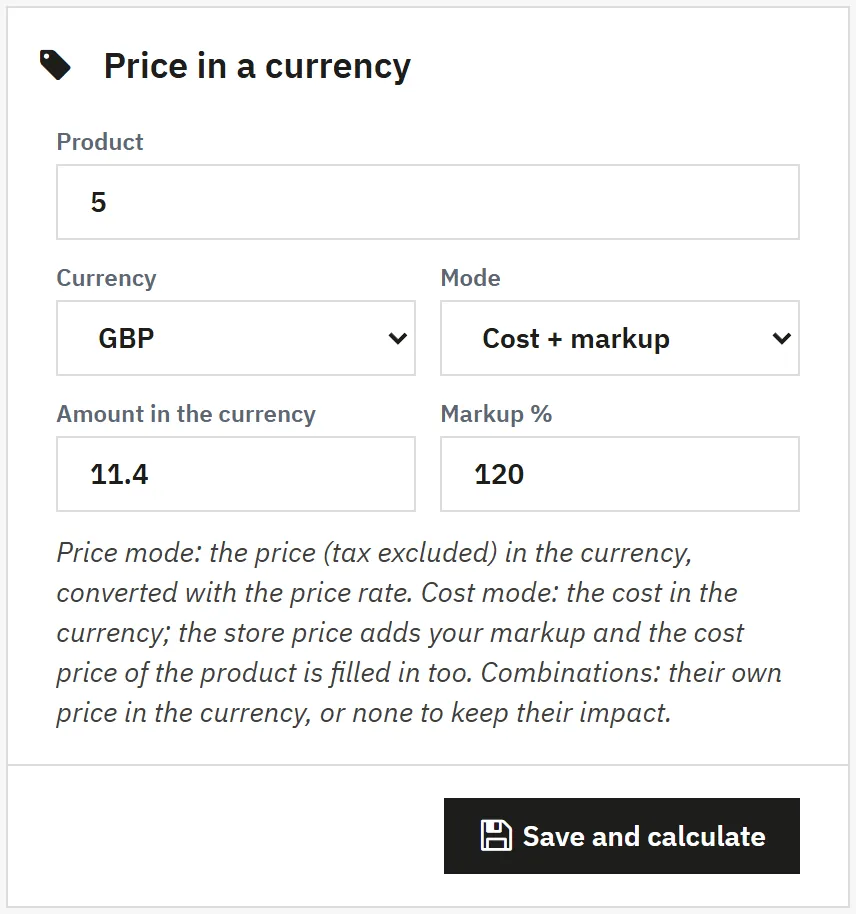
Catalog > Price currencies > Products, form Price in a currency:
Product: the product ID (7), product ID and combination ID (1-8), or a product or combination reference
Currency: one of your price currencies
Mode:Price: the price tax excluded in the currency; Cost + markup: the cost in the currency and your markup in %; the cost price of the product or combination is filled in too
Save and calculate writes the store price at once and adds a log row
Price in a currency
Combinations: give a combination its own price in the currency and the module sets its price impact so that the combination ends at that price, also after the product price changes. Combinations without their own price keep their impact.
The products list
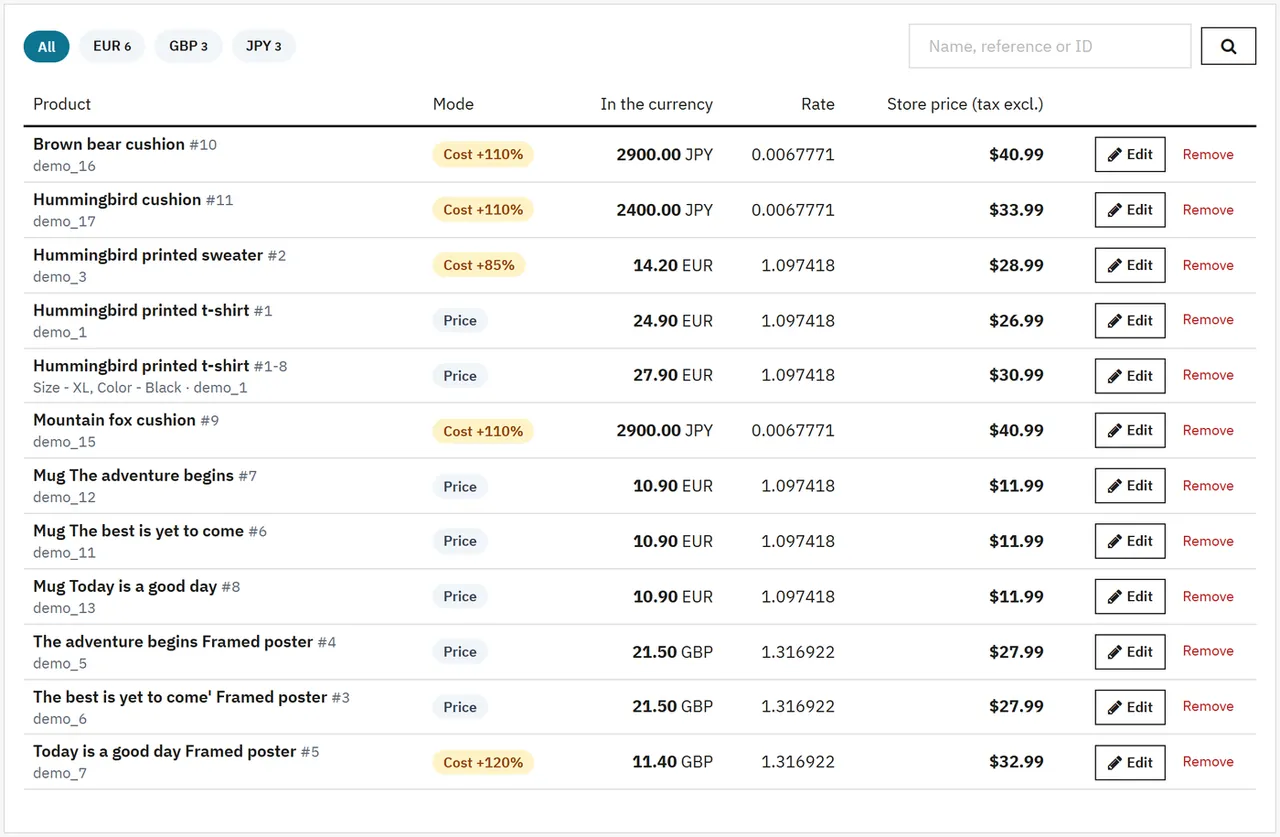
Every product and combination with a price currency: mode, the amount in the currency, the rate used and the store price now. Filter by currency or search by name, reference or ID. Edit fills the form; Remove stops following the currency (the store price stays). A price changed by hand on the product page is shown as changed and is set back at the next recalculation.
Products
A whole category
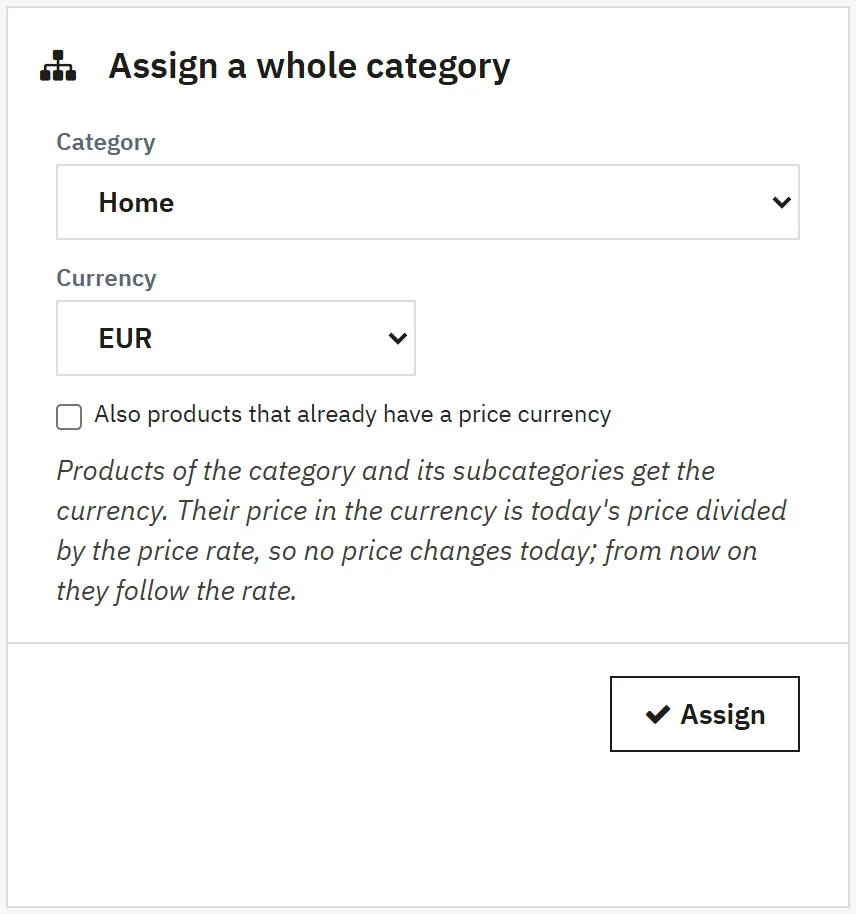
Assign a whole category gives every product of the category and its subcategories the currency. The price in the currency is today's price divided by the price rate, so no price changes today; from then on the prices follow the rate. Products that already have a price currency are skipped unless you tick the box.
Assign a whole category
When rates move
The daily job (cron address, or opening Catalog > Price currencies once a day) fetches the ECB rates and recalculates the currencies whose price rate moved more than the threshold. Saving a manual rate does the same at once.
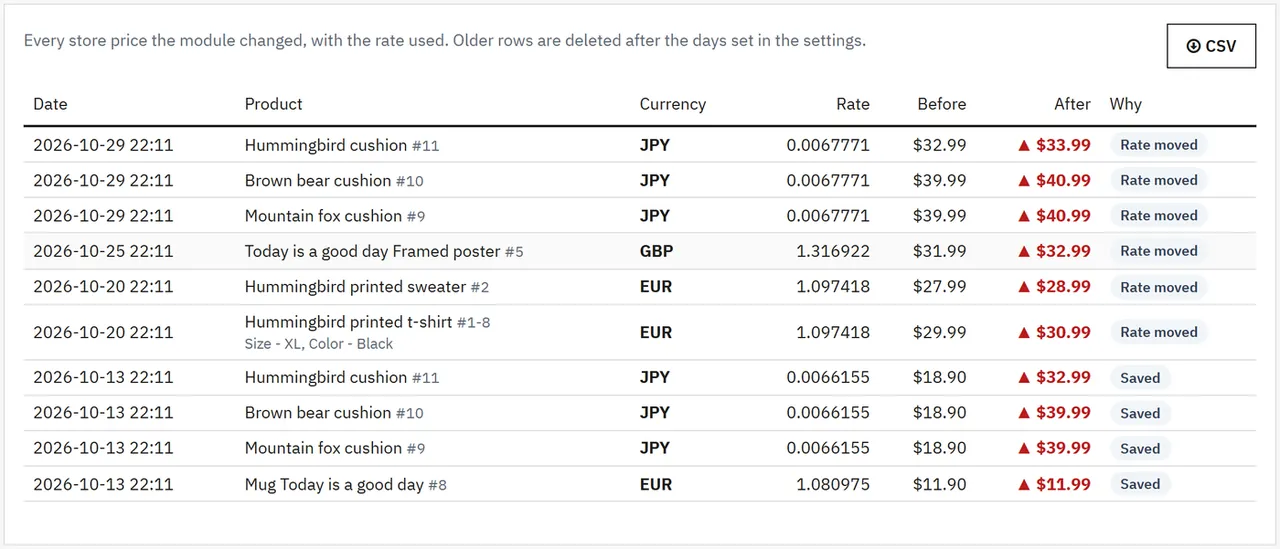
Price log
Date, product, currency, the rate used, the price before and after, and why (saved, rate moved, recalculated). CSV exports the whole log.
Price log
On the product page
The Modules tab of the product page shows the price currency of the product and its combinations, with a link to the Products tab.
FAQ
Is this the same as PrestaShop's currencies?
No. PrestaShop's currency rates convert the prices shown to shoppers who pick another currency. This module changes the price of the product itself, in your store currency, from a price or cost you keep in your supplier's currency.
Do shoppers see the supplier currency?
No. They see your normal store prices; cart, checkout, cart rules, specific prices and taxes work as before.
Will prices jump every day?
Only when the price rate moved more than your threshold (0.5 % by default). With rounding and an ending like .99 the prices stay tidy.
What if I change a price on the product page?
It works until the next recalculation of that currency, which sets the price back from the currency. Remove the product from the Products tab to manage its price by hand again.
Does it work with combinations?
Yes. A combination can have its own price in the currency; the module sets its price impact.
Where do the rates come from?
From the European Central Bank daily reference rates (free, no key), or the rate you enter. The adjustment adds your margin for bank fees.
My store currency is not an ECB currency. Use manual rates.
Does it work with multistore?
Prices are written to every shop of the product. Tested on single-shop stores.
The department store theme for PrestaShop 8.2 and 9.x: colour-coded departments, a department list beside the hero slider with two side promos, a big search with a department picker, tabbed product grids, a 2 + 1 + 2 offer grid, deals of the day with real countdowns, a department showcase, a promotions band and a three-column product page with a sticky buy box. Four styles (Meridian, Harbor, Citrus, Night), every colour editable. A child theme of Classic, no core changes.
Stop AI crawlers, scrapers, vulnerability scanners and unwanted countries before PrestaShop 8.2 or 9.x builds a page. Googlebot and Bingbot are verified by DNS and always allowed; 50+ bots get one switch each; country rules use free GeoIP databases and can close only the checkout; IP and network lists, rate limits for search, filters and forms, honeypots and the add to cart flood fix; a one-second challenge instead of a captcha; learning mode, dashboard, log, IP tester and Cloudflare export. Two hooks, no overrides.
Import and update products from supplier CSV, XML and JSON feeds in PrestaShop 8.2 or 9.x on a schedule: URL, FTP, SFTP or upload; field mapping with real sample values; match by reference, EAN-13, supplier reference or MPN; markup by price band and category with .99 rounding; a price guard that holds back big drops and below-cost prices; combinations from feed rows; stock-only syncs; products missing for N runs set to stock 0 with a safety limit; a dry-run preview with old and new values, run history with a row log and undo. No overrides, no storefront hooks.