Rules that move PrestaShop 8.2 and 9.x orders on by themselves: cancel unpaid bank wires, deliver shipped orders, move cash on delivery on, by state, time in state, payment module, carrier, total, delivery country, customer group and shop. Preview first; live rules change the state through PrestaShop's own order history, with or without the state e-mail. Activity log, cron address and Run now. No overrides.
On saleVersion 1.0.0Compatible with PrestaShop 8.2 – 9.x No core file edits
Built forPrestaShop
Orders that move on by themselves (sample data)1 of 7
Rules that move PrestaShop 8.2 and 9.x orders on by themselves: cancel unpaid bank wires, deliver shipped orders, move cash on delivery on, by state, time in state, payment module, carrier, total, delivery country, customer group and shop. Preview first; live rules change the state through PrestaShop's own order history, with or without the state e-mail. Activity log, cron address and Run now. No overrides.
PrestaShop 8.2 - 9.x
Overview
Orders that wait cost you. Unpaid bank wires and checks hold stock until someone cancels them; shipped orders stay "Shipped" until someone closes them; cash on delivery orders wait for someone to move them on. Order Automation Rules does it on a schedule, the way you would do it by hand.
Conditions: one or more order states and the time in that state (from the order history), payment module, carrier, order total in your default currency, delivery country, customer group and shop
The PrestaShop way: the new state goes through PrestaShop's own order history, as on the order page: stock comes back on cancel, payments, invoices and vouchers behave as when an employee changes the state
Customer e-mail or silent: send the e-mail of the new state, or change it quietly. A private note on the order says why
Preview first: every rule lists the orders it matches now. New rules start in preview and only write down what they would do; live needs a confirmation
Safe by default: a new rule leaves older orders alone unless you allow it, a rule acts on an order once, and a limit per run
Activity: every change and every preview, with filters, and orders that someone moved again afterwards
Runs on its own: a private cron address, Run now, and a run on admin visits as a safety net
Templates: cancel unpaid bank wires, deliver shipped orders, cash on delivery to preparation, or a blank rule
No overrides, no outside service.
Tested on
PrestaShop
9.2.0 and 8.2.8
Back office
PrestaShop 9 and 8 admin themes
Payments
Bank transfer, check, cash on delivery (the modules PrestaShop ships)
Rules
Installation
Requirements
PrestaShop 8.2.0 to 9.x (tested on 8.2.8 and 9.2.0)
PHP 7.2.5 to 8.5, as your PrestaShop version allows
A server cron job (recommended) or regular back office visits
Install
Go to Modules > Module Manager > Upload a module and choose kvorderautomation-1.0.0.zip.
Open Orders > Automation rules > Settings and enter your licence key. The module runs for 14 days without a key.
Copy the Server cron line into your hosting control panel (cron jobs), for example every 15 minutes.
Go to Rules and start from a template.
Update
Upload the new zip the same way. Rules and activity stay.
Uninstall
Uninstall deletes the rules and their activity. Orders, their states and their history are not touched.
Configuration
Orders > Automation rules > Settings
Setting
What it does
Rules run
Off stops every rule without changing them
Run on admin visits
When the last run is over 15 minutes old, opening the back office starts a run in the background. A safety net, not a schedule
Cron address
A private address that runs the rules. Keep it secret: anyone with it can start a run (never more than your rules allow)
Server cron line
The same address as a line for your server's crontab, every 15 minutes
Last run
When the rules last ran, from any source
If your shop is in maintenance mode, PrestaShop answers the cron address with the maintenance page unless the server's IP address is in the maintenance IP list (Shop Parameters > General > Maintenance).
Licence
Enter the key from your Kavio Labs account. Without a key the module runs for 14 days. When the licence is not active the rules stop; you can still edit them and read the activity.
Usage
A rule
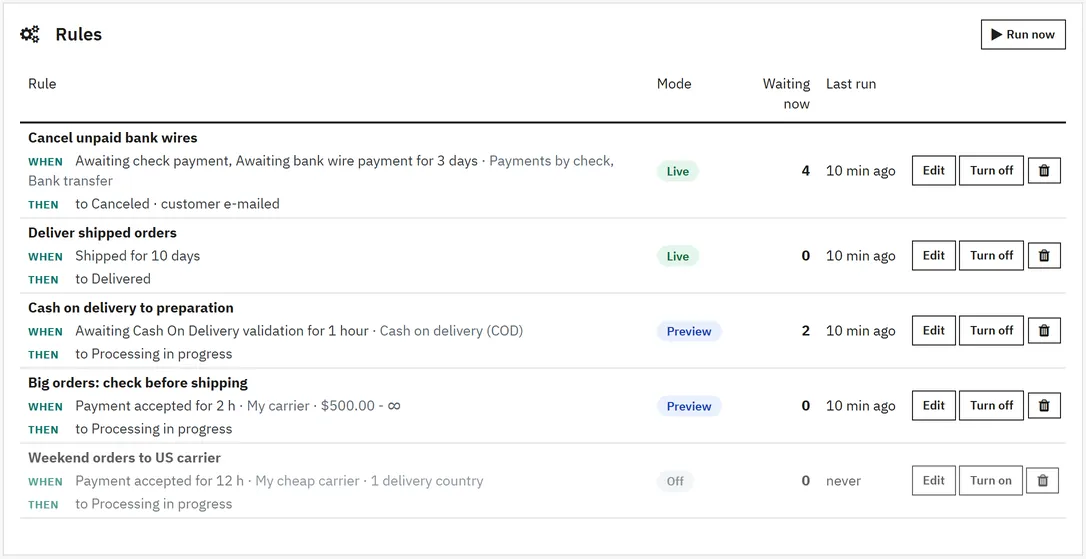
Orders > Automation rules > Rules shows your rules, how many orders each one matches now and when it last ran. Start from a template or a blank rule.
Rule
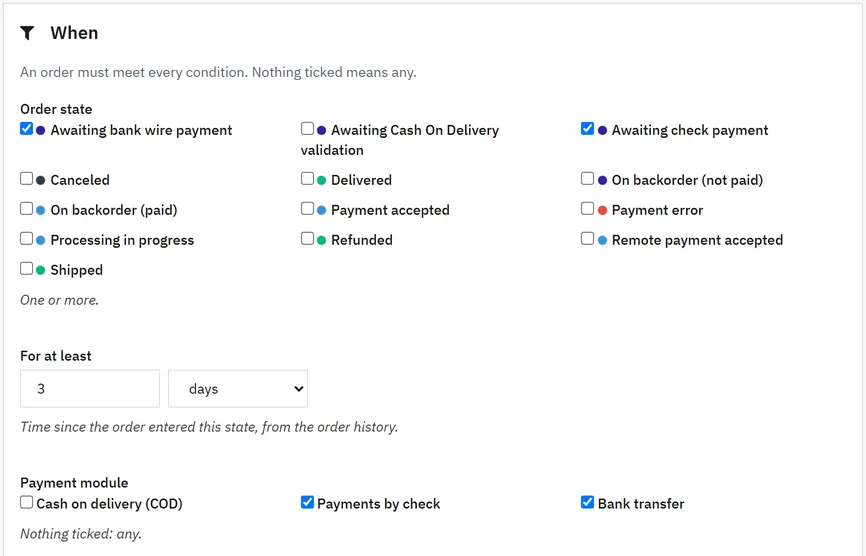
When: an order must meet every condition. Nothing ticked means any.
Order state and For at least: the time since the order entered its current state, from the order history. An order that left the state and came back counts from the last time.
Payment module, Carrier (kept by carrier reference, so editing a carrier does not break the rule), Order total (tax incl., converted to your default currency), Delivery country, Customer group, Shops (multistore).
Older orders: off by default, so a new rule only acts on orders placed after you save it. Tick it to include older orders.
Then
New state: set through the order history, as on the order page.
Customer e-mail: send the e-mail of the new state (only states with an e-mail template), or change it silently.
Private note: added to the order as a private message.
Limits: orders per run (1 to 500) and the order of rules.
Preview, then live
New rules start in Preview: a run writes down what it would change and changes nothing. The rule page lists the orders it matches now. When it does what you expect, choose Live and tick the confirmation.
Running
The rules run from the cron address, from Run now on the rules page, and on admin visits when that is on. One run at a time; a rule acts on an order once.
Activity
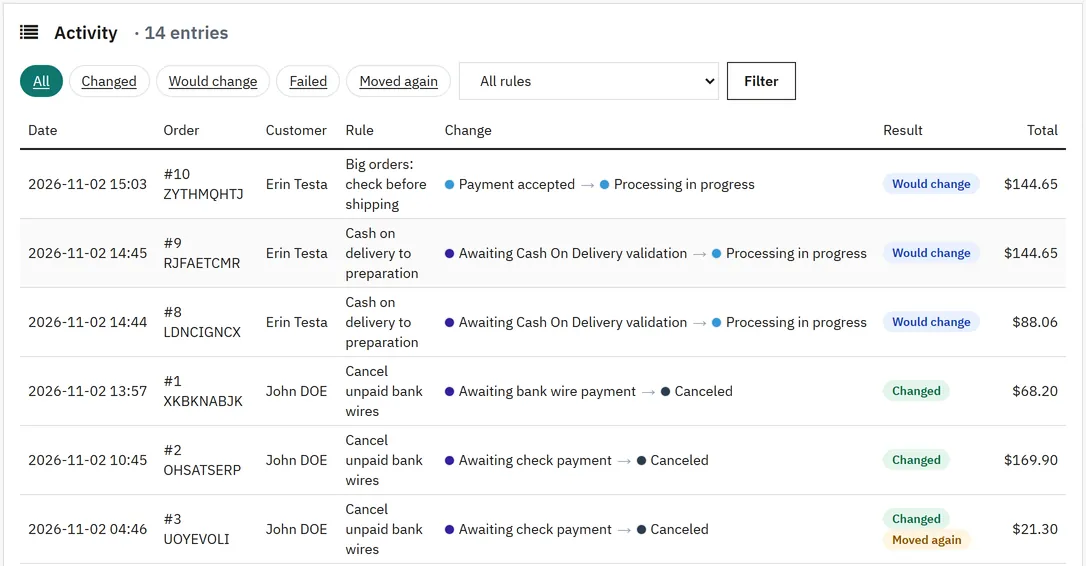
Activity lists every change and every preview with the order, customer, rule, the states before and after, and the result. Filter by result or rule. Moved again marks orders that a person, a payment or another module moved after the rule changed them. The order page shows a panel with the rule activity of that order.
Activity
FAQ
Does canceling through a rule put the stock back?
Yes. The rule changes the state through PrestaShop's order history, the same way the order page does, so stock, payments, invoices and vouchers behave as when an employee changes it.
Will customers get an e-mail?
Only when Send the e-mail of the new state is ticked and the new state has an e-mail template (Orders > Statuses).
Can a rule change the same order twice?
No. A rule acts on an order once. If someone moves the order back, the rule leaves it alone, and the activity shows it as Moved again.
What happens to orders placed before I created the rule?
Nothing, unless you tick Also orders placed before this rule.
I have no cron job. Keep Run on admin visits on: when the last run is over 15 minutes old, opening the back office starts a run. For a reliable schedule, add the cron line.
Does it work with other payment modules?
Yes. Every installed payment module is listed, plus modules used on recent orders.
Multistore?
Rules can be limited to shops. Not tested on a real multistore setup.
The department store theme for PrestaShop 8.2 and 9.x: colour-coded departments, a department list beside the hero slider with two side promos, a big search with a department picker, tabbed product grids, a 2 + 1 + 2 offer grid, deals of the day with real countdowns, a department showcase, a promotions band and a three-column product page with a sticky buy box. Four styles (Meridian, Harbor, Citrus, Night), every colour editable. A child theme of Classic, no core changes.
Stop AI crawlers, scrapers, vulnerability scanners and unwanted countries before PrestaShop 8.2 or 9.x builds a page. Googlebot and Bingbot are verified by DNS and always allowed; 50+ bots get one switch each; country rules use free GeoIP databases and can close only the checkout; IP and network lists, rate limits for search, filters and forms, honeypots and the add to cart flood fix; a one-second challenge instead of a captcha; learning mode, dashboard, log, IP tester and Cloudflare export. Two hooks, no overrides.
Import and update products from supplier CSV, XML and JSON feeds in PrestaShop 8.2 or 9.x on a schedule: URL, FTP, SFTP or upload; field mapping with real sample values; match by reference, EAN-13, supplier reference or MPN; markup by price band and category with .99 rounding; a price guard that holds back big drops and below-cost prices; combinations from feed rows; stock-only syncs; products missing for N runs set to stock 0 with a safety limit; a dry-run preview with old and new values, run history with a row log and undo. No overrides, no storefront hooks.