Send purchases, refunds and shop events from your PrestaShop 8.2 or 9.x server to GA4 Measurement Protocol, Meta Conversions API and TikTok Events API with one module and your own accounts: same event id as your pixels, built-in consent, purchases only on the statuses you choose, partial refunds from credit slips, queue with retries and a full event log. No relay, no monthly fee, no overrides.
On saleVersion 1.0.0Compatible with PrestaShop 8.2 – 9.x No core file edits
Built forPrestaShop
From your PrestaShop server straight to GA4, Meta and TikTok, with no paid relay1 of 9
Send purchases, refunds and shop events from your PrestaShop 8.2 or 9.x server to GA4 Measurement Protocol, Meta Conversions API and TikTok Events API with one module and your own accounts: same event id as your pixels, built-in consent, purchases only on the statuses you choose, partial refunds from credit slips, queue with retries and a full event log. No relay, no monthly fee, no overrides.
PrestaShop 8.2 - 9.x
Overview
Send your shop's e-commerce events from your own server to the free, official endpoints of Google Analytics 4, Meta and TikTok. Ad blockers, browser privacy limits and closed tabs no longer cost you purchases, and every event is deduplicated with the browser pixel. One module for all three, with your own accounts: no relay, no monthly fee.
GA4 Measurement Protocol: purchase, refund, add_to_cart, begin_checkout, sign_up / generate_lead and (optional) view_item, with the visitor's GA client id and session id
Meta Conversions API: Purchase, AddToCart, InitiateCheckout, ViewContent, Lead and CompleteRegistration, with SHA-256 hashed customer data, IP, user agent, fbp and fbc
TikTok Events API (free with a TikTok Ads account): CompletePayment, AddToCart, InitiateCheckout, ViewContent, Contact, Subscribe and CompleteRegistration
Deduplication: the server event and the browser tag share one event id; purchases use purchase.<order id>
Optional browser tags: gtag.js with Consent Mode v2, the Meta Pixel and the TikTok Pixel, firing the same events with the same ids, including add to cart
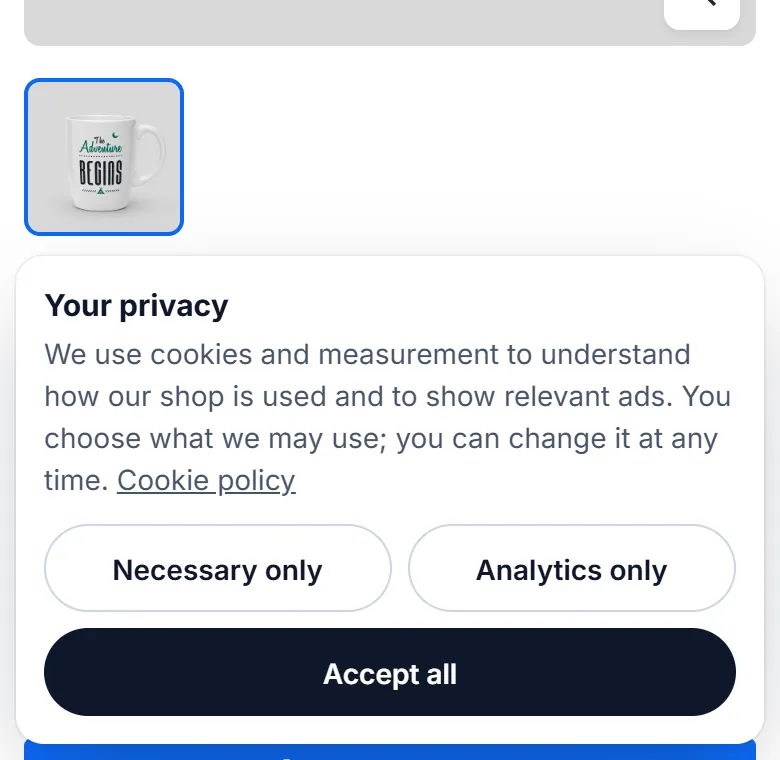
Consent-aware: built-in banner, Cookiebot, CookieYes or any cookie rule; GA4 needs analytics consent, Meta and TikTok need marketing consent; the choice is stored with each order
Purchases when they are real: you choose the statuses; by default every status marked as paid plus Awaiting cash on delivery; a purchase is sent once, also when a payment module confirms the order from a callback without the visitor's cookies
Refunds: a GA4 refund on the Refunded status, partial refunds from credit slips
Leads: account registration, contact form and newsletter signup
Queue with retries: events are queued, sent after the page is delivered, and retried after 1 min, 5 min, 15 min, 1 h and 3 h; a cron URL or store traffic picks up the rest
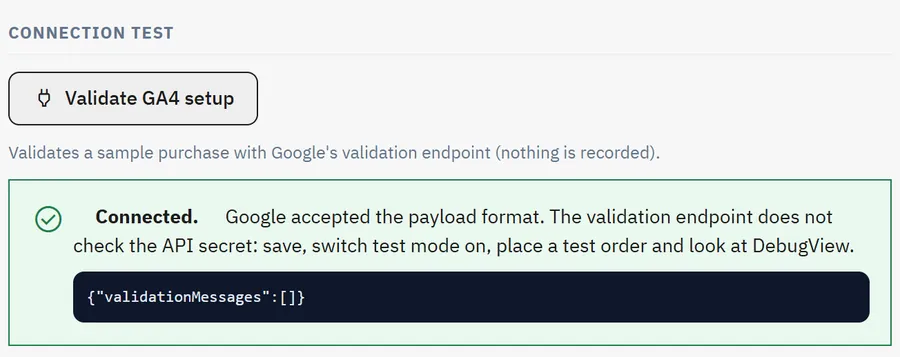
Test mode: Meta and TikTok test event codes, GA4 validation endpoint; connection test buttons for every destination
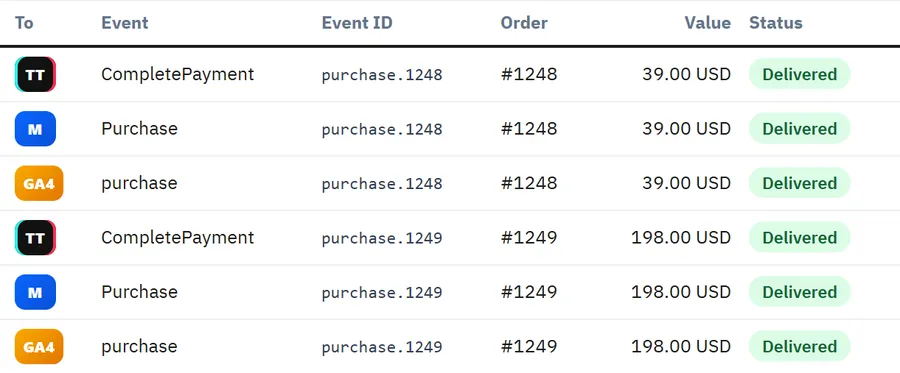
Event log: every request body and answer, status, retries, filters, purge policy; dashboard counters
Multistore: every shop can have its own ids and tokens
Official endpoints only: no paid service, no relay server, no Google Tag Manager server container
No core file changes, no overrides, no ionCube
PrestaShop 8.2 and 9.x, Classic, Hummingbird and child themes, standard and one-page checkout
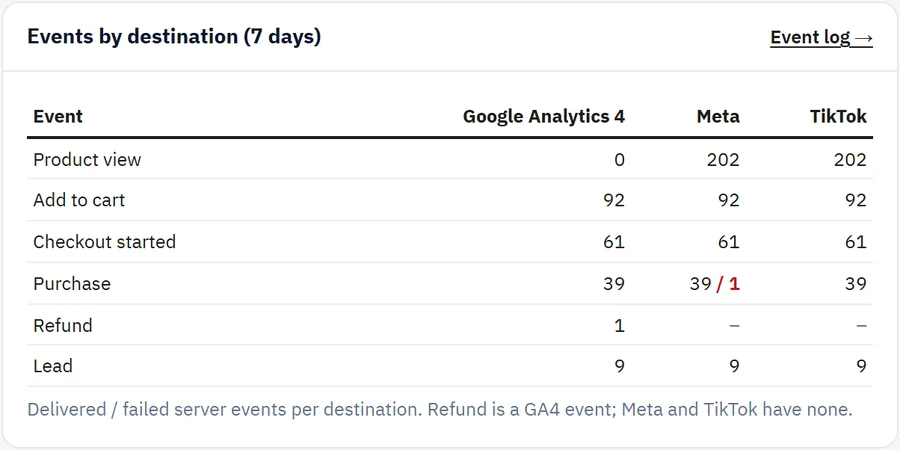
Events per destination on the dashboard
Installation
Requirements
PrestaShop 8.2.0 or newer, or PrestaShop 9.x
PHP 7.2.5 or newer (the PHP version your PrestaShop needs), with cURL (recommended) or outbound HTTPS through allow_url_fopen
A GA4 property, a Meta dataset (pixel) and/or a TikTok pixel of your own; each destination is optional
Install
Back office: Modules > Module Manager > Upload a module, choose kvserversidetracking-1.0.0.zip.
Click Configure, or open Advanced Parameters > Server-side tracking.
Connect a destination and read the setup checklist on the Dashboard tab.
The module creates its own tables (kv_sst_event, kv_sst_order, kv_sst_cart, kv_sst_pending). Core tables and core files are not changed and no override is installed.
Cron (recommended)
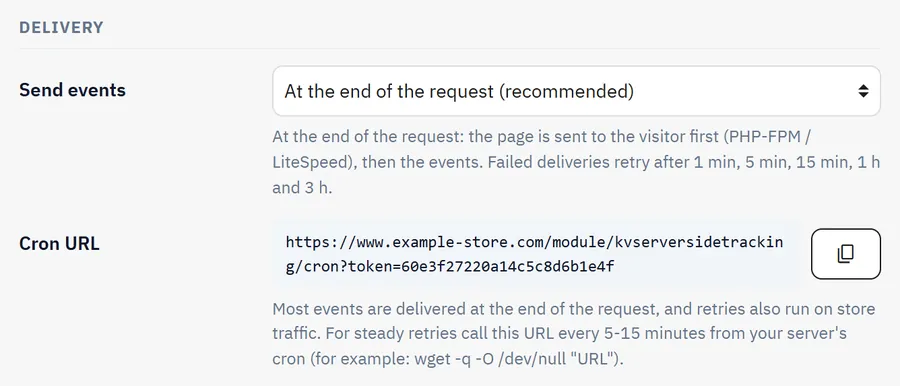
Most events are delivered at the end of the request, and retries also run on store traffic. For steady retries on quiet nights, call the cron URL every 5-15 minutes from your server's cron. The URL with its secret token is on the Delivery & log tab:
Upload the new zip the same way. Settings, log and queue stay.
Uninstalling
Uninstalling deletes the settings, the event log and the queue. Reports already delivered to Google, Meta and TikTok stay there.
Configuration
Advanced Parameters > Server-side tracking. In multistore, select a shop to give it its own ids and tokens; "All shops" sets the defaults.
Google Analytics 4
In Google Analytics: Admin > Data streams > your web stream. Copy the Measurement ID (G-...) and create an API secret under Measurement Protocol API secrets.
Setting
Meaning
Measurement ID, API secret
Of the same data stream
Endpoint
Global, or the EU endpoint to keep the collection in the EU
Send from the server
GA4 does not merge server and browser events (except purchases by transaction id), so an event sent from the server is not fired by our browser tag
Send user_id
Logged-in customers are sent with their PrestaShop customer id (no personal data)
Print gtag.js
Leave off when another module or your theme loads Google Analytics
GA4 connection test
Meta
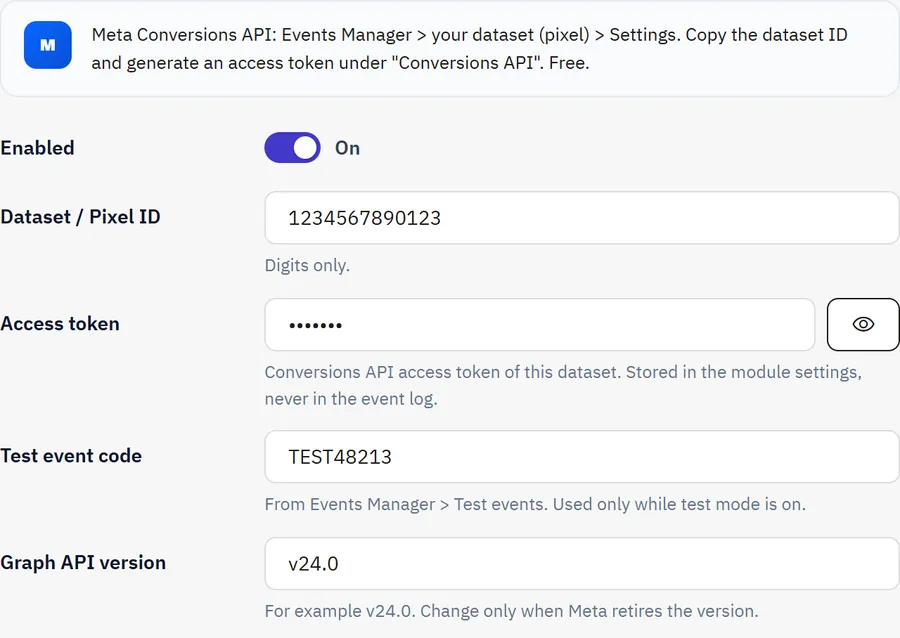
In Events Manager: your dataset (pixel) > Settings. Copy the dataset ID and generate an access token under Conversions API.
Setting
Meaning
Dataset / Pixel ID, Access token
Of the same dataset
Test event code
From Events Manager > Test events, used only while test mode is on
Graph API version
Change only when Meta retires the version
Print the Meta Pixel
Loads after marketing consent and fires the same events with the shared event ids. Leave off when another module loads the pixel; deduplication then works only for events that pixel sends with the same ids
Meta settings
TikTok
In TikTok Ads Manager: Tools > Events > Web events > your pixel > Settings. Copy the pixel code and generate an access token. The TikTok connection test needs a test event code, so it never counts as real traffic.
Orders & events
Setting
Meaning
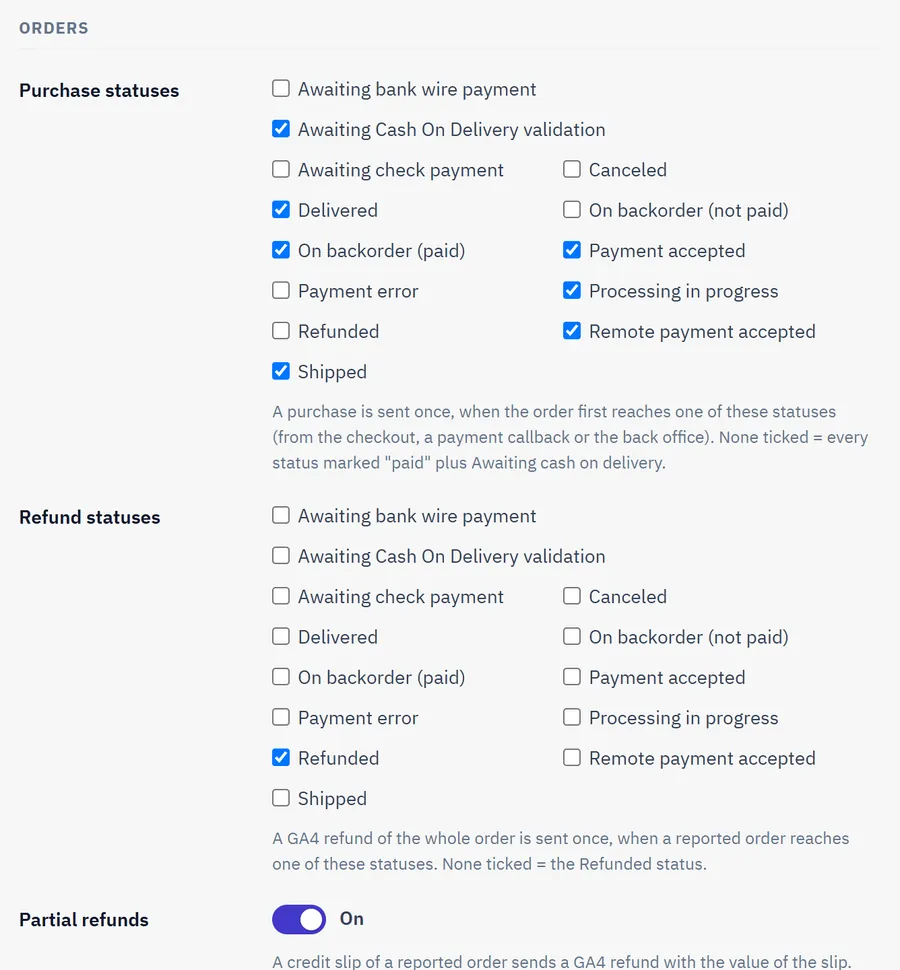
Purchase statuses
A purchase is sent once, when the order first reaches one of them. None ticked: every status marked "paid" plus Awaiting cash on delivery. Bank wire and check orders wait for the payment
Refund statuses
A GA4 refund of the whole order, once. None ticked: Refunded
Partial refunds
A credit slip of a reported order sends a GA4 refund with the value of the slip
Value
Order total, or products without tax and shipping
Item id
Product ID, reference, or product-combination (12-34). Must match your Merchant Center, Meta or TikTok catalogue if you use one
No events for crawlers, your office or your staff; orders from these addresses are not reported either
Purchase statuses
Consent
GA4 needs analytics consent, Meta and TikTok need marketing consent. The decision is read from a cookie on every request and stored with each order for later status changes.
Source
How it works
Not checked
Always send. Stores with EU or UK visitors should choose a source
Built-in banner
Accept all, Analytics only, Necessary only; optional link to your privacy page
Cookiebot, CookieYes
Reads their cookie and reacts to their events
Other banner
Cookie name and one regular expression for analytics and one for marketing
Before a decision: Do not send (opt-in, EU / UK) or Send (opt-out regions). Other scripts can call window.kvSst.consent(analytics, marketing) and window.kvSst.open().
Built-in banner on a phone
Delivery & log
Setting
Meaning
Test mode
GA4 events go to the validation endpoint (checked, not recorded, findings in the log). Meta and TikTok events carry your test event code
Send events
At the end of the request (the page reaches the visitor first on PHP-FPM / LiteSpeed), or only by the cron URL
Keep events
Finished events older than this are deleted
Keep request bodies
Off: the body of a delivered event is removed right after delivery
Delivery settings
Usage
Go live in four steps
Connect a destination and press its test button.
Switch Test mode on, place a test order, and watch GA4 DebugView, Meta Test events or TikTok Test events.
Choose the consent source on the Consent tab.
Switch Test mode off. Add the cron URL to your server.
What is sent when
Moment
GA4
Meta
TikTok
Product page
view_item (optional)
ViewContent
ViewContent
Add to cart
add_to_cart
AddToCart
AddToCart
Checkout page, once per cart content
begin_checkout
InitiateCheckout
InitiateCheckout
Order reaches a purchase status
purchase
Purchase
CompletePayment
Order reaches a refund status, or a credit slip
refund
-
-
Registration
sign_up
CompleteRegistration
CompleteRegistration
Contact form
generate_lead
Lead
Contact
Newsletter
generate_lead
Lead
Subscribe
Guest checkouts are not reported as registrations.
Late payment confirmations
The visitor's ids, IP, browser and consent are kept with the cart at checkout and moved to the order. So a payment module that confirms the order from a callback, or a status you change in the back office days later, still reports the purchase with the right visitor.
Event log
Advanced Parameters > Server-side tracking > Event log. Filter by status, destination, event, order and date. Click a row for the request body and the full answer. Retry selected, Retry all failed, Send queue now and Delete old events are at the top. Tokens and API secrets are added when an event is sent and never appear here.
Event log
Multistore
Each event is sent with the ids and tokens of its shop. Select a shop in the shop switcher to see only its numbers.
After a token expires
Delivery fails with the destination's message on the Dashboard card and in the log. Enter the new token, then use Retry all failed: events of the last 72 hours go out again (Meta and TikTok accept 7 days, GA4 72 hours).
FAQ
Do I need Google Tag Manager or a server container?
No. Events go straight from your PrestaShop server to the official endpoints. There is no monthly hosting and no third-party relay.
Which accounts do I need?
Only your own: a GA4 property, a Meta dataset, a TikTok Ads account. Connect one, two or all three.
Will purchases be counted twice with my pixel?
Not for Meta and TikTok when the pixel sends the same event id. Our optional pixel output does that. If another module prints the pixel, leave its purchase event on and switch off the server purchase, or remove that module's pixel and use ours. In GA4, we never send the same event from both sides, and purchases are unique by transaction id.
The official Facebook module is free. Why this one?
It covers Meta only. This module also covers GA4 and TikTok with one queue, one log and one consent logic, and it reports the purchase only on the statuses you choose.
What about bank wire or check orders?
They wait until the order reaches a purchase status, for example Payment accepted. Cash on delivery counts at Awaiting cash on delivery by default; tick your own statuses to change that.
What personal data leaves my server?
Meta and TikTok receive SHA-256 hashes of e-mail, phone, name and address, plus IP, user agent and their click and browser ids. GA4 receives no personal data. Only with the consent you configured. Tell your customers about server-side tracking in your privacy policy.
Does it slow down my shop?
Events are stored first and sent after the page is delivered on PHP-FPM and LiteSpeed. On other setups choose "Only by the queue worker (cron)". Each delivery has a short timeout.
Do I need a cron job?
No, but it is recommended: retries also run on store traffic, and the cron URL keeps them running on quiet nights.
Does it work with my theme and my payment modules?
Yes for Classic, Hummingbird and themes built on them: it uses standard hooks and PrestaShop's updateCart event. A theme with a custom add-to-cart that does not emit updateCart still sends the server event; only the browser event waits for the next page.
Does it work with page cache modules?
Add to cart, checkout and purchase events are not affected. A full page cache that serves product pages without running PHP cannot create a view event for those hits.
Is it GDPR compliant by itself?
It gives you the tools (consent gating, hashing, retention), but compliance depends on your consent text and your privacy policy.
The department store theme for PrestaShop 8.2 and 9.x: colour-coded departments, a department list beside the hero slider with two side promos, a big search with a department picker, tabbed product grids, a 2 + 1 + 2 offer grid, deals of the day with real countdowns, a department showcase, a promotions band and a three-column product page with a sticky buy box. Four styles (Meridian, Harbor, Citrus, Night), every colour editable. A child theme of Classic, no core changes.
Stop AI crawlers, scrapers, vulnerability scanners and unwanted countries before PrestaShop 8.2 or 9.x builds a page. Googlebot and Bingbot are verified by DNS and always allowed; 50+ bots get one switch each; country rules use free GeoIP databases and can close only the checkout; IP and network lists, rate limits for search, filters and forms, honeypots and the add to cart flood fix; a one-second challenge instead of a captcha; learning mode, dashboard, log, IP tester and Cloudflare export. Two hooks, no overrides.
Import and update products from supplier CSV, XML and JSON feeds in PrestaShop 8.2 or 9.x on a schedule: URL, FTP, SFTP or upload; field mapping with real sample values; match by reference, EAN-13, supplier reference or MPN; markup by price band and category with .99 rounding; a price guard that holds back big drops and below-cost prices; combinations from feed rows; stock-only syncs; products missing for N runs set to stock 0 with a safety limit; a dry-run preview with old and new values, run history with a row log and undo. No overrides, no storefront hooks.