Premium sports and outdoor store theme for PrestaShop 8.2 and 9.x: a hero slider with glass product cards and real deal timers, a mega menu with picture cards, shop by activity tiles, a gear check that filters products by the weather, rich product cards with a second picture, spec chips and quick add, last light deals with a segmented clock, and a product page with Built for gauges, a fit scale and a delivery panel. A child theme of Classic with four presets, one-click demo content and the 9.2 one-page checkout, no core changes.
Tested on 9.2.0 & 8.2.8Updated Nov 1, 2026Version 1.0.0Compatible with PrestaShop 8.2 – 9.x No core file edits
Built forPrestaShop
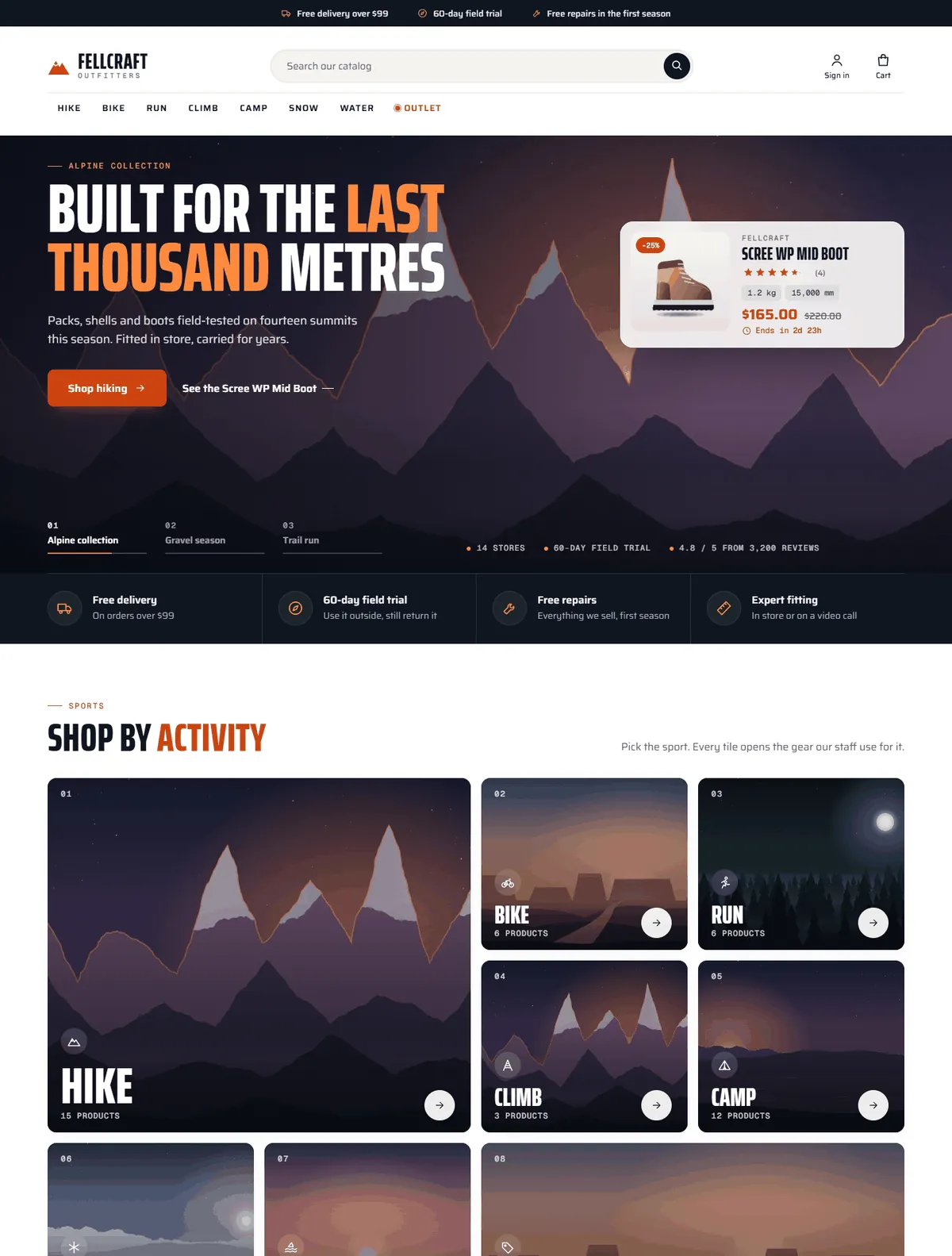
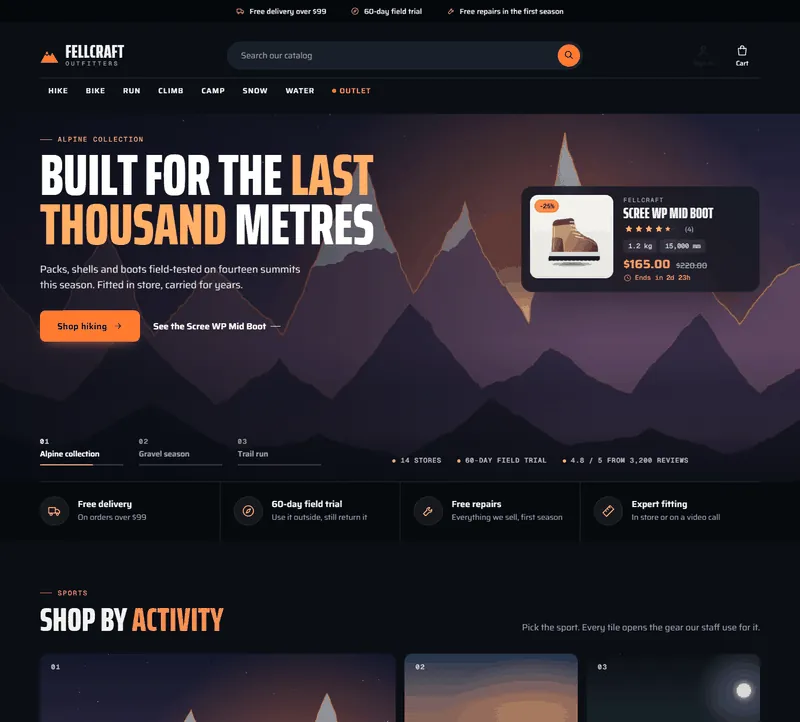
Home page: hero slider with a glass product card, a real deal timer and the trust row1 of 12
What it does
Premium sports and outdoor store theme for PrestaShop 8.2 and 9.x: a hero slider with glass product cards and real deal timers, a mega menu with picture cards, shop by activity tiles, a gear check that filters products by the weather, rich product cards with a second picture, spec chips and quick add, last light deals with a segmented clock, and a product page with Built for gauges, a fit scale and a delivery panel. A child theme of Classic with four presets, one-click demo content and the 9.2 one-page checkout, no core changes.
Ridge turns PrestaShop into an outdoor store that feels like the place your customers are going. Shoppers pick their sport, filter by the weather they expect and compare the numbers that matter (grams, litres, millimetres, degrees) before they buy. Built on standard PrestaShop data: categories, features, brands and specific prices with end dates.
Features
Look premium from the first screen
Hero slider with up to three scenes, each with a headline and a glass product card: picture, rating, specs, price and a real deal timer.
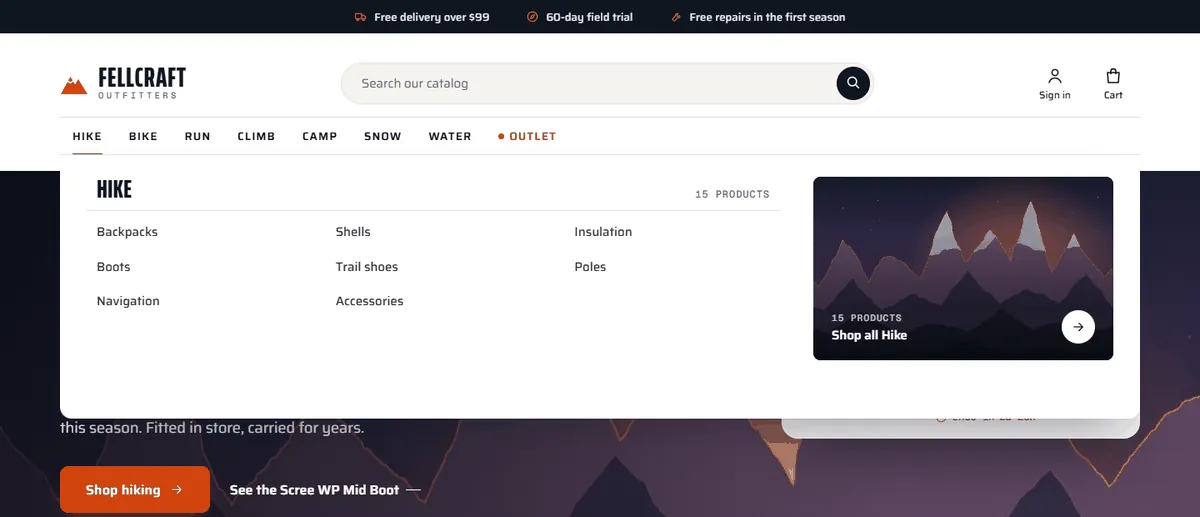
Mega menu with a picture card per sport and a highlighted Outlet item; a slide-in drawer on phones.
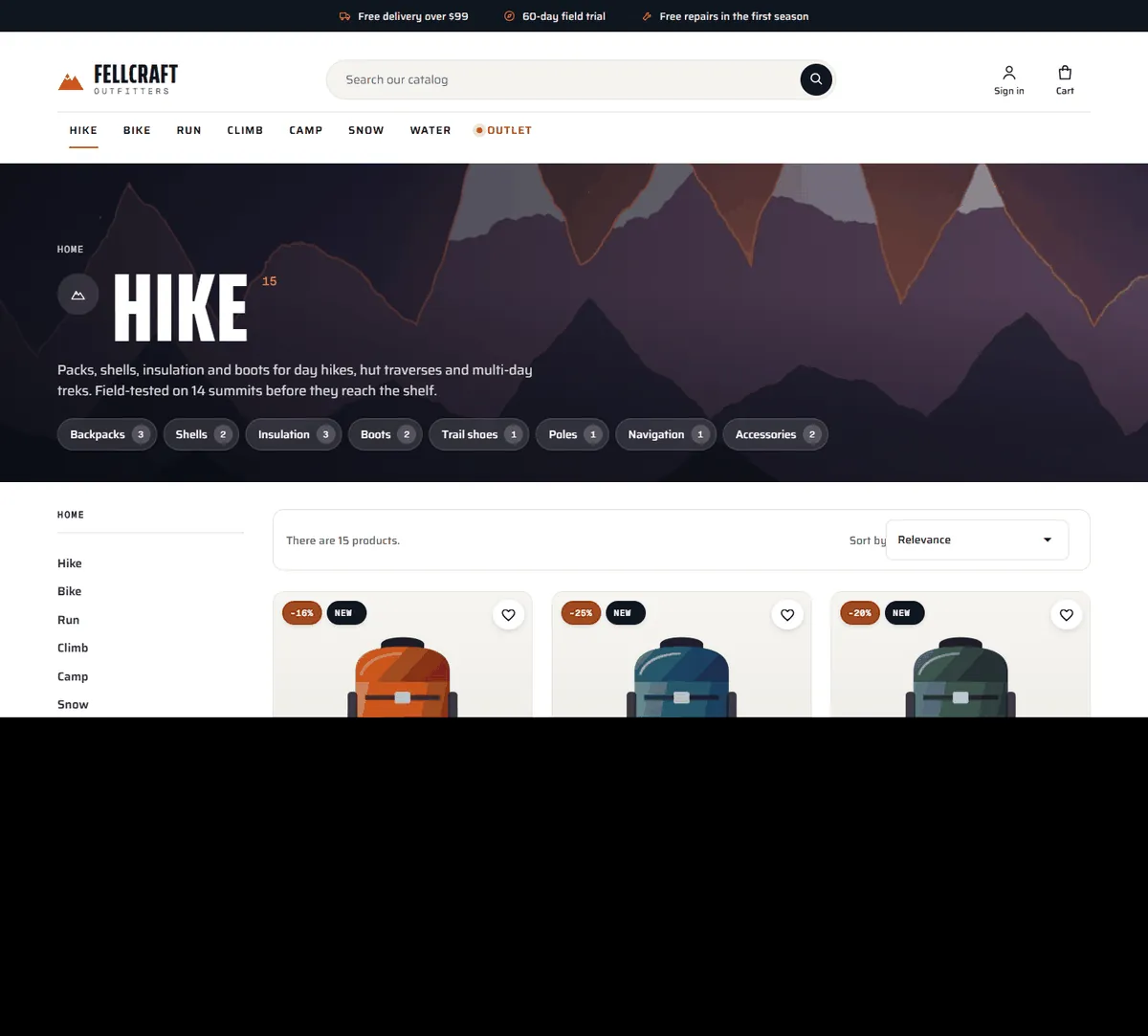
Shop by activity tiles with pictures, icons and product counts; scene heroes on category pages with sub-category chips.
Help shoppers choose
Gear check: chips for Rain, Wind, Below 0 °C, Heat and Overnight filter a product grid in the browser.
Product cards with a second picture on hover, Quick view and Add to cart (or Choose size), brand, condition icons, rating, spec chips, the number of sizes and deal timers.
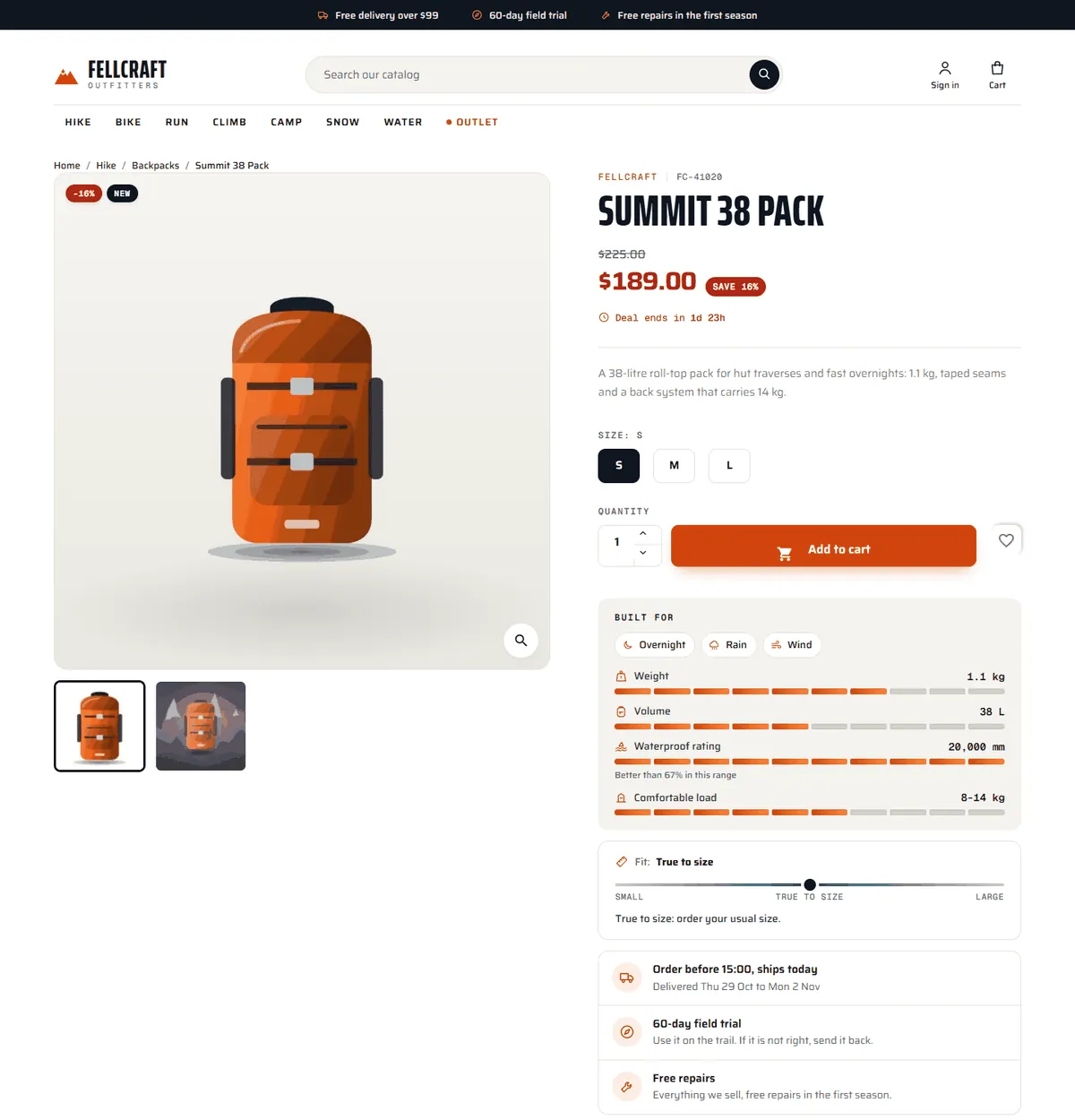
Product page: deal timer under the price, size buttons, Built for gauges that compare weight, volume or waterproof rating with the rest of the range, a fit scale and a delivery panel with cut-off and delivery dates. A sticky buy bar on phones.
Sell more per visit
Last light deals: a segmented clock that counts to the earliest real end date and four deal rows.
Spotlight: one product on its scene with its gauges and conditions.
Field notes that link to your CMS pages, a brand wall and a services band.
Four presets. Summit, Glacier, Forest and Dusk (dark), all text pairs WCAG AA.
What you get
Download & installOne theme .zip for PrestaShop 8.2 and 9.x, installed in Design > Theme & Logo. Download it from My licenses right after payment.
12 months of updates & supportNew versions and help for 12 months (24 or 36 months at checkout). After that the theme keeps working; renew anytime at 50%.
License for your storeOne production domain with all its subdomains; staging and local development hosts are free. How licensing works
30-day refundFull refund within 30 days of your first purchase, no reason needed. Refund policy
Tested buildsPrestaShop 8.2 – 9.x. Tested on PrestaShop 9.2.0 and PrestaShop 8.2.8, before every release.
Documentation & supportFull guide (Installation, Configuration, FAQ) on this page. Tickets from your account, first reply within 1 business day.
Compatibility
Ridge: Sports & Outdoor Theme works with PrestaShop 8.2 – 9.x.
We list the builds we install and test on. “Tested” means the full test plan runs on that build before every release; “Supported” means the build is inside the supported range.
Compatibility
Version
Range
Runs on
Status
PrestaShop 9
9.0 – 9.2
PHP 8.1 – 8.4
Tested on 9.2.0 before every release
PrestaShop 8.2
8.2.0 – 8.2.x
PHP 7.2.5 – 8.1
Tested on 8.2.8 before every release
1.0.0
Nov 1, 2026
Latest
First release for PrestaShop 8.2.x and 9.x (9.0 to 9.2), one code base: a child theme of Classic (Classic 2.2 on 8.2, Classic 3.x on 9.x) plus the companion module "Ridge theme settings".
Header: top bar notes (taking turns on phones), mountain-mark wordmark, pill search, account and cart icons from one line icon set, a main menu with mega panels (sub-categories, product count, picture card) and a highlighted item; slide-in drawer on phones; a focused checkout header.
Home sections (module): hero slider with scenes, glass product cards and deal timers, a slide index with progress; trust row; shop by activity tiles; gear check filtered by conditions; last light deals with a segmented clock; spotlight with Built for gauges; field notes linked to CMS pages; brand wall; services band; the newsletter as "The conditions report" band; footer brand column and outline wordmark.
Product cards: second picture on hover, Quick view, Add to cart or Choose size, brand, condition icons, rating, spec chips, number of sizes, price, regular price and deal timer.
Category scene hero with product count and sub-category chips; listing toolbar, filters and pagination restyled.
Product page: brand and reference line, deal timer, size buttons, Built for (condition chips, segmented gauges against the category), fit scale, delivery panel, tabs across the full width, sticky buy bar on phones, restyled reviews and quick view.
Cart, classic checkout, PrestaShop 9.2 one-page checkout (own page template for the Classic layout, Bootstrap 5 attribute bridge), account and CMS pages restyled.
Four presets: Summit, Glacier, Forest, Dusk; all text pairs WCAG AA. Self-hosted Saira, Saira Extra Condensed and Geist Mono (SIL OFL 1.1).
Motion: sticky header shadow, slide crossfade with a slow zoom, reveal on scroll, lift on cards and tiles, cart bump; all off with prefers-reduced-motion.
Demo content importer ("Fellcraft Outfitters": 50 products, 40 categories, 4 brands, features, sizes, timed deals, reviews, 3 field-note pages, generated illustrations) that hides the stock sample catalogue and home blocks and restores them on removal.
No core changes, no overrides. English only.
How do I install the theme?
Download the package from My licenses and install it in Design > Theme & Logo > Add a new theme, like any other PrestaShop theme. The Documentation tab has every step, from the first activation to the theme settings.
Which PrestaShop versions does it work with?
PrestaShop 8.2 – 9.x. Every release is installed and tested on PrestaShop 9.2.0 and PrestaShop 8.2.8 before it is published. The Compatibility tab lists every version range.
What does the license cover?
One production store domain with every subdomain (www, shop., staging.), plus local development hosts such as localhost, *.local and *.test. A store on another domain needs its own license; a second-store license is 40% off. You have 14 days after installing to enter the key. 12 months of updates and support are included; after that the theme keeps working and renewals are 50% off. How licensing works
Can I get a refund?
Yes. Ask for a full refund within 30 days of your first purchase, no reason needed: open a ticket or write to [email protected] with your order number. The money goes back to the card or bank account you paid with within 5 business days of approval. Refund policy
How do I get help?
Open a ticket from your account, so your license details are attached. We answer Monday to Friday: bug reports within 1 business day, how-to questions within 2. Support policy. Not a customer yet? Ask a pre-sales question.
Ridge is a classic sports and outdoor storefront theme for PrestaShop 8.2 and 9.x by Kavio Labs. It is made for shops that sell hiking, bike, running, climbing, camping, snow and water sports gear: shoppers pick their sport, filter by the weather they expect and compare specs before they buy. A child theme of Classic, so it runs on PrestaShop 8.2 and 9.x, including the 9.2 one-page checkout.
Ridge home page, Summit preset
What you get
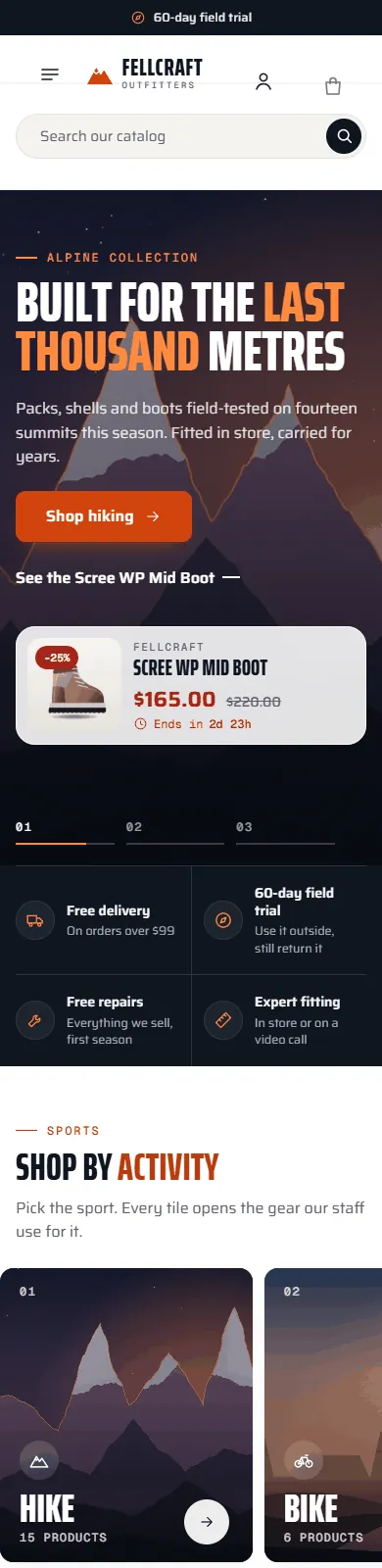
Hero slider with a product card. Up to three slides, each with its own scene, headline, button and a glass product card (picture, rating, specs, price and a real deal timer). A slide index with a progress line, swipe on phones, pause on hover, no autoplay with reduced motion.
Mega menu with pictures. Each top category opens a panel with its sub-categories, the product count and a picture card ("Shop all Hike"). One menu item (for example Outlet) can be highlighted in the accent colour.
Shop by activity. Picture tiles for your top-level categories with an icon, a number and the product count.
Gear check. Chips built from your Conditions feature (Rain, Wind, Below 0 °C, Heat, Overnight) filter a grid of products in the browser, with counts per condition.
Rich product cards. A second picture on hover, Quick view and Add to cart (or Choose size for products with sizes), the brand, condition icons, rating, spec chips (for example 1.1 kg, 38 L), the number of sizes, the price with the regular price and a deal timer that only appears when the sale has a real end date.
Last light deals. A dark band with a segmented clock that counts down to the earliest real end date and four deal rows.
Spotlight. One product on its scene with Built for gauges and the conditions it is made for.
Field notes, brands and services. Three editorial cards that link to your CMS pages, a brand wall with product counts and a band of big numbers (stores, trial days, warranty, dispatch).
Category scene hero. Category pages open with the category picture, the name, the product count, an excerpt of the description and sub-category chips with counts.
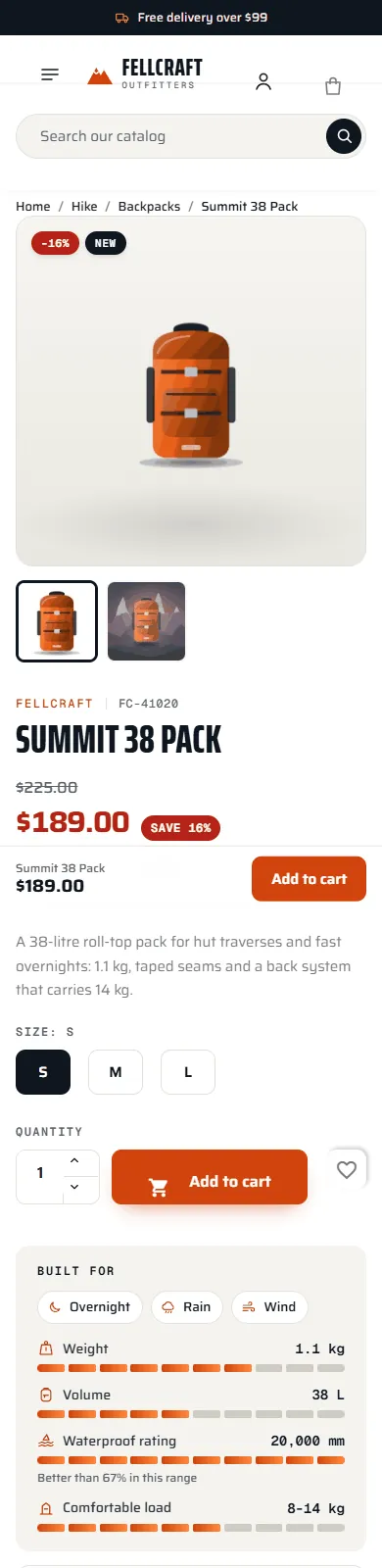
Product page. Brand and reference line, the deal timer under the price, size buttons, Built for (condition chips and segmented gauges that compare numeric features such as weight, volume or waterproof rating with the rest of the category), a fit scale (runs small, true to size, runs large) and a delivery panel (dispatch cut-off and delivery dates, field trial, repairs). A sticky buy bar on phones.
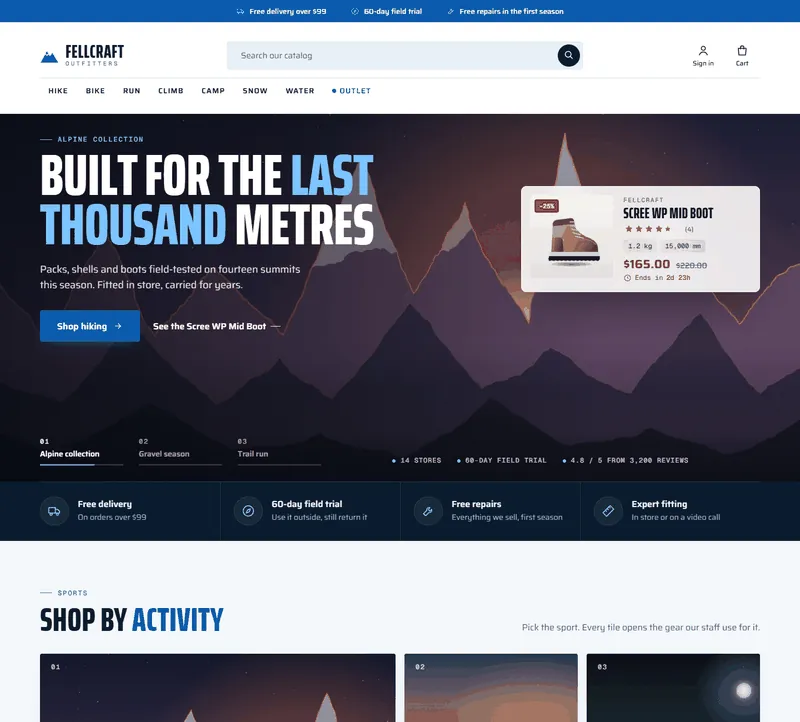
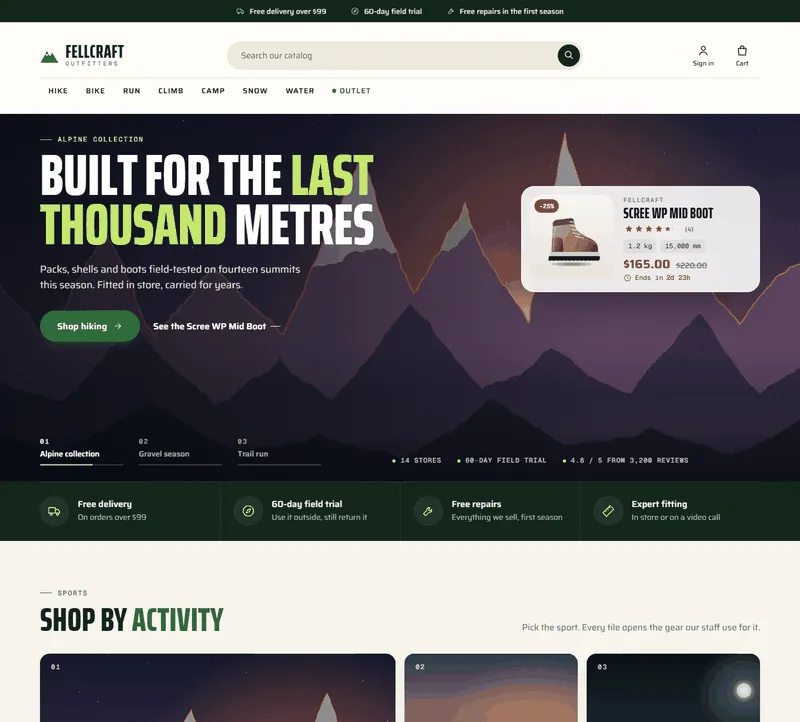
Four presets.Summit (white page, night-blue bands, flare-orange buttons), Glacier (ice blue, square corners), Forest (warm paper, pine green, lime highlights) and Dusk (a dark edition). Every text pair meets WCAG AA contrast.
One icon set, motion and depth. Line icons across the header, sections and product page; soft shadows, lift on hover, reveal on scroll and a cart bump, all switched off with prefers-reduced-motion.
Self-hosted fonts. Saira, Saira Extra Condensed and Geist Mono under the SIL Open Font License 1.1. No requests to font CDNs.
Demo content. One button imports Fellcraft Outfitters: eight sports with sub-categories, fifty products from four fictional brands with conditions, weight, volume, waterproof and temperature features, sizes, timed deals, reviews and three field-note pages. Everything is generated illustration, no photos and no real brands.
Ridge mega menuRidge category pageRidge product page with Built for gauges and the fit scale
On a phone the menu becomes a slide-in drawer, the top bar notes take turns, sections scroll sideways and the product page gets a sticky buy bar.
Home on a phone
Product on a phone
Glacier
Forest
Dusk
Compatibility
PrestaShop 8.2.x and 9.x (tested on 8.2.8 and 9.2.0), PHP 7.2.5 to 8.5.
Needs the Classic theme, which ships with PrestaShop.
Classic five-step checkout and the PrestaShop 9.2 one-page checkout.
Works with the PrestaShop core modules (main menu, search, product comments, wish list, faceted search, newsletter) and with Kavio Labs modules such as Product Personalizer, Make an Offer and Sell by Weight & Length.
No core changes, no overrides. English only.
Installation
Requirements
PrestaShop 8.2.x or 9.x with the Classic theme present (it ships with PrestaShop; do not delete it, Ridge is its child theme).
PHP 7.2.5 or newer (the PHP version your PrestaShop already runs on is fine).
Install the theme
Go to Design > Theme & Logo and click Add new theme.
Choose Import from your computer, upload kvridge-1.0.0.zip and click Next. PrestaShop unpacks the theme into themes/kvridge and copies the companion module Ridge theme settings into modules/kvridge.
Click Use this theme next to Ridge. PrestaShop installs and enables the companion module, applies the Ridge image sizes and puts the modules in the Ridge positions (every position the companion module uses is listed in the theme's config/theme.yml).
Go to Design > Image Settings and click Regenerate thumbnails (all types) so your existing product pictures get the new sizes. On PrestaShop 9 you can also run bin/console prestashop:thumbnails:regenerate.
Go to Advanced Parameters > Performance and click Clear cache.
Licence key
Ridge works for 14 days without a key. Open Modules > Module Manager > Ridge theme settings > Configure, scroll to Licence, paste the key from your Kavio Labs account and click Save key. The licence is checked from this page (and once a day), never on a storefront request. Without a valid key the theme itself keeps working with the Summit look; the home page sections, the mega menu cards, the top bar notes, the text logo, the card extras (spec chips, condition icons, second picture, quick add, deal timers), the category hero, the product page extras and the other presets are switched off until the key is valid. (The PrestaShop Addons edition has no licence key and makes no outbound calls.)
Import the demo content (optional)
On the same configuration page, click Import demo content. It adds eight sports with sub-categories, fifty products from four fictional brands with conditions, weight, volume, waterproof and temperature features, sizes, timed deals, reviews and three field-note CMS pages, and sets the shop name to "Fellcraft Outfitters" (and the shop e-mail to a placeholder address). To let the new look show, it also hides the stock demo content while it is installed:
the default sample products, the default top categories (Clothes, Accessories, Art) and the default brands are set to inactive;
the stock home blocks that the Ridge sections replace (image slider, banner, custom text, reassurance, featured products, best sellers and specials) are unhooked. New products stays as the new arrivals shelf.
Click Remove demo content to delete everything the import created and to switch all of the above back on, with your previous settings restored. The demo state is kept when you uninstall the module, so you can still remove it afterwards.
Set up your catalogue
Sports: your top-level categories become the menu, the activity tiles and the mega menu panels. Give each one a category picture (at least 1600 x 900 px, a landscape works best): it is used by the activity tile, the mega menu card and the category hero. Sub-categories without their own picture use their parent's picture.
Products in parent categories: list each product in its sub-category and in the sport (for example Backpacks and Hike), so the sport page shows all of them. The demo import does this for you.
Conditions: a feature named Conditions with one or more values per product: Rain, Wind, Below 0 °C, Heat, Overnight (any words work; the icon is picked from the word). It drives the gear check chips, the card icons and the product page.
Specs: features such as Weight (380 g, 1.1 kg), Volume (38 L), Waterproof rating (20,000 mm), Temperature rating (-9 to +3 °C) and Comfortable load (8-14 kg). The first two a product has become the spec chips on its card; the numeric ones become the Built for gauges.
Fit: a feature named Fit with the value Runs small, True to size or Runs large.
Brands: assign each product a brand (Catalog > Brands & Suppliers). The brand shows above the name and fills the brand wall.
Deals with an end date: create a specific price with a percentage and an end date (the product's Pricing tab). The card timers, the hero card timer and the deals clock only use real end dates.
Product pictures: at least 800 x 800 px, the product on a white or very light background. A second picture (the product in use or on a scene) appears when the pointer is over the card.
Field notes: create CMS pages for your route guides, tests or care tips and link them in the Notes setting with cms:ID.
One-page checkout (PrestaShop 9.2)
If you enable the one-page checkout of the PrestaShop module "One Page Checkout", Ridge takes over its page template and renders it in the Ridge look. Nothing else is needed.
Updating
Upload the new theme zip the same way (PrestaShop asks you to delete the old theme folder first, or replace the files by FTP). Your settings stay in the database.
Uninstalling
Switch to another theme in Design > Theme & Logo, then delete Ridge there. Uninstall Ridge theme settings in the Module Manager to remove its settings. Remove the demo content first if you imported it.
Configuration
Everything is on one page: Modules > Module Manager > Ridge theme settings > Configure. Save with the Save button at the end of the settings form.
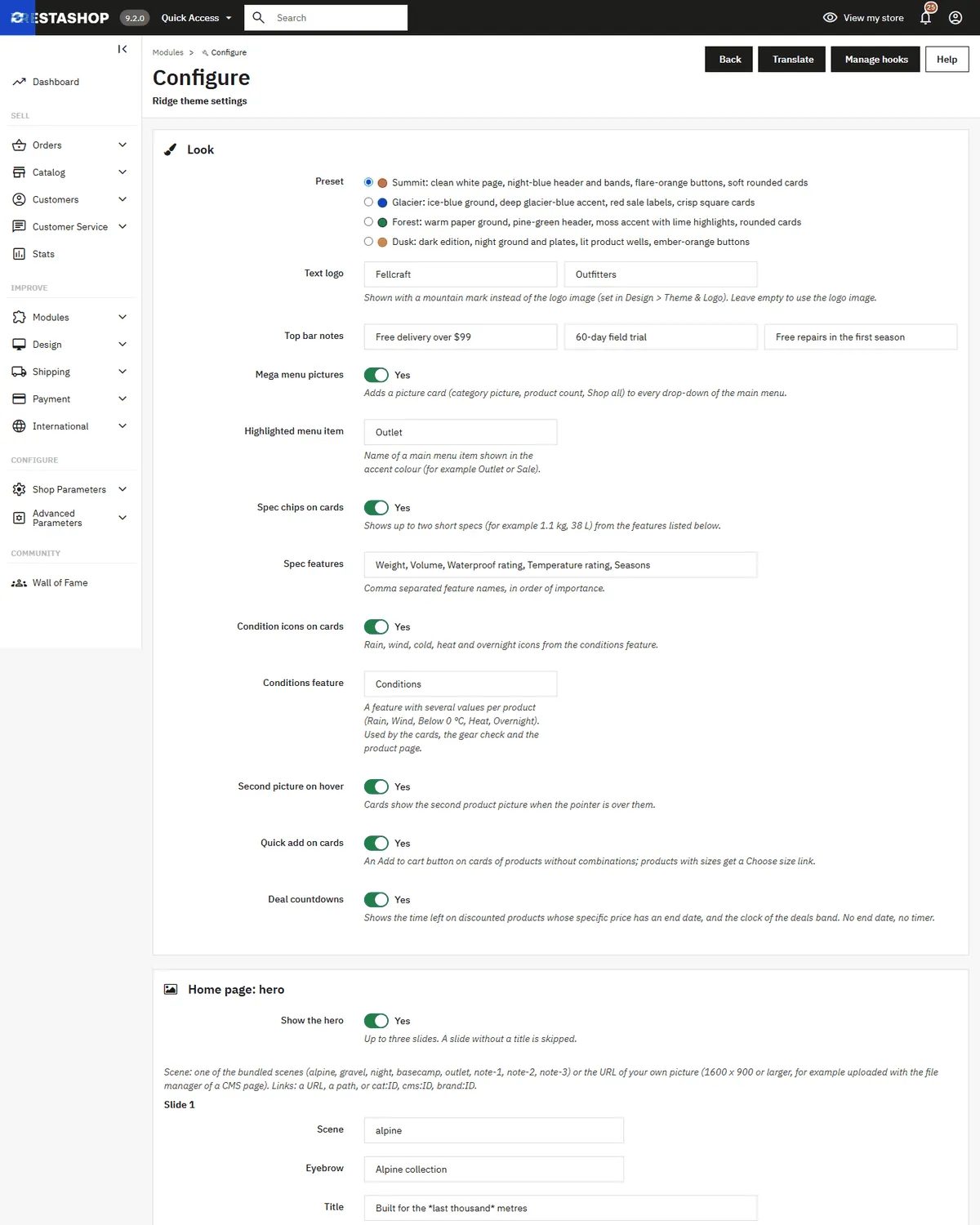
Ridge configuration page
Look
Setting
What it does
Preset
Summit (default), Glacier, Forest or Dusk. Colours, corners and a few details change; the layout stays the same.
Text logo
A mountain mark with your shop name and a small word under it (for example Fellcraft / Outfitters). Leave empty to use the logo image from Design > Theme & Logo.
Top bar notes
Up to three short notes in the bar above the header (delivery, trial, repairs). On phones they take turns.
Mega menu pictures
Adds a picture card with the product count and Shop all to every drop-down of the main menu. Uses the category pictures.
Highlighted menu item
The name of a main menu item shown in the accent colour with a pulsing dot (for example Outlet or Sale).
Spec chips on cards / Spec features
Up to two short specs on each card, taken from the listed features in order. Values longer than 16 characters are skipped.
Condition icons on cards / Conditions feature
Small icons for the values of the conditions feature. The same feature drives the gear check and the product page.
Second picture on hover
Cards show the product's second picture when the pointer is over them.
Quick add on cards
An Add to cart button on cards of products without combinations or required customization; other products get Choose size (or View product).
Deal countdowns
Timers on cards, in the hero card, on the product page and the deals clock. Only discounts with an end date get a timer.
Home page: hero
Up to three slides; a slide without a title is skipped. For each slide:
Scene: one of the bundled scenes (alpine, gravel, night, basecamp, outlet, note-1, note-2, note-3) or the URL of your own picture (1600 x 900 or larger). You can upload pictures with the file manager of a CMS page and paste the address.
Eyebrow, Title, Text, Button: put *a few words* between asterisks to show them in the accent colour (this works in every section title).
Button link: a URL, a path starting with /, or cat:12, cms:4, brand:3.
Product card ID: shows this product as a glass card on the slide.
Stats under the hero: up to three short facts, separated by |.
Home page: sections
Section
Settings
Trust row
One item per line: `title
text`, four at most.
Shop by activity
Title and text. The tiles are your top-level categories (eight at most) with their picture and product count.
Gear check
Title, text and up to sixteen product IDs (empty: the newest products). Chips come from the conditions feature of those products.
Deals band
Title, text and up to four discounted product IDs (empty: the deals that end first). The clock counts to the earliest real end date.
Spotlight
Product ID, scene, eyebrow, title and text. Shows the product's Built for gauges and conditions.
Field notes
One per line: `tag
title
reading time
link
scene`, three at most. The first one is the large card.
Brands
Your brands with products, eight at most, with the product count.
Services band
One per line: `big number
text`, four at most.
Footer
The outline wordmark across the footer, a line at the bottom and the text under the logo in the footer.
The stock product shelves (New products, Featured products, Best sellers, Specials) keep their own module settings and positions.
Product page
Setting
What it does
Built for
Condition chips and up to four segmented gauges.
Gauge features
Comma separated feature names. End a name with - when lower is better (Weight-, Temperature rating-) and with + when higher is better (Volume+, Waterproof rating+). Each gauge compares the product with the products of its default category (or the parent category when there are fewer than three) and says "Better than 67% in this range" when it is in the better half. Units: g and kg, L, mm, °C; for ranges the lower number counts when lower is better and the higher number otherwise.
Fit scale / Fit feature
A three-step scale with a tip, from a feature with the values Runs small, True to size or Runs large.
Delivery dates line / Order cut-off hour
"Order before 15:00, ships today" and a delivery window counted in working days.
Trial line, Repairs or returns line
`title
text`. Leave empty to hide.
Demo content
Import demo content and Remove demo content are on the same page; see Installation.
Licence
The licence card is at the end of the page (own-site edition only). See Installation.
FAQ
Does Ridge change PrestaShop core files or use overrides?
No. Ridge is a child theme of Classic plus a companion module that uses standard hooks. The only module template it replaces is the page template of the 9.2 one-page checkout, inside the theme folder, which is the supported way to customise a module template.
Which PrestaShop versions are supported?
PrestaShop 8.2.x and 9.x (tested on 8.2.8 and 9.2.0). The same zip works on both.
My sport page (Hike) shows no products. PrestaShop lists only the products that are assigned to a category. Assign your products to the sub-category and to the sport. The activity tiles and the category hero already count the products of the whole sport.
The gear check, the condition icons or the Built for block do not show. They need a feature named Conditions (or the name you set) and numeric features such as Weight or Volume on your products. Products without them simply do not show these parts.
A gauge looks short for a good product. The gauge compares the product with the other products of the same category. If lower is better for a feature (weight, temperature rating), end its name with - in Gauge features.
Why is there no timer on some discounted products?
Ridge only shows a timer when the specific price has an end date. No end date, no timer: we never show a fake countdown.
Can I use my own pictures in the hero?
Yes. Upload a picture (for example with the file manager of a CMS page) and paste its address into the slide's Scene. Use 1600 x 900 or larger.
What does the demo import change, and can I undo it?
It adds its own categories, products, brands, features, reviews and three CMS pages, sets the shop name and e-mail, hides the stock sample content and unhooks the stock home blocks that Ridge replaces. Remove demo content deletes what it added and restores everything else, including your settings.
Does Ridge load fonts or scripts from other servers?
No. The fonts are in the theme (SIL Open Font License 1.1) and the module makes no storefront requests. The own-site edition checks its licence from the configuration page only.
Will it work with my modules?
Ridge keeps the Classic hooks, classes and data attributes, so modules that work with Classic work with Ridge. It is tested with the core modules and with Kavio Labs modules such as Product Personalizer, Make an Offer and Sell by Weight & Length.
Where do I get support?
From your Kavio Labs account (My licences). Updates and support are included for the period you bought.
Sell by weight, length, area or volume on PrestaShop 8.2 and 9.x: amount field with quick amounts and live total, exact decimal stock and real shipping weight. No overrides.
Shoppers propose a price per item; the shop accepts, counters or declines, or rules answer at once. The agreed price is a one-time specific price for that customer's cart.