Grocery, farm shop, bakery and deli theme for PrestaShop 8.2 and 9.x built for fast basket filling on phones: round aisle bubbles, Add buttons that turn into a quantity stepper, a price per kg on every card, produce stickers, a recipe block that adds every ingredient, a free-delivery progress bar and a Nutrition and allergens tab. A child theme of Classic with four presets, one-click demo content and the 9.2 one-page checkout.
AvailableVersion 1.0.0Compatible with PrestaShop 8.2 – 9.x No core file edits
Built forPrestaShop
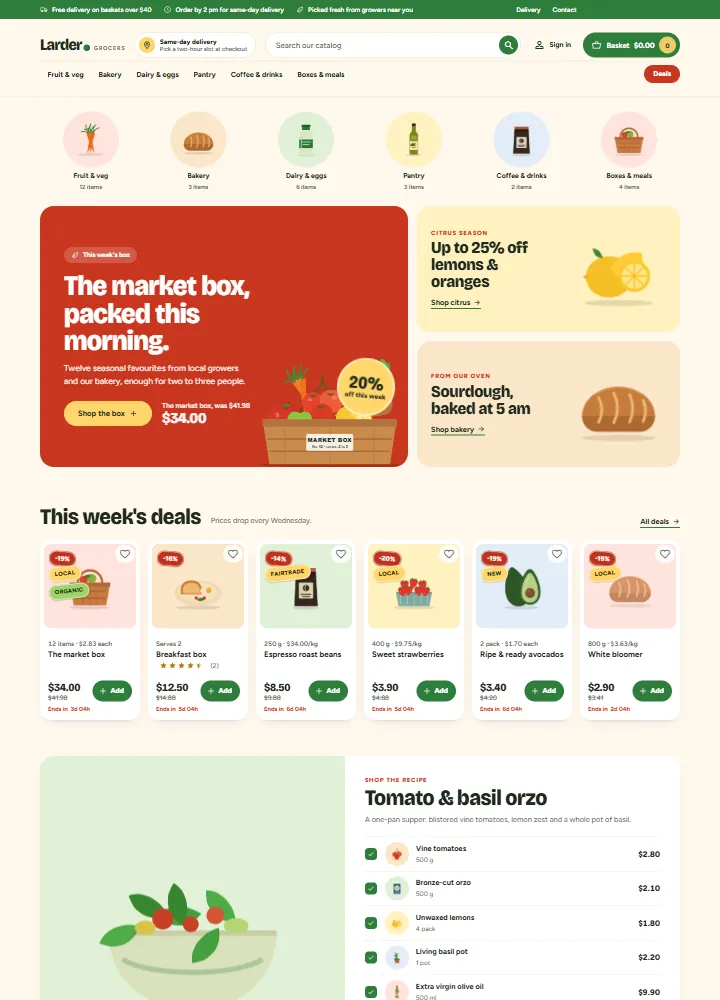
Home page: aisle bubbles, a campaign hero with a countdown and two promo boxes1 of 12
Grocery, farm shop, bakery and deli theme for PrestaShop 8.2 and 9.x built for fast basket filling on phones: round aisle bubbles, Add buttons that turn into a quantity stepper, a price per kg on every card, produce stickers, a recipe block that adds every ingredient, a free-delivery progress bar and a Nutrition and allergens tab. A child theme of Classic with four presets, one-click demo content and the 9.2 one-page checkout.
PrestaShop 8.2 - 9.x
Overview
Pantry is a classic, conversion-first storefront theme for grocers, farm shops, bakeries, delis and meal-box stores on PrestaShop 8.2 and 9.x by Kavio Labs. It is built for shops where people fill a basket with many items, mostly on a phone: aisle bubbles, one-tap Add buttons with a quantity stepper, a price per kg on every card and a recipe block that adds every ingredient at once. It is the PrestaShop version of the Pantry theme for OpenCart and WooCommerce.
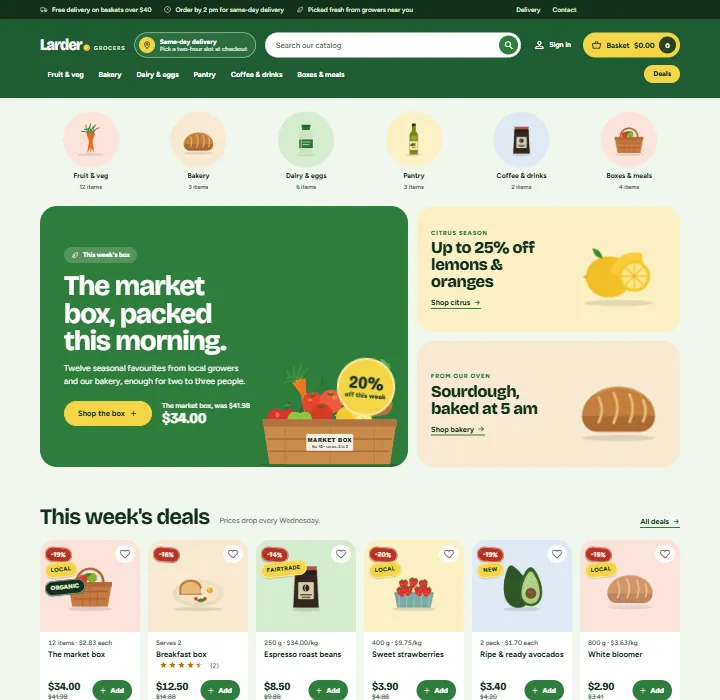
Pantry home page, Market preset
What you get
Aisle bubbles. Your top categories as round bubbles with the category picture (or a produce drawing) and the number of items.
Hero with two promo boxes. A large hero with a headline, button, the name and price of a campaign product, a round badge ("20% off this week") and a drawing of a produce box, next to two promo boxes for a seasonal offer and a bakery or deli line.
Deals row. Six products with a running sale, each with a countdown ("Ends in 3d 04h"). Prices and end dates come from your specific prices.
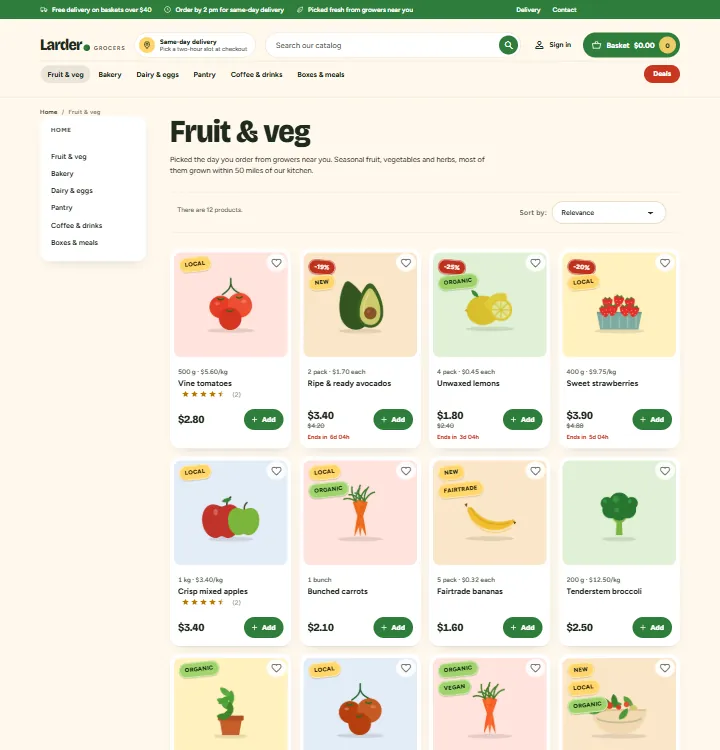
Cards built for baskets. A pastel picture well, produce stickers (sale percent, Organic, Local, Fairtrade, Vegan), the pack size and price per kg ("500 g · $5.60/kg", or per litre, or each), rating, price, regular price and a green Add button. Press Add and it turns into a - 2 + stepper; press minus at one and the product leaves the basket. No page reload, no pop-up.
Recipe block. A recipe with its ingredients as products, all ticked, a live total and one Add all to basket button. Shoppers untick what they already have.
How delivery works. Three steps (pick a slot, we pick it fresh, at your door) and an offer band.
Header made for shopping. A top bar with three promises, a delivery slot pill, a pill search, an account link, a basket pill with the total, the aisle bar and a Deals button.
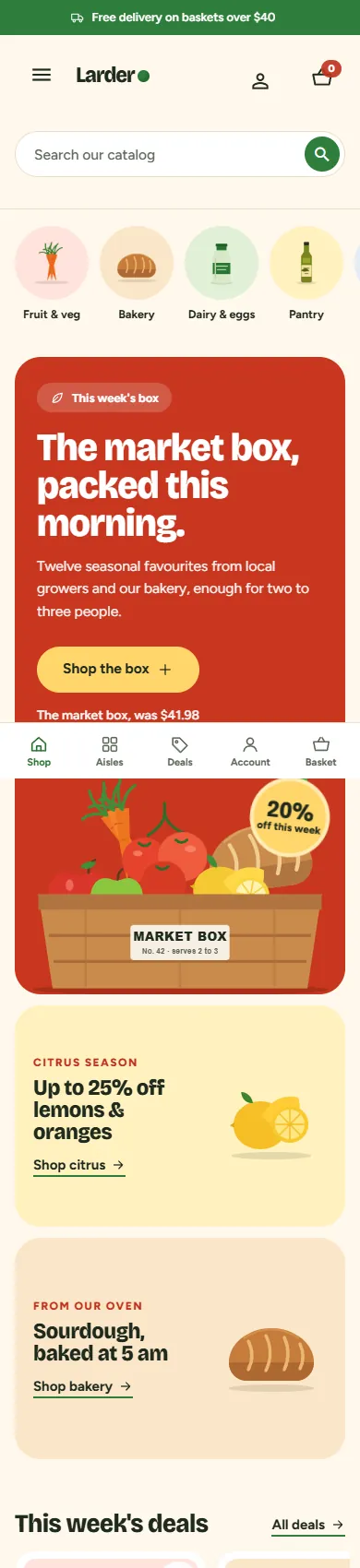
Phone basket bar. On phones a floating bar shows the number of items, the total and "Add $12.40 for free delivery" with a progress line, above a five-tab bottom bar (Shop, Aisles, Deals, Account, Basket).
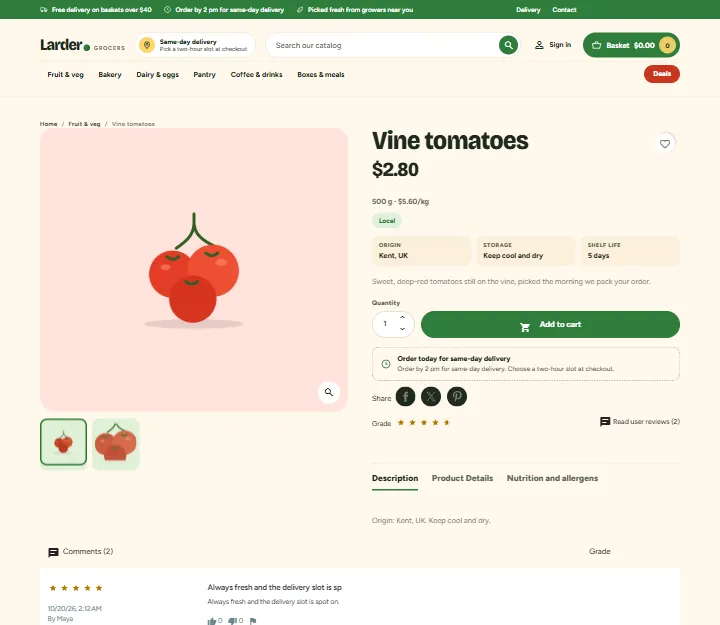
Product page. A tinted gallery, the pack size and price per kg, dietary chips, three fact boxes (origin, storage, shelf life), a delivery note under the buy button ("Order by 2 pm for same-day delivery") and a Nutrition and allergens tab with a table per 100 g and allergen chips.
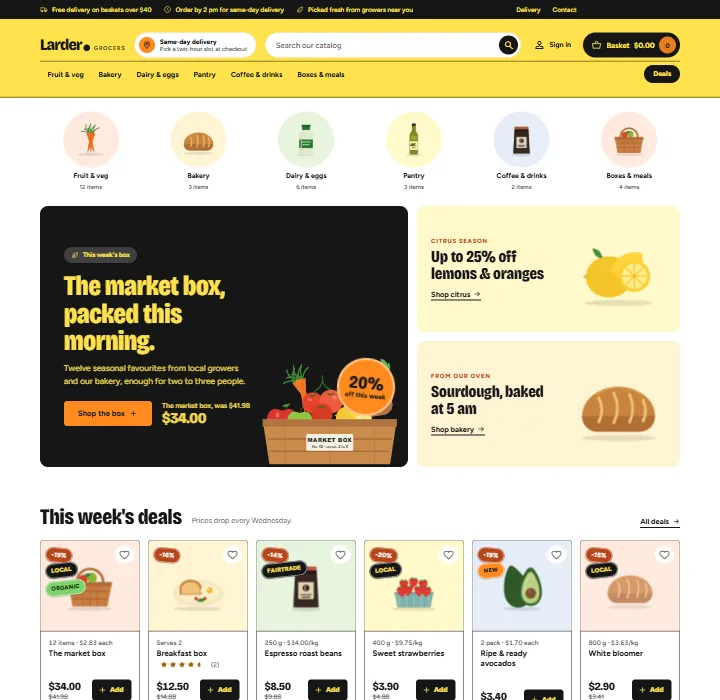
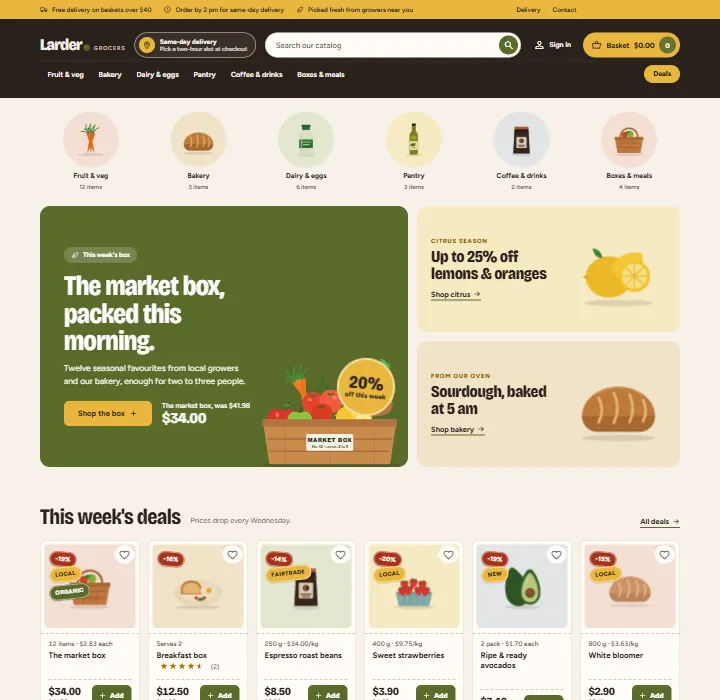
Four presets.Market (warm cream, tomato and basil green), Greenhouse (leaf green and lemon, flat cards), Citrus (lemon and ink, outlined cards) and Deli (parchment and espresso, mustard top bar, perforated card edge). Presets change card shapes and type, not only colours. Every text pair meets WCAG AA contrast.
Self-hosted fonts. Bricolage Grotesque and Figtree under the SIL Open Font License 1.1. Pantry makes no requests to font CDNs.
One-page checkout ready. Works with the classic five-step checkout and with the PrestaShop 9.2 one-page checkout.
Demo content. One button imports "Larder Grocers": six aisles and thirty groceries with pack sizes, origin, storage, shelf life, allergens, dietary labels, nutrition values, reviews and a timed weekly deals sale.
Pantry category pagePantry product page
On a phone the menu becomes a slide-in drawer, the aisle bubbles scroll sideways and the deals row becomes a swipeable strip.
Pantry home page on a phone
Greenhouse
Citrus
Deli
Works with
Sell by Weight & Length (Kavio Labs): products sold by weight or length show Choose amount on their cards (the amount is chosen on the product page); its amount field and unit price are styled in the Pantry look.
Make an Offer and Abandoned Cart Recovery (Kavio Labs): they keep working; the theme does not change them.
The PrestaShop core modules (wishlist, product comments, faceted search, social sharing, email subscription) keep working; Pantry only restyles them.
What is not included
No product photos are included; the demo uses generated illustrations. The pack size, dietary labels, facts, allergens and nutrition table need your own data in product features (named Pack size, Dietary, Origin, Storage, Shelf life, Allergens, Energy and so on); without them those elements are not shown. Pantry does not give legal advice: allergen and nutrition information must be correct and follow the food labelling rules where you sell.
How it is built
Pantry is a child theme of Classic. Classic ships with PrestaShop 8.2 and 9.x, so one theme runs on both. Pantry overrides a few templates (header, footer, product card, shopping cart block, checkout header), adds one stylesheet and one small script, and sets the image sizes. A small companion module, Pantry theme settings, provides the presets, the home page sections, the card and product page data and the demo content.
Versions
PrestaShop 8.2.x
PrestaShop 9.0 - 9.2
Parent theme
Classic 2.2
Classic 3.x
Checkout
classic five steps
classic five steps or one-page checkout (9.2)
PHP
7.2.5 to 8.1
8.1 to 8.5
One licence covers one shop domain and includes 12 months of updates and support.
Pages
Installation
Requirements
PrestaShop 8.2.x or 9.x with the Classic theme present (it ships with PrestaShop; do not delete it, Pantry is its child theme).
PHP 7.2.5 or newer (the PHP version your PrestaShop already runs on is fine).
Install the theme
Go to Design > Theme & Logo and click Add new theme.
Choose Import from your computer, upload kvpantry-1.0.0.zip and click Next. PrestaShop unpacks the theme into themes/kvpantry and copies the companion module Pantry theme settings into modules/kvpantry.
Click Use this theme next to Pantry. PrestaShop installs and enables the companion module, applies the Pantry image sizes and puts the modules in the Pantry positions (every position the companion module uses is listed in the theme's config/theme.yml).
Go to Design > Image Settings and click Regenerate thumbnails (all types) so your existing product pictures get the new sizes. On PrestaShop 9 you can also run bin/console prestashop:thumbnails:regenerate.
Go to Advanced Parameters > Performance and click Clear cache.
Licence key
Pantry works for 14 days without a key. Open Modules > Module Manager > Pantry theme settings > Configure, scroll to Licence, paste the key from your Kavio Labs account and click Save key. The licence is checked from this page (and once a day), never on a storefront request. Without a valid key the theme itself keeps working; the home page sections, the top bar notes, the text logo, the Add buttons, the unit line, stickers, countdowns, the product page extras and the presets other than Market are switched off until the key is valid. (The PrestaShop Addons edition has no licence key and makes no outbound calls.)
Import the demo content (optional)
On the same configuration page, click Import demo content. It adds six aisles and thirty groceries with pack sizes, origin, storage, shelf life, allergens, dietary labels, nutrition values and reviews, and sets the shop name to "Larder Grocers". To let the new look show, it also hides the stock demo content while it is installed:
the default sample products, the default top categories (Clothes, Accessories, Art) and the default brands (Studio Design, Graphic Corner) are set to inactive;
the stock home blocks that the hero and the deals row replace (image slider, banner, custom text, on sale and the reassurance block) are unhooked.
Click Remove demo content to delete everything the import created and to switch all of the above back on, with your previous settings restored.
Recommended product data
Product pictures: at least 800 x 800 px, the product on a white or very light background. Cards and the gallery blend the picture into a pastel well.
Pack size and price per kg: a feature named Pack size with a value such as "500 g", "1 kg", "750 ml", "1 L" or "6 pack". Pantry shows it above the name with the price per kg, per litre or per item. If you set a unit price on the product itself (Pricing tab), that one is shown instead.
Dietary labels: a feature named Dietary with one or more values from Organic, Local, Vegan, Fairtrade. They become stickers on cards (two at most) and chips on the product page.
Facts: features named Origin, Storage and Shelf life become the three boxes under the price.
Allergens: a feature named Allergens with a text such as "Gluten, Milk". The value None shows "No allergens declared".
Nutrition per 100 g: features named Energy, Fat, Carbohydrate, of which sugars, Fibre, Protein and Salt; type the unit in the value ("40 kcal", "0.3 g"). They fill the table in the Nutrition and allergens tab and are left out of the Product Details tab so nothing appears twice.
Sales with an end date: create a specific price with a percentage and an end date (the product's Pricing tab). The countdowns and the deals row use it.
Home page product lists: in Modules > Featured products, Best sellers and New products set the number of products to 8 (the demo import does this for you). The stock "On sale" block is replaced by the Deals row: unhook it in Design > Positions if it still shows.
You can use other feature names: every name is a setting on the configuration page.
One-page checkout (PrestaShop 9.2)
If you enable the one-page checkout in the settings of the PrestaShop module "One Page Checkout", Pantry takes over its page template and renders it in the Pantry look. Nothing else is needed.
Updating
Upload the new theme zip the same way (PrestaShop asks you to delete the old theme folder first, or replace the files by FTP). Your settings stay in the database.
Uninstalling
Switch to another theme in Design > Theme & Logo, then delete Pantry there. Uninstall Pantry theme settings in the Module Manager to remove its settings. Remove the demo content first if you imported it.
Preset. Market, Greenhouse, Citrus or Deli. The preset changes colours, corner radius, card outlines, the shape of the picture well and the header. The choice applies to the whole storefront.
Text logo. A wordmark with an accent dot and an optional small word next to it (for example "Grocers"). Leave it empty to use the logo image from Design > Theme & Logo.
Top bar notes. Up to three short notes with icons in the bar above the header, plus links to your delivery page (a CMS page whose title contains "delivery") and the contact page. Leave all empty to hide the bar.
Delivery slot pill. A title, a text and an optional link, shown in the header next to the search. Leave the title empty to hide it.
Deals button. The button on the right of the aisle bar; it opens the Prices drop page. Leave empty to hide it.
Footer about text. Shown under the logo in the first footer column.
Product cards and baskets
Add button with quantity stepper. Each card gets a green Add button that turns into a - n + stepper once the product is in the basket. It adds the default combination. Products that need a customisation show Choose; products sold by weight or length (Sell by Weight & Length) show Choose amount.
Pack size and price per kg. The unit line above the name.
Produce stickers. Organic, Local, Vegan and Fairtrade stickers from the dietary feature.
Sale countdown. "Ends in 2d 04h" on discounted products whose specific price has an end date.
Phone basket bar and bottom bar. The floating basket bar and the five-tab bar on phones. They are not shown on the cart and checkout pages.
Free delivery from. The basket amount, in the shop currency, for the progress line in the phone basket bar. 0 hides the progress line. Set your carrier's free shipping threshold in the shipping settings as usual; this number only drives the message.
Home page: aisles and hero
Aisle bubbles: switch and a heading for screen readers. The bubbles list your top categories (up to nine) with the category picture; categories without a picture get a produce drawing chosen by a word in the name (veg, bakery, dairy, coffee and so on).
Hero with two promo boxes: switch, kicker, title (put *one word* between asterisks to show it in the accent colour; the same works in the other section titles), text, button label and link (a full https:// address or a path that starts with /; empty link: the Best sellers page).
Hero product ID: shows that product's name and price (with the regular price when it is on sale) under the button. Use the product picture shows its picture on a pastel panel instead of the drawing of a produce box.
Round badge: big text|small text, for example 20%|off this week. Empty hides it.
Promo box 1 and 2: kicker, title, link label, link and an optional product ID whose picture is shown (otherwise a drawing of lemons and bread). Empty links: Prices drop and Best sellers.
Home page: rows, recipe and delivery
Deals row: switch, title, text and up to six product IDs. Empty: the products with a running sale (at least two needed).
Recipe block: switch, kicker, title, text, up to three facts (25 min|Serves 2|Vegetarian) and two to six ingredient product IDs. The ingredients are ticked; the total follows the ticks; Add all to basket adds the ticked ones, each in its default combination.
How delivery works: switch, title and three steps, title|text.
Offer band: switch, title, text, button label and link (empty link: the sign-in page).
The product lists on the home page (Popular products, Best sellers, New products) come from the PrestaShop modules of the same names; configure them there.
Product page and feature names
Facts under the price, Nutrition and allergens tab and Delivery note: switches. The delivery note says "Order today for same-day delivery" before the same-day cut-off hour (0-23, server time zone) and "Order now for delivery tomorrow" after it.
Pack size, Dietary, Fact, Allergens and Nutrition feature names. The product features the theme reads. Defaults: Pack size, Dietary, "Origin, Storage, Shelf life", Allergens and "Energy, Fat, Carbohydrate, of which sugars, Fibre, Protein, Salt".
Demo content
Import demo content and Remove demo content, see Installation. The import hides the stock sample catalogue and the stock home blocks and the removal restores them.
Licence
Paste your Kavio Labs licence key and click Save key. Check now asks the licence server again. The card shows the state: start period (14 days), active (with the licensed domain and the date until which you get updates), or the reason why the theme extras are switched off.
The check sends the licence key, the product ID and version, the shop's host names and the PrestaShop version, and receives a signed answer. Nothing else leaves your shop. Local and development hosts are covered by every licence. The PrestaShop Addons edition has no licence card and makes no outbound calls.
Menu, columns and layouts
Pantry keeps Classic's layouts. Change them in Design > Theme & Logo > Choose layouts. The category pages use the two-column layout with the filter column; the product page and the home page use the full-width layout. The main menu appears as the aisle bar; sub-categories open in a full-width panel.
Where Pantry puts the modules
When you enable the theme, these module positions are applied (all of them are listed in config/theme.yml): top bar notes (displayBanner); aisle bubbles and hero at the top of the home page (displayWrapperTop); deals row and recipe block before the stock product lists (displayHome); how delivery works and the offer band above the newsletter (displayFooterBefore); unit price, chips and facts under the price (displayProductPriceBlock); delivery note under the buy button (displayProductAdditionalInfo); the Nutrition and allergens tab (displayProductExtraContent); the phone bars (displayBeforeBodyClosingTag). You can move modules in Design > Positions as usual.
FAQ
Does Pantry change PrestaShop files?
No. It is a child theme of Classic plus a small module. It does not edit core files, other modules or Classic, and it uses no overrides.
Why a Classic child theme and not a Hummingbird child theme?
PrestaShop 8.2 only has Classic, and Hummingbird 2.1 is built for PrestaShop 9.2 only. A Classic child theme runs on 8.2 and on every 9.x release with one code base. For the PrestaShop 9.2 one-page checkout, which is written for Hummingbird's layout, Pantry ships its own version of the page template, so the checkout works in the Pantry look.
Do I need to regenerate the pictures?
Once, after enabling the theme, if you want the Pantry sizes on existing pictures: Design > Image Settings > Regenerate thumbnails.
The product pictures have a visible box around them. Pantry blends the picture into a pastel well with a multiply effect, so pictures on a white background look clean. Pictures with a grey or coloured background show that background; use white backgrounds.
A card shows no unit line or price per kg. It needs a feature named Pack size with a value such as "500 g", "1 L" or "6 pack". Pack sizes in other units ("1 bunch", "Serves 2") are shown without a price per unit. A unit price set on the product itself is used when there is no pack size calculation.
A card shows no Add button. The product needs a customisation (shows Choose), is sold by weight or length (shows Choose amount), is out of stock without backorders (shows Out of stock), or the switch Add button with quantity stepper is off.
What happens when I press minus at one?
The product is removed from the basket and the Add button comes back. If the product has a minimum quantity, minus at the minimum removes it as well.
The countdown does not show. It needs a percentage discount (specific price) with an end date in the future, and the switch Sale countdown on. Discounts without an end date show no countdown.
The stock On sale block still shows under the home page rows. The Deals row replaces it. Unhook Specials from the displayHome position in Design > Positions, or keep both. The demo import unhooks it for you.
The phone basket bar says nothing about free delivery. Set Free delivery from to your carrier's free shipping amount. 0 hides the message and the progress line.
Is the nutrition table legal advice?
No. It shows what you enter in your features. Allergen and nutrition information must be correct and follow the food labelling rules of the countries you sell to.
What does the demo import hide, and how do I get it back?
While the demo content is installed, the sample products, the default top categories and brands are inactive and the stock home blocks (image slider, banner, custom text, on sale, reassurance) are unhooked, so the new home page is not mixed with them. Remove demo content switches them all back on.
Can I use my own logo image?
Yes. Leave Text logo empty and upload the logo in Design > Theme & Logo. The logo is shown at up to 52 px height.
Is Pantry translated?
Pantry is English only. Texts you type in the settings are shown as you typed them.
Can I change the fonts?
The fonts are files in themes/kvpantry/assets/fonts (Bricolage Grotesque and Figtree). Replace the @font-face rules at the top of assets/css/pantry.css to use others.
Does it work with the faceted search, wishlist, product comments?
Yes; they are styled by the theme. Register the faceted search filters for your categories as usual (the dietary and country features make good filters).
The shop keeps working. The theme templates and styles stay; the home page sections, the top bar notes, the text logo, the Add buttons, the unit line, stickers, countdowns, the product page extras and the presets other than Market are switched off until the licence is valid again.
Where do I get help?
Through the support form on kaviolabs.com. Updates and support are included for 12 months.
Sell by weight, length, area or volume on PrestaShop 8.2 and 9.x: amount field with quick amounts and live total, exact decimal stock and real shipping weight. No overrides.
Shoppers propose a price per item; the shop accepts, counters or declines, or rules answer at once. The agreed price is a one-time specific price for that customer's cart.