EN 16931 e-invoices and credit notes from your PrestaShop invoices and credit slips, with the same numbers: ZUGFeRD / Factur-X PDF/A-3, XRechnung CII and UBL, Peppol UBL; validation, e-mail attachments, customer downloads and ZIP export (PrestaShop 8.2 and 9.x, no overrides).
AvailableVersion 1.0.0Compatible with PrestaShop 8.2 – 9.x No core file edits
Built forPrestaShop
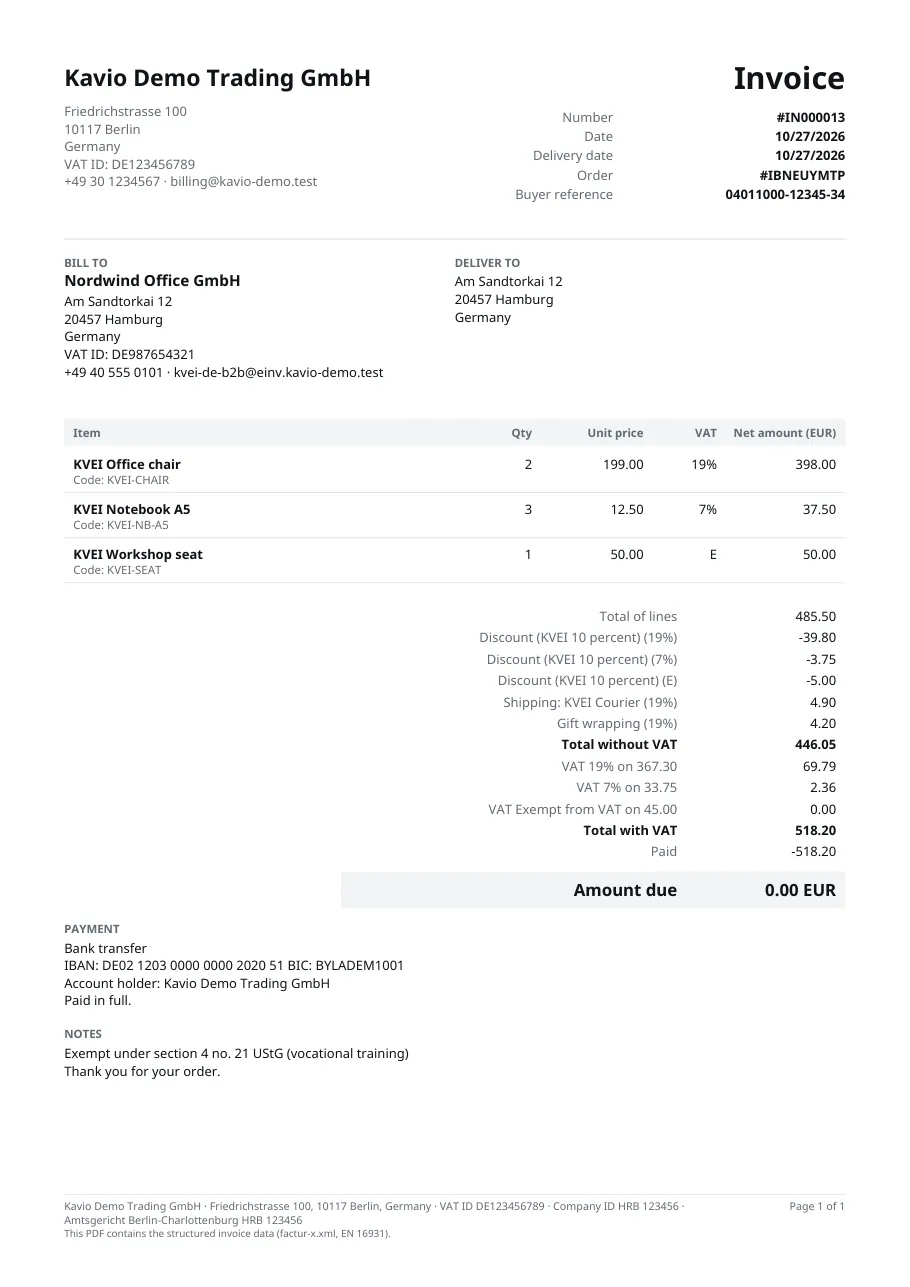
ZUGFeRD / Factur-X: the PDF/A-3 invoice with the EN 16931 data inside1 of 6
EN 16931 e-invoices and credit notes from your PrestaShop invoices and credit slips, with the same numbers: ZUGFeRD / Factur-X PDF/A-3, XRechnung CII and UBL, Peppol UBL; validation, e-mail attachments, customer downloads and ZIP export (PrestaShop 8.2 and 9.x, no overrides).
PrestaShop 8.2 - 9.x
Overview
Structured e-invoices next to your PrestaShop invoices: every PrestaShop invoice gets an EN 16931 e-invoice and every credit slip an e-credit note, with the same number, in four formats:
ZUGFeRD / Factur-X (EN 16931 profile): a PDF/A-3 invoice that people read like any invoice, with the factur-x.xml data file inside for accounting software (France, Germany and most of the EU)
XRechnung 3.0 CII and XRechnung 3.0 UBL: the German standard for public buyers and B2B
Peppol BIS Billing 3.0 UBL: for the Peppol network (Belgium, the Nordics, the Netherlands and more)
What it does
Same numbers as PrestaShop: no second invoice series. The e-invoice is created when PrestaShop makes its invoice (an order status that creates invoices, or the "Generate invoice" button); the e-credit note when PrestaShop makes a credit slip (standard refund, partial refund, return)
Kept in step: when an order is edited after invoicing, the e-invoice is rebuilt with the same number and date
Business buyers: company and VAT number of the invoice address, French SIRET / SIREN, an optional buyer reference / Leitweg-ID and Peppol ID in the address form, an optional purchase order number at the payment step (business buyers or everyone); all editable on the order page
VAT done right: rates frozen on each order line, categories S / Z / E / AE / K / G / O, intra-community supply for EU business buyers without tax, exports outside the EU, exempt tax rules (mapping per tax rule), cart rules as allowances per VAT group, shipping and gift wrapping as charges, rounding to the PrestaShop invoice total
Built-in validation of every document in every format (EN 16931, XRechnung BR-DE and Peppol rules) with plain messages on the order page
Delivery: attached to every e-mail where PrestaShop attaches its PDF invoice and to the credit slip e-mail; downloads on the customer's order page (and the guest tracking page); ZIP export from Orders > E-invoices and from the orders list
Payment means from the payment module (bank wire = SEPA credit transfer with your IBAN, cheque, cash on delivery, online payment), mapping per module
Measured quantities of Sell by Weight & Length (kg, m, m² ...) written with their unit
No overrides, no external service, nothing sent anywhere; PrestaShop 8.2 and 9.x in one package; Classic and Hummingbird, standard and one-page checkout
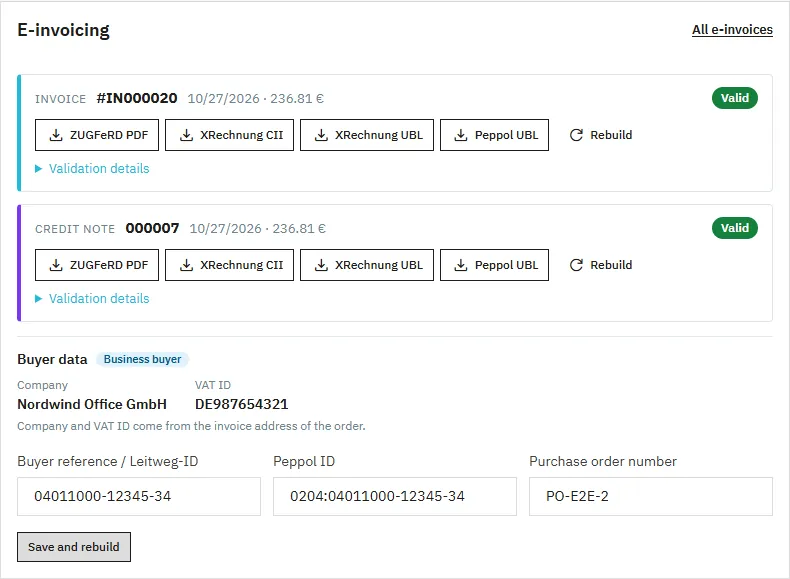
E-invoicing card on the order pageZUGFeRD invoice
Installation
Requirements: PrestaShop 8.2.0 – 9.x, PHP 7.2.5 or newer (PrestaShop 9 needs PHP 8.1+), the PHP zip extension (for ZIP downloads; PrestaShop needs it anyway). PrestaShop invoices must be on (Orders > Invoices > Enable invoices): e-invoices use the PrestaShop invoice numbers.
Modules > Module Manager > Upload a module: drop kveueinvoicing-1.0.0.zip (kaviolabs.com) or the package from PrestaShop Addons.
Click Configure and open Seller data: enter your VAT ID (or tax number / registration ID), legal name, address, phone, e-mail and IBAN. Empty fields fall back to the shop details of Shop Parameters > Contact > Stores; the IBAN can also be read from the bank wire module.
Check the box at the top of the configuration page: it lists what is still missing ("Before you start").
Kavio Labs package only: enter your licence key in the Licence card and click Check now. The module works for 14 days without a key.
The module adds Orders > E-invoices, an E-invoicing card on the order page, the buyer reference and Peppol ID fields in the address form and the purchase order field at the payment step.
Orders invoiced before the installation
Open the order and click Create e-invoice on the E-invoicing card, or select orders in Orders > Orders and use the bulk action Download e-invoices (ZIP): the e-invoices of invoiced orders are created first.
Update
Upload the new package the same way (Module Manager > Upload a module). Settings and documents are kept.
Uninstall
Uninstalling removes the settings and the menu entry. The e-invoices and buyer data stay in the database (they are accounting records) unless you switch on Data > Delete e-invoices on uninstall first. Installing the module again shows them again.
Configuration
Modules > Module Manager > EU E-Invoicing > Configure. In multistore, the settings apply to the shop context selected at the top of the back office.
Settings
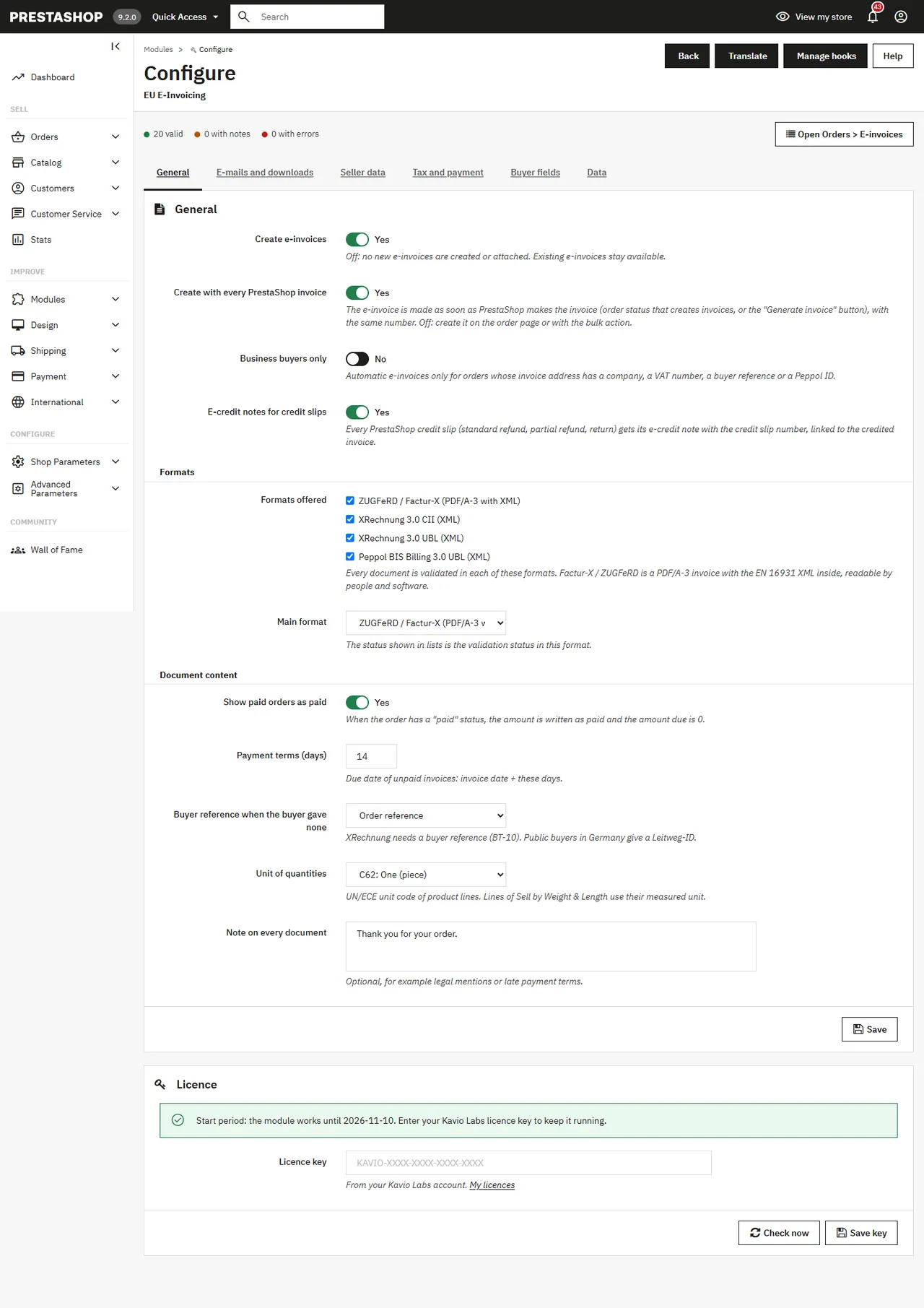
General
Setting
Default
Create e-invoices
Yes
Off: nothing new is created or attached; existing documents stay available
Create with every PrestaShop invoice
Yes
Off: create them on the order page or with the bulk action
Business buyers only
No
Automatic e-invoices only when the invoice address has a company, a VAT number, a buyer reference or a Peppol ID
E-credit notes for credit slips
Yes
One e-credit note per PrestaShop credit slip, linked to the credited invoice
Formats offered / Main format
all four / ZUGFeRD
Each document is validated in every offered format; the list status is the status in the main format
Show paid orders as paid
Yes
Orders with a "paid" status: amount written as paid, amount due 0
Payment terms (days)
14
Due date of unpaid invoices
Buyer reference when the buyer gave none
Order reference
XRechnung needs a buyer reference (BT-10)
Unit of quantities
C62 (piece)
UN/ECE code of product lines
Note on every document
–
Legal mentions, late payment terms
E-mails and downloads
Attach to invoice e-mails: added to every e-mail where PrestaShop attaches its PDF invoice (order confirmation and statuses with "Attach invoice PDF to email", e.g. "Payment accepted").
Attach to credit slip e-mails: added to the "New credit slip" e-mail.
Files attached: ZUGFeRD PDF by default; add XRechnung or Peppol XML if your customers want them.
Downloads on the order page with the formats customers may download.
Seller data
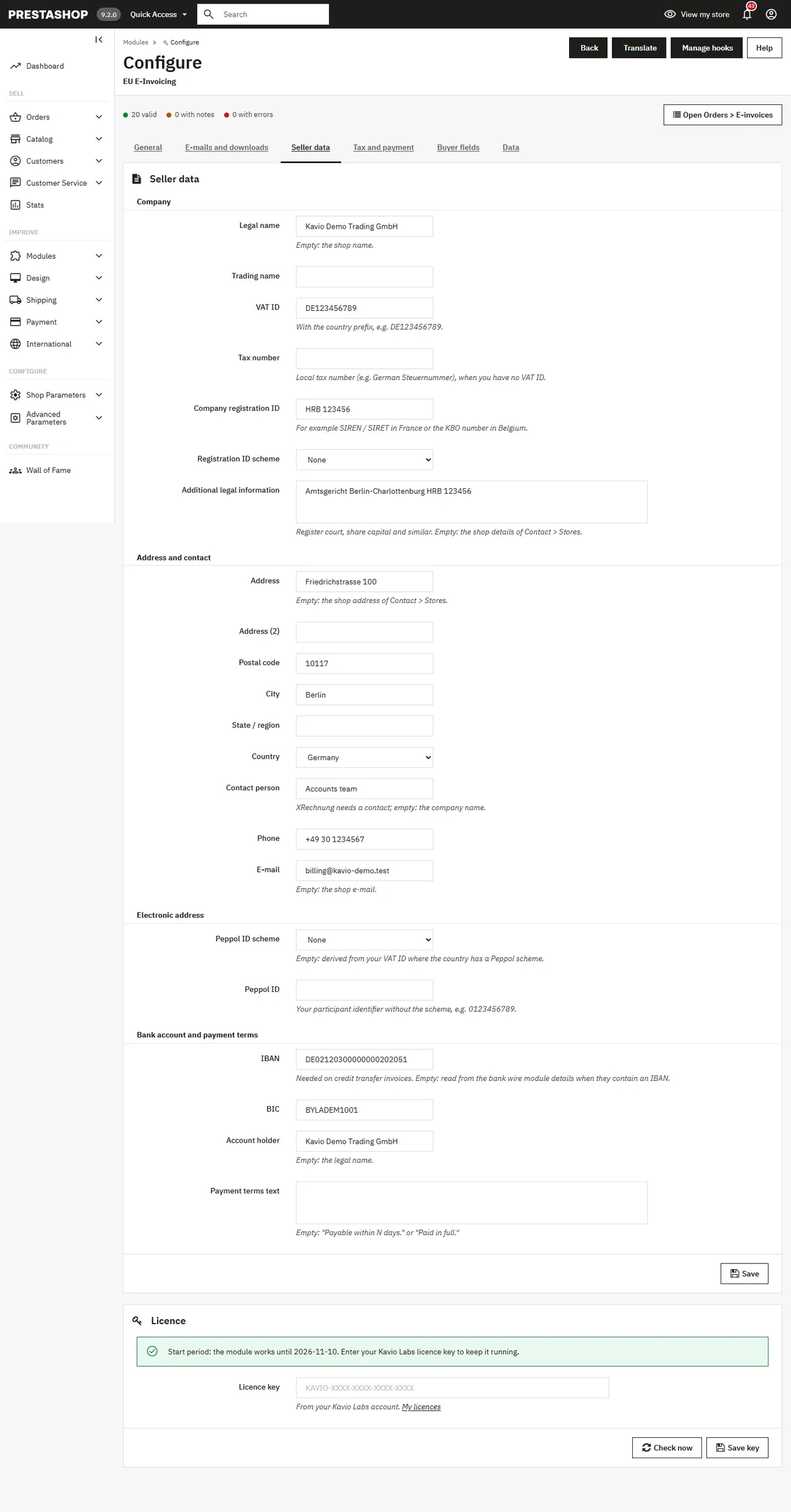
Legal name, trading name, VAT ID, tax number, company registration ID with its scheme (e.g. 0002 SIREN / 0009 SIRET), legal information (register court, capital), address, contact person, phone, e-mail, Peppol ID, IBAN / BIC / account holder and a payment terms text. XRechnung needs a phone, an e-mail and a contact; Peppol needs your Peppol ID or a VAT ID it can be derived from.
Seller data
Tax and payment
Category of untaxed lines (Z zero rated, E exempt, O not subject to VAT) for lines taxed at 0 % that no rule matches.
EU business buyers without tax: K (intra-community supply, default) or AE (reverse charge). Used when the buyer has a VAT ID, is in another EU country and the order has no tax.
Detect exports: untaxed orders delivered outside the EU get category G.
Exemption reason (category E): printed on exempt lines.
Tax rules: for each tax rule group, the category of its lines when they are taxed at 0 % (e.g. E for exempt training services). Lines with a rate above 0 % are always S.
Payment modules: payment means per module. Automatic: bank wire = 58 SEPA credit transfer (with your IBAN), cheque = 20, cash on delivery = 10, other modules = 68 online payment service.
Buyer fields
Buyer reference / Leitweg-ID and Peppol ID in the address form (optional fields, or hidden).
Purchase order number at the payment step: business buyers (invoice address with a company or VAT number), all buyers, or hidden.
Check the VAT number format of the address form (format only, no online lookup).
Data
Delete e-invoices on uninstall (off by default).
Usage
Every day
Nothing to do: when PrestaShop makes an invoice (for example when an order gets the status "Payment accepted"), the e-invoice is created with the same number and attached to the e-mail that carries the PrestaShop PDF invoice. When you refund (Standard refund, Partial refund or Return products with "Generate a credit slip"), the credit slip gets its e-credit note and the "New credit slip" e-mail carries it.
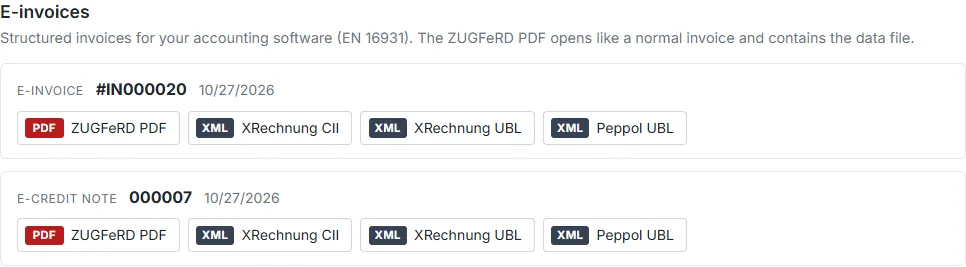
Order page: E-invoicing card
Order card
Every document with its number, date, total and validation status, download buttons per format (a red ! marks a format with errors) and Validation details (rule and plain message).
Rebuild: builds the document again from the current order data and settings; number and date stay.
Create e-invoice (or Create invoice and e-invoice when the order has no PrestaShop invoice yet).
Buyer data: company and VAT ID come from the invoice address; buyer reference / Leitweg-ID, Peppol ID and purchase order number can be changed here (Save and rebuild).
Orders > E-invoices
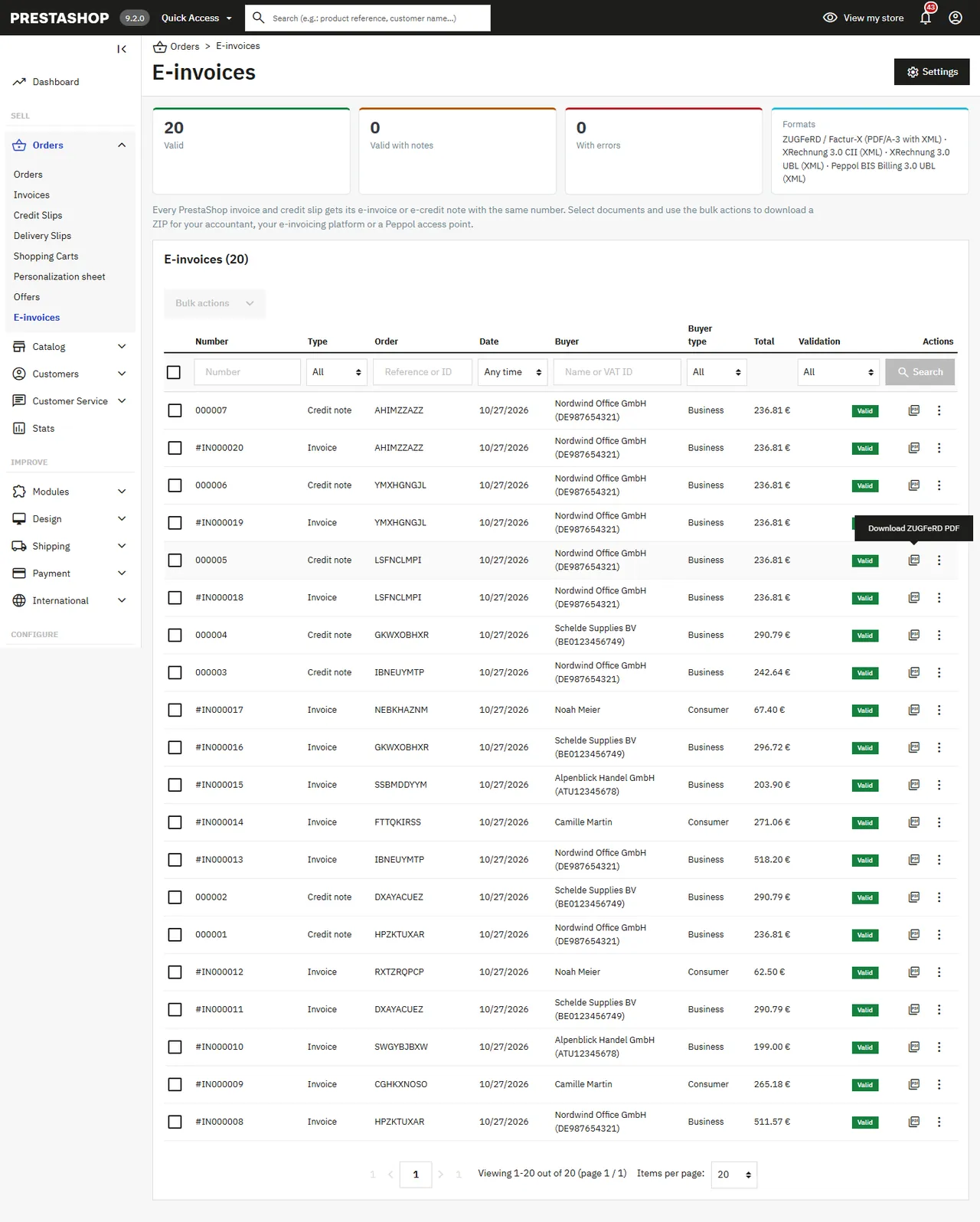
E-invoices list
All e-invoices and e-credit notes with filters (number, type, order, date, buyer, buyer type, validation status), downloads per row and bulk actions: Download ZIP in one format or in all formats, Rebuild selected. Send the ZIP to your accountant, upload it to your e-invoicing platform (in France: your approved platform, "plateforme agréée") or to your Peppol access point.
Orders > Orders
The E-invoice column shows the e-invoice number and status; the bulk action Download e-invoices (ZIP) downloads the e-invoices and e-credit notes of the selected orders in the main format (missing ones of invoiced orders are made first).
Customers
Customer downloads
Customers download their e-invoices on the order details page of My account; guests on the order tracking page. Links are signed with the order's secret key, so a link never opens another order. Business buyers enter their buyer reference and Peppol ID in their address and the purchase order number at the payment step:
Purchase order number
FAQ
Does it send invoices to the tax authority, to Chorus Pro or over Peppol?
No. The module creates the structured files (Factur-X / ZUGFeRD, XRechnung, Peppol UBL) and delivers them by e-mail, download and ZIP export. Transmission through the approved platforms of the French reform or through a Peppol access point is done by those services: upload the files or let their import pick them up. The module makes no outbound connection.
Does it change my PrestaShop invoices?
No. The PrestaShop PDF invoice stays as it is; the e-invoice carries the same number and amounts. Both go with the e-mail.
Why "Errors" in the Peppol format for a consumer order?
Peppol needs an electronic address of the buyer, which consumers do not have. The list status follows the main format (ZUGFeRD by default), so consumer orders show "Valid"; the Peppol file is for business buyers with a Peppol ID or a VAT ID it can be derived from.
The invoice total differs by a cent from the sum of the lines. PrestaShop rounds per item, per line or on the total (Shop Parameters > General). The e-invoice keeps the exact PrestaShop total and writes the difference as rounding amount (BT-114), which EN 16931 allows.
Intra-community supply / reverse charge?
When the buyer's invoice address has a VAT ID in another EU country and the order was sold without tax, lines get category K (or AE, see Tax and payment) with the exemption code; exports outside the EU get G. Category E for exempt tax rules is set per tax rule.
Can I edit an order after the invoice was made?
Yes. The e-invoice is rebuilt with the same number and date when the order is opened, downloaded or e-mailed again.
Which tools were the files tested with?
The KoSIT validator with the XRechnung 3.0 configuration, the CEN EN 16931 and Peppol BIS 3.0 schematrons with the UBL / CII schemas, and Mustang (veraPDF) for the PDF/A-3 Factur-X file. Check the requirements of your country with your tax adviser.
Multistore?
Settings per shop, group or all shops; documents remember their shop; lists follow the shop context.
Sell by weight, length, area or volume on PrestaShop 8.2 and 9.x: amount field with quick amounts and live total, exact decimal stock and real shipping weight. No overrides.
Shoppers propose a price per item; the shop accepts, counters or declines, or rules answer at once. The agreed price is a one-time specific price for that customer's cart.