Buy X get Y, cheapest item free, volume tiers, bundles and automatic free gifts for PrestaShop 8.2 and 9.x, scheduled by date, day and hour, with priorities and stacking rules: an offers box on the product page, list badges, cart nudges and statistics per promotion. Discounts stay native cart rules, so taxes, invoices and credit slips just work. No overrides.
On saleVersion 1.0.0Compatible with PrestaShop 8.2 – 9.x No core file edits
Built forPrestaShop
Five promotion types with schedules, priorities and stacking1 of 9
Buy X get Y, cheapest item free, volume tiers, bundles and automatic free gifts for PrestaShop 8.2 and 9.x, scheduled by date, day and hour, with priorities and stacking rules: an offers box on the product page, list badges, cart nudges and statistics per promotion. Discounts stay native cart rules, so taxes, invoices and credit slips just work. No overrides.
PrestaShop 8.2 - 9.x
Overview
The promotion engine PrestaShop cart rules are missing: buy X get Y, cheapest item free, % off the Nth item, volume tiers, bundles and automatic free gifts, scheduled by date, day and hour, with priorities and stacking rules. Create campaigns in Catalog > Promotions; each applied promotion appears as its own discount line, so shoppers see exactly what they saved.
Buy X get Y: buy 2 get 1 free, buy 1 get 1 at 50%, 30% off the 3rd item, buy 3 shirts get a cap free; same or other products, cheapest or most expensive first, repeat, at most N times per order
Tiered discount: 3+ items 5% off, 6+ items 10% off, or by subtotal
Product discount: percent, fixed price or amount off for products, categories or brands, with exclusions and a minimum quantity
Bundle: a set price or discount for products bought together
Free gift: added to the cart automatically when the cart qualifies, removed when it no longer does
When and for whom: dates, days of the week, happy hours (also past midnight), customer groups, shops, minimum subtotal, voucher-gated offers, uses in total and per customer, maximum discount
Priority and stacking: promotions apply in priority order on what the earlier ones left; stop further promotions; skip items on sale or already discounted; never below zero
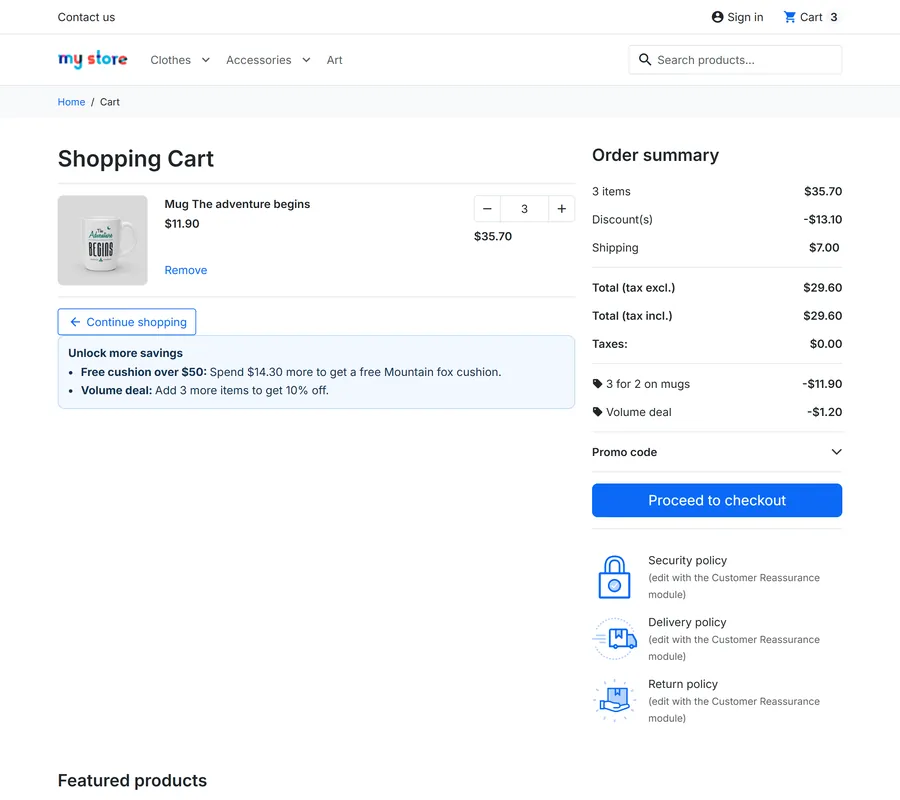
On the storefront: an offers box on the product page, badges in product lists, cart nudges such as "Add 1 more item to get 1 free"
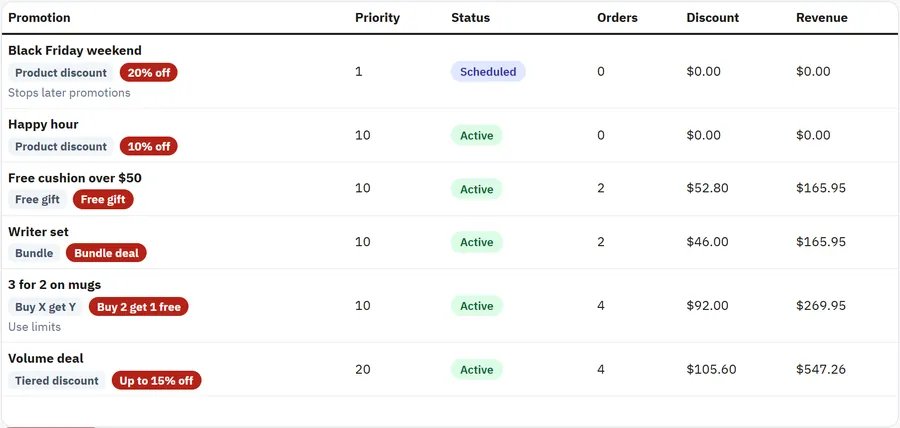
For you: list with status tabs and statistics per promotion (orders, discount given, revenue)
Native orders: every discount is a core cart rule of that cart, so taxes, payments, invoices and credit slips work as usual; no overrides, no core changes
PrestaShop 8.2 and 9.x, Classic, Hummingbird and child themes, standard and one-page checkout
Cart with a promotion and nudges
Installation
Requirements
PrestaShop 8.2.0 or newer, or PrestaShop 9.x
PHP 7.2.5 or newer (the PHP version your PrestaShop needs)
Install
Back office: Modules > Module Manager > Upload a module, choose kvadvancedpromotions-1.0.0.zip.
Open Catalog > Promotions and add your first promotion.
The module creates its own tables (kv_ap_campaign, kv_ap_order, kv_ap_rule). Core tables and core files are not changed and no override is installed.
Your theme needs the standard hooks displayProductAdditionalInfo and displayShoppingCartFooter for the offers box and the nudges; Classic, Hummingbird and themes built on them have them.
Updating
Upload the new zip the same way. Campaigns and statistics stay.
Uninstalling
Uninstalling deletes the campaigns, the statistics and the hidden cart rules of open carts. Placed orders keep their discounts.
Configuration
Catalog > Promotions > Settings
Setting
Default
What it does
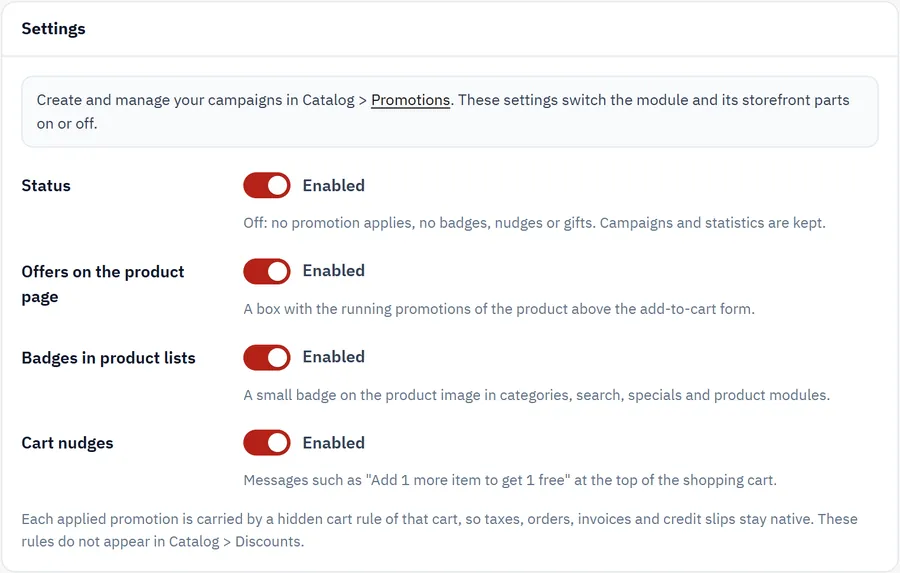
Status
On
Off: no promotion applies, no badges or nudges. Promotions and statistics are kept.
Offers on the product page
On
A box with the running promotions of the product near the add-to-cart button.
Badges in product lists
On
A badge on the product image in categories, search and product blocks.
Cart nudges
On
"Add 1 more item to get 1 free" on the cart page. Each promotion can switch its nudge off.
The promotions themselves are managed in Catalog > Promotions: see Usage.
Settings
Usage
The promotion list
Catalog > Promotions shows every promotion with its type, badge, schedule, priority and status (Active, Scheduled, Ended, Disabled), the orders that used it, the discount given and the revenue of those orders. Copy starts a variant (the copy is disabled), the switch enables or disables a promotion, and delete removes it (statistics of placed orders stay).
Promotion list
Creating a promotion
The Name is what shoppers see as the discount line. Choose a type, then the rule. Product pickers search as you type; leave them empty for all products. Categories include their subcategories unless you untick it, and Exclusions keep products or categories out.
Promotion form
Buy X get Y
Buy X and Get Y. With The same products every complete group of X + Y items earns Y discounted items: buy 2 get 1 free with 6 items gives 2 free.
With Other products each application needs X items of the buy products and Y items of the get products. The get items must be in the cart; use Free gift to add them automatically.
Discount: free, percent off, fixed price per item or amount off each item, on the cheapest or the most expensive items. Repeat and At most (times per order).
Tiered discount
Count by number of items or subtotal, up to eight rows From > Discount. The highest row reached applies to every item of the set.
Product discount
Percent off, fixed price per item, amount off each item or amount off the total, optionally from a minimum number of items.
Bundle
Up to ten products with quantities. Every complete bundle gets the bundle price, percent off or amount off.
Free gift
One unit of the gift product, when the cart has at least the items and/or the subtotal you set. The gift is removed when the cart no longer qualifies, and not given when it is out of stock. A product with combinations is given in its default combination.
When and for whom
Starts / Ends, Days of the week, Hours: a window such as 22:00 - 02:00 runs past midnight and belongs to the day it starts.
Customer groups and Shops (none ticked: all).
Voucher code: the promotion only applies when the shopper enters this code. Create the voucher in Catalog > Discounts first; a 0% voucher only unlocks the promotion.
Minimum cart subtotal (tax included), Uses in total, Uses per customer, Maximum discount per order.
Priority and stacking
Promotions apply in priority order; each works on the price left after the earlier ones, so two 10% promotions give 19%.
A voucher the shopper enters is calculated by PrestaShop on the product prices and comes on top. Do not apply when a voucher is used switches the promotion off in that case.
Stop further promotions: when this promotion applies, later ones are skipped.
Skip items: items on sale, or already discounted by an earlier promotion.
A price agreed for one cart, such as an accepted offer of our Make an Offer module, is never discounted again.
What shoppers see
An offers box on the product page, a badge on the product image in lists, one discount line per promotion in the cart and at checkout (it cannot be removed by the shopper), the gift as a free line, and nudges that update when the cart changes.
Offers on the product page
How the money is calculated
Amounts are in your default currency with tax included and are converted to the shopper's currency.
Each applied promotion is a hidden core cart rule of that cart with a whole-order amount. PrestaShop spreads it over the order, so taxes, invoices and credit slips stay native. In a cart with mixed tax rates the tax split of the discount therefore follows the whole cart, not the discounted item.
Hidden rules do not appear in Catalog > Discounts, and those of abandoned carts are removed after a week.
FAQ
Why not just use cart rules?
A cart rule cannot say "cheapest of every 3 items free", cannot give a higher discount at 6 items than at 3 across a category, and cannot price a set of products. This module works those out and hands the result to a cart rule of that cart.
Does it use overrides?
No. Standard hooks only, no core file changes.
Will shoppers see strange voucher codes?
No. The discount line shows the promotion name and it has no remove link. The hidden rules have random codes.
Does it work with vouchers?
Yes. Choose per promotion whether it combines with vouchers or stops when one is used, or let a voucher code unlock the promotion.
What happens to an order when a promotion ends later?
Nothing. The order keeps its discount. A cart that is still open is recalculated on the cart and checkout pages.
Are taxes correct?
PrestaShop calculates them, as for any voucher: the discount is spread over the order. With mixed tax rates in one cart, that split follows the whole cart.
Does it work with several currencies?
Yes. Campaign amounts are in the default currency and are converted.
Do canceled orders count for the use limits?
No. Canceled, refunded and failed orders do not count.
Can a gift be a product with combinations?
Yes, in its default combination. One unit per promotion.
Does my theme need changes?
Not for Classic, Hummingbird and themes built on them.
The department store theme for PrestaShop 8.2 and 9.x: colour-coded departments, a department list beside the hero slider with two side promos, a big search with a department picker, tabbed product grids, a 2 + 1 + 2 offer grid, deals of the day with real countdowns, a department showcase, a promotions band and a three-column product page with a sticky buy box. Four styles (Meridian, Harbor, Citrus, Night), every colour editable. A child theme of Classic, no core changes.
Stop AI crawlers, scrapers, vulnerability scanners and unwanted countries before PrestaShop 8.2 or 9.x builds a page. Googlebot and Bingbot are verified by DNS and always allowed; 50+ bots get one switch each; country rules use free GeoIP databases and can close only the checkout; IP and network lists, rate limits for search, filters and forms, honeypots and the add to cart flood fix; a one-second challenge instead of a captcha; learning mode, dashboard, log, IP tester and Cloudflare export. Two hooks, no overrides.
Import and update products from supplier CSV, XML and JSON feeds in PrestaShop 8.2 or 9.x on a schedule: URL, FTP, SFTP or upload; field mapping with real sample values; match by reference, EAN-13, supplier reference or MPN; markup by price band and category with .99 rounding; a price guard that holds back big drops and below-cost prices; combinations from feed rows; stock-only syncs; products missing for N runs set to stock 0 with a safety limit; a dry-run preview with old and new values, run history with a row log and undo. No overrides, no storefront hooks.