Edit prices, stock, categories and combinations of PrestaShop 8.2 and 9.x in a spreadsheet grid: paste from Excel, bulk actions with a before and after preview, rounding on the price with tax, specific prices with dates, a change log with one-click undo and CSV export. A value a colleague changed is never overwritten. No overrides.
On saleVersion 1.0.0Compatible with PrestaShop 8.2 – 9.x No core file edits
Built forPrestaShop
Your catalog in one spreadsheet grid1 of 9
Edit prices, stock, categories and combinations of PrestaShop 8.2 and 9.x in a spreadsheet grid: paste from Excel, bulk actions with a before and after preview, rounding on the price with tax, specific prices with dates, a change log with one-click undo and CSV export. A value a colleague changed is never overwritten. No overrides.
PrestaShop 8.2 - 9.x
Overview
Edit your catalog like a spreadsheet: a grid for prices, stock, categories and combinations, bulk actions with a before/after preview, and a change log with one-click undo.
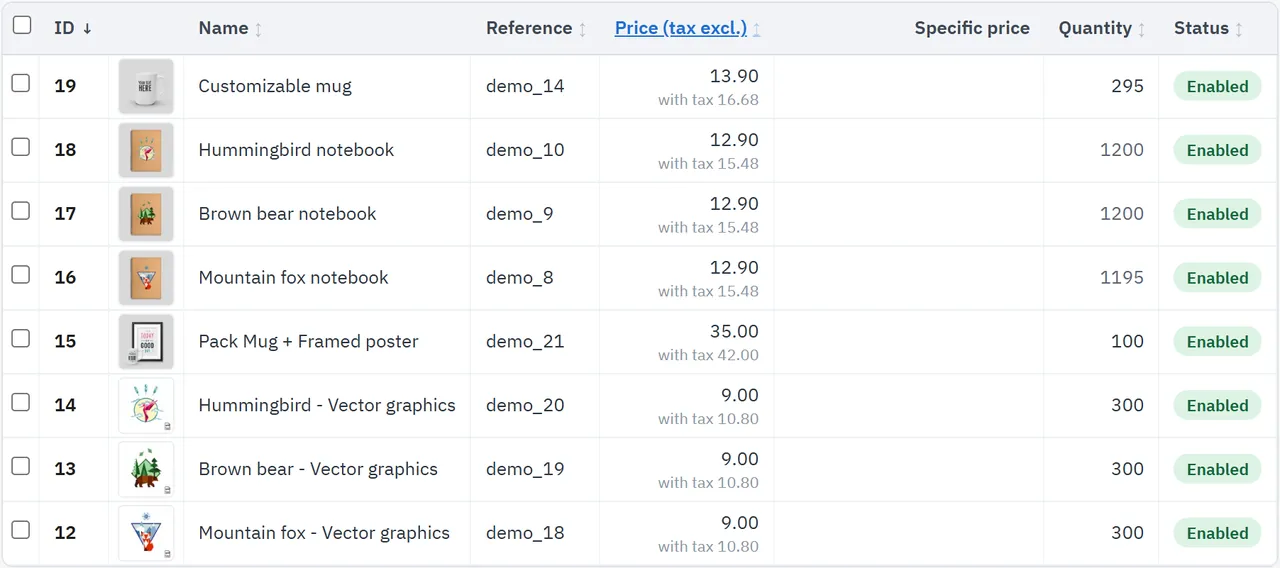
Spreadsheet grid: name, reference, EAN-13, price, cost price, specific price, quantity, status, visibility, weight, categories with default category, brand, out-of-stock behavior and combinations; choose the columns you need
Keyboard and paste: arrows, Enter, Tab, Ctrl+S; paste a column or block from Excel or Google Sheets; changes stay marked until you save
Bulk actions with preview: before and after per product, how many change, how many are skipped and why; nothing is written before you confirm
Repricing: increase or decrease by percent or amount, round to cents, whole numbers, .99 or .95, also on the price with tax that customers see
Sales in a minute: specific prices by percent, amount or fixed price, with dates and customer group, for a selection or a whole filter
Categories: add, remove, move, set the default category
Combinations: quantity, price impact and reference of each combination in a popover; change all combination quantities in bulk
Change log with undo: every save and bulk action, value by value; undo restores it and keeps values changed since
Safe for teams: a value someone changed after you opened the page is not overwritten
Filters and export: text, category with sub-categories, brand, status, stock, out-of-stock behavior, price, quantity, specific price, combinations; CSV of the filter or the selection
Large catalogs: bulk actions run in steps, so they finish without a server timeout
Plays well with PrestaShop: changes go through the core classes, so stock movements, the search index and other modules stay in step; no overrides, no core changes
PrestaShop 8.2 and 9.x, multistore aware (one shop at a time)
The grid
Installation
Requirements
PrestaShop 8.2.0 or newer, or PrestaShop 9.x
PHP 7.2.5 or newer (the PHP version your PrestaShop needs)
Install
Back office: Modules > Module Manager > Upload a module, choose kvbulkproducteditor-1.0.0.zip.
Open Catalog > Bulk product editor.
The module creates two tables for the change log (kv_bpe_batch, kv_bpe_change). Core tables and core files are not changed and no override is installed.
Permissions
The editor needs access to its own page and to Catalog > Products (Advanced Parameters > Team > Permissions). With view rights only, an employee can look at the grid, filter and export. Saving, bulk actions and undo need edit rights on both.
Updating
Upload the new zip the same way. The change log stays.
Uninstalling
Uninstalling deletes the change log, so past edits can no longer be undone. Your products stay as they are.
Configuration
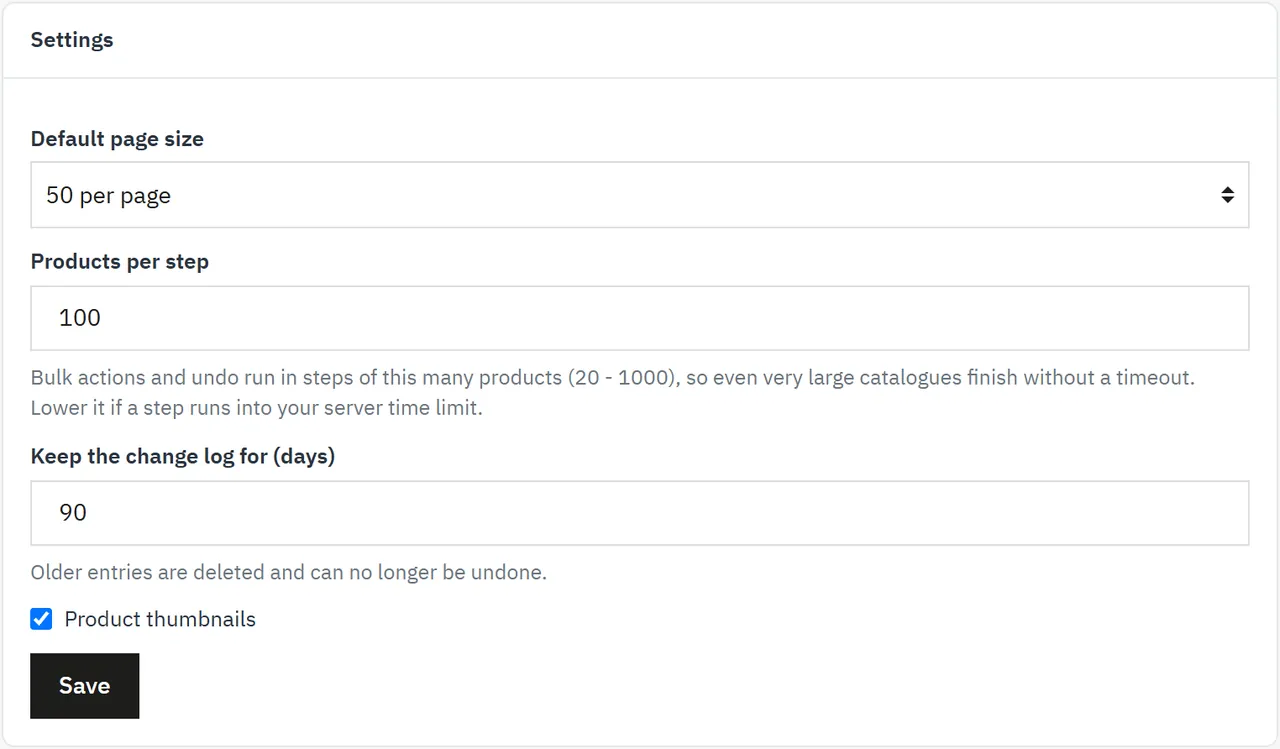
Catalog > Bulk product editor > Settings
Setting
Default
What it does
Default page size
50
Products per page in the grid (25, 50, 100 or 250). Each employee can change it in the grid.
Products per step
100
Bulk actions and undo run in steps of this many products (20 - 1000). Lower it if a step runs into your server time limit.
Keep the change log for (days)
90
Older entries are deleted and can no longer be undone.
Product thumbnails
On
The cover image in the grid.
The visible columns are chosen in the grid (Columns) and remembered in the browser.
Settings
Usage
Edit in the grid
Open Catalog > Bulk product editor and filter the products you want.
Click a cell to select it. Double-click, or press Enter, to edit; or just start typing. On a touch screen, tap the cell.
Enter and Tab confirm and move on, Esc cancels, the arrows move, Ctrl+Z drops the change of the selected cell.
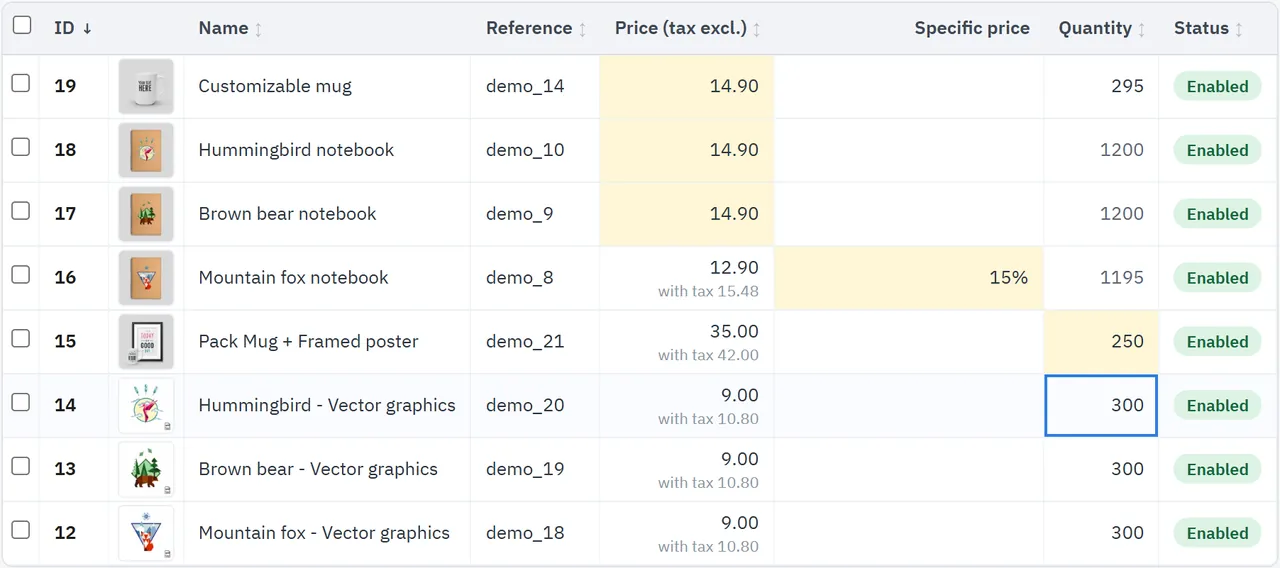
Changed cells turn yellow. Save (or Ctrl+S) writes them; the message offers Undo.
Paste from a spreadsheet: select the first cell and press Ctrl+V. A column or a block is filled in from there, row by row.
Numbers may be typed as 12.5, 12,50 or 1.234,50.
Specific price cell: 12.50 is a fixed price, 15% a percentage, empty removes it. It edits the specific price shown in the cell; the +1 means there are more, which you can change with a bulk action.
Quantity of a product with combinations is the sum of its combinations: change it in the Combinations column.
Prices are without tax, as PrestaShop stores them. The line below shows the price with tax.
Changes waiting to be saved
Bulk actions
Select products with the checkboxes, or set a filter. Select all matching extends the selection to every page.
Press Bulk action, choose what it applies to, the field and the action.
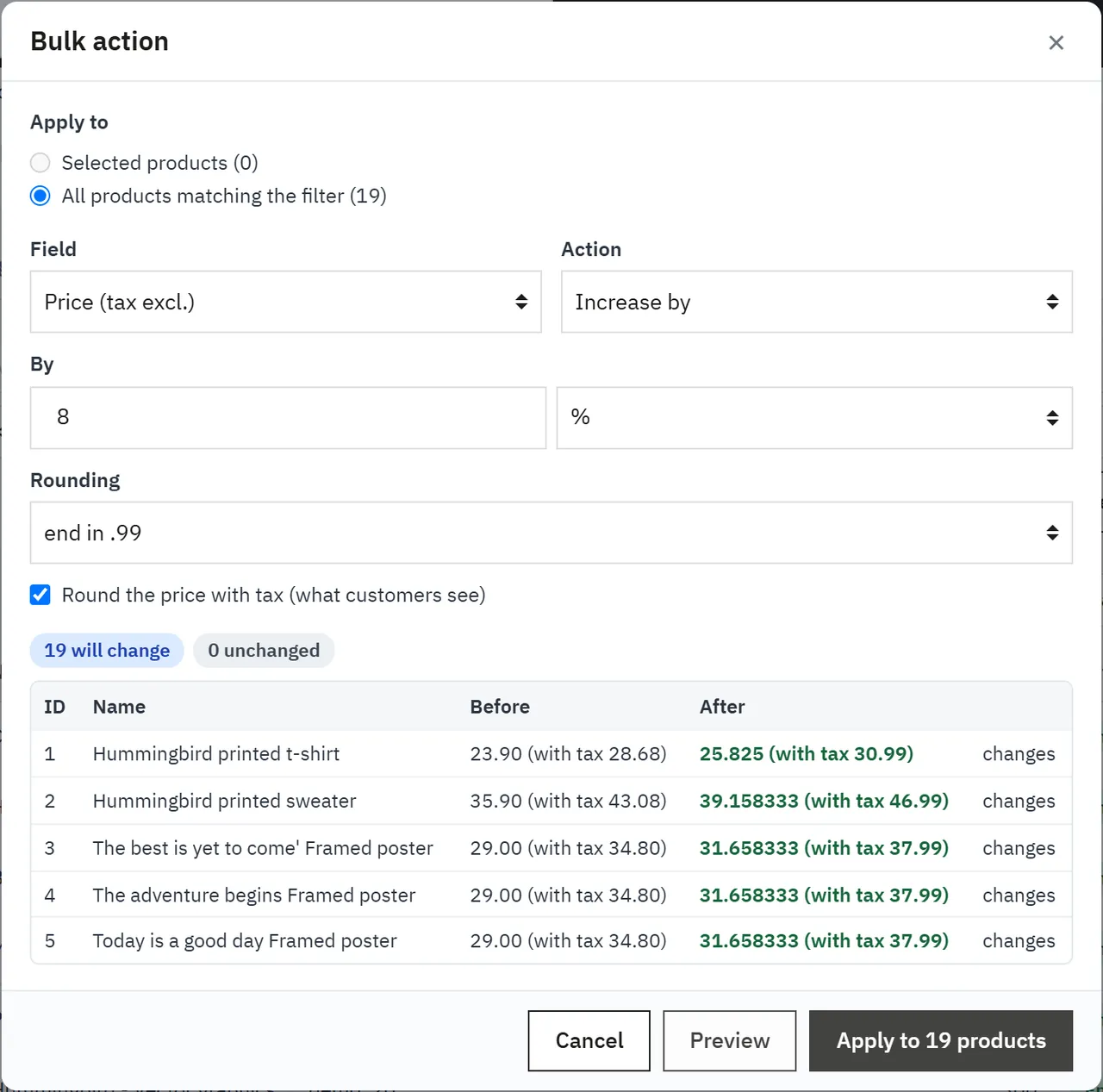
Press Preview: you see how many products change, how many stay and how many are skipped with the reason, and before and after for the first 25 products. Nothing has been written yet.
Press Apply. The bar shows the progress. Undo this change takes it back.
Field
Actions
Name
Find and replace, add text at the start or end
Reference
Set, find and replace, add text at the start or end
EAN-13, status, visibility, brand, when out of stock
Set
Price, cost price, weight
Set, increase or decrease by percent or amount
Quantity
Set, increase or decrease
Specific price
Set, remove
Categories
Add, remove, move to, set the default category
Combination quantities
Set, increase or decrease
Rounding applies to increases and decreases: to cents, whole numbers, .99 or .95. Tick Round the price with tax to make the price customers see end in .99. The price without tax then gets as many decimals as it needs.
Specific prices: without rounding, a percentage or amount stays a real discount that follows later price changes. With rounding, the result is stored as a fixed price. Specific prices for one country, currency, customer, combination or from a higher quantity are left alone, as are those from catalog price rules.
Categories: a product always keeps one category. If you remove its default category, the first remaining one becomes the default.
Preview of a bulk action
Change log and undo
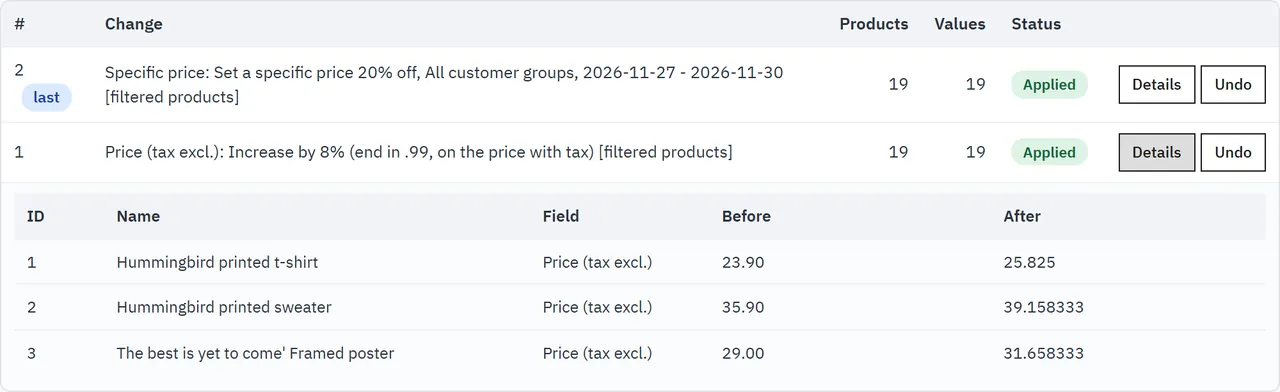
The Change log tab lists every save, bulk action and undo, newest first. Details shows the old and new values (the first 200). Undo restores the old values of an entry. A value that was changed again since then is kept, and the summary tells you how many.
If a bulk action was interrupted, for example by a closed browser, the entry shows Interrupted and Continue.
Change log
When someone else changed a product
Each save compares the value you saw with the current value. If it changed in the meantime, your edit is not written, the cell turns red and the grid shows the current value. Enter it again if you still want it.
Export
Export CSV downloads the selected products, or everything matching the filter. The file is UTF-8 and opens in Excel and Google Sheets. It contains prices with and without tax, specific prices, stock, categories, brand and the number of combinations.
Multistore
The editor works on one shop: the one selected in the header, or the default shop under "All shops". A notice shows which. Shop-level values such as price and status change for that shop only. Reference, EAN-13, weight and brand are shared by all shops in PrestaShop.
FAQ
Does it change core files?
No. No overrides and no core changes. Changes go through the core classes, as a product form does.
Do other modules notice the changes?
Yes. Product saves, stock changes and specific prices go through PrestaShop, with its hooks, stock movements and search index update.
Can I undo a bulk action?
Yes, for as long as the change log keeps it (90 days by default). Values changed again since then are kept.
Does the preview write anything?
No. Nothing is written before you press Apply.
How many products can it handle?
Bulk actions run in steps, so the size of the catalog does not cause a timeout. The preview counts the first 5,000 products of a scope and says so when there are more.
Why does a price have many decimals?
PrestaShop stores prices without tax. To make a price with tax end in .99, the price without tax needs more decimals, as it does in the product form.
Why is the quantity of some products grey?
They have combinations. Their quantity is the sum of the combinations: edit it in the Combinations column.
Can it import a CSV?
No, the module exports CSV. To change many values from a spreadsheet, copy a column and paste it into the grid. For supplier feeds, see our Scheduled Supplier Feed Import.
Can it edit descriptions, images or features?
Not in this version.
Does it translate names?
It edits the name in your back office language. Switch the language of your employee profile to edit another one.
What happens without a license on the own-site package?
After the 14-day trial the grid, filters, CSV export, the change log and undo keep working. Saving changes and new bulk actions stop until a valid key is entered. Your products are not touched.
The department store theme for PrestaShop 8.2 and 9.x: colour-coded departments, a department list beside the hero slider with two side promos, a big search with a department picker, tabbed product grids, a 2 + 1 + 2 offer grid, deals of the day with real countdowns, a department showcase, a promotions band and a three-column product page with a sticky buy box. Four styles (Meridian, Harbor, Citrus, Night), every colour editable. A child theme of Classic, no core changes.
Stop AI crawlers, scrapers, vulnerability scanners and unwanted countries before PrestaShop 8.2 or 9.x builds a page. Googlebot and Bingbot are verified by DNS and always allowed; 50+ bots get one switch each; country rules use free GeoIP databases and can close only the checkout; IP and network lists, rate limits for search, filters and forms, honeypots and the add to cart flood fix; a one-second challenge instead of a captcha; learning mode, dashboard, log, IP tester and Cloudflare export. Two hooks, no overrides.
Import and update products from supplier CSV, XML and JSON feeds in PrestaShop 8.2 or 9.x on a schedule: URL, FTP, SFTP or upload; field mapping with real sample values; match by reference, EAN-13, supplier reference or MPN; markup by price band and category with .99 rounding; a price guard that holds back big drops and below-cost prices; combinations from feed rows; stock-only syncs; products missing for N runs set to stock 0 with a safety limit; a dry-run preview with old and new values, run history with a row log and undo. No overrides, no storefront hooks.