EU withdrawal button ("Withdraw from contract here" with a two-step statement, Confirm withdrawal, an instant acknowledgement e-mail and an Orders > Withdrawals register), the official EU legal guarantee notice per language at checkout (also the 9.2 one-page checkout), GARAN producer guarantee labels, the Omnibus lowest price of the 30 days before a reduction and GPSR product safety information, for PrestaShop 8.2 and 9.x. Every text editable per language, hooks only, no overrides.
On saleVersion 1.0.0Compatible with PrestaShop 8.2 – 9.x No core file edits
Built forPrestaShop
Withdrawal button, legal guarantee notice, GARAN, lowest price and GPSR in one module1 of 10
EU withdrawal button ("Withdraw from contract here" with a two-step statement, Confirm withdrawal, an instant acknowledgement e-mail and an Orders > Withdrawals register), the official EU legal guarantee notice per language at checkout (also the 9.2 one-page checkout), GARAN producer guarantee labels, the Omnibus lowest price of the 30 days before a reduction and GPSR product safety information, for PrestaShop 8.2 and 9.x. Every text editable per language, hooks only, no overrides.
PrestaShop 8.2 - 9.x
Overview
One module for the EU consumer-law information your shop has to show, built for PrestaShop 8.2 and 9.x:
Withdrawal button (Directive (EU) 2023/2673, since 19 June 2026): a "Withdraw from contract here" button on every page, a two-step online withdrawal statement ending with Confirm withdrawal, and an immediate acknowledgement e-mail with the content, date and time of the statement
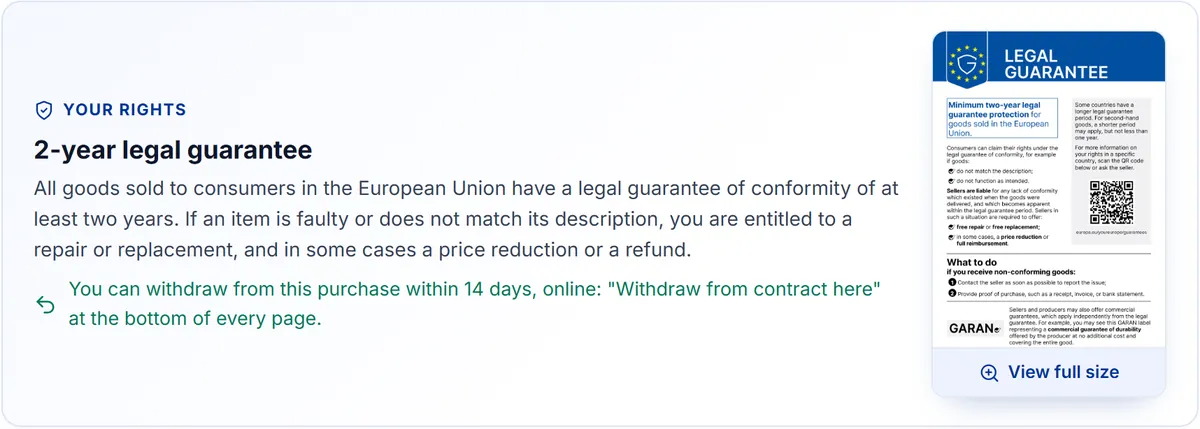
EU legal guarantee notice (Directive (EU) 2024/825 and Implementing Regulation (EU) 2025/1960, since 27 September 2026): the official harmonised notice, per store language, at checkout, on product pages and on a guarantee page
GARAN label: the producer's commercial guarantee of durability per product, as a badge that opens the full label on the first click or hover (nested display)
Lowest prior price (Directive 98/6/EC Art. 6a, "Omnibus"): price history and "Lowest price in the 30 days before this reduction" under every reduced price, on product pages and product lists
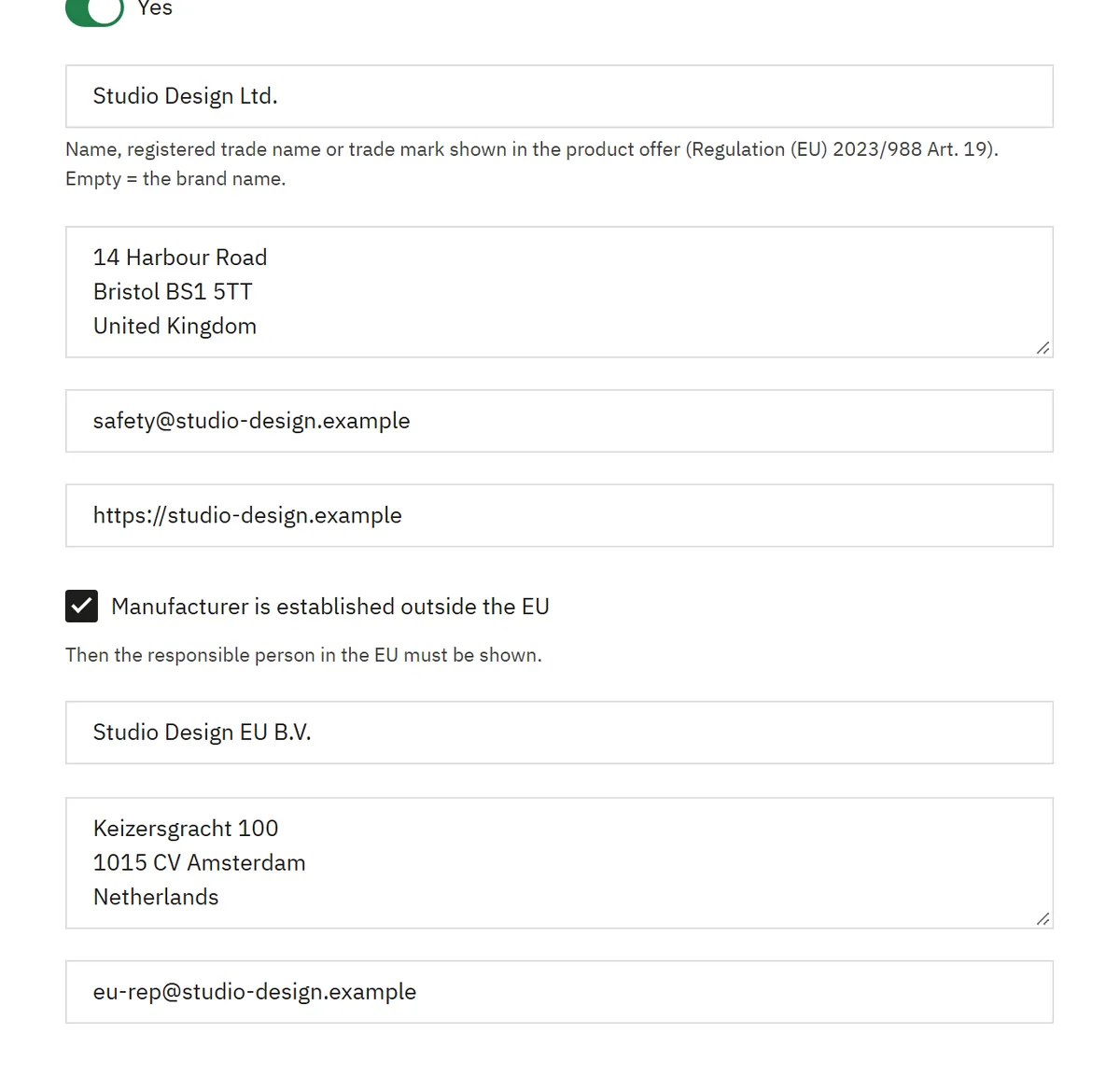
Product safety information (GPSR, Regulation (EU) 2023/988 Art. 19): manufacturer, EU responsible person, product identifiers and safety warnings per language in the product offer
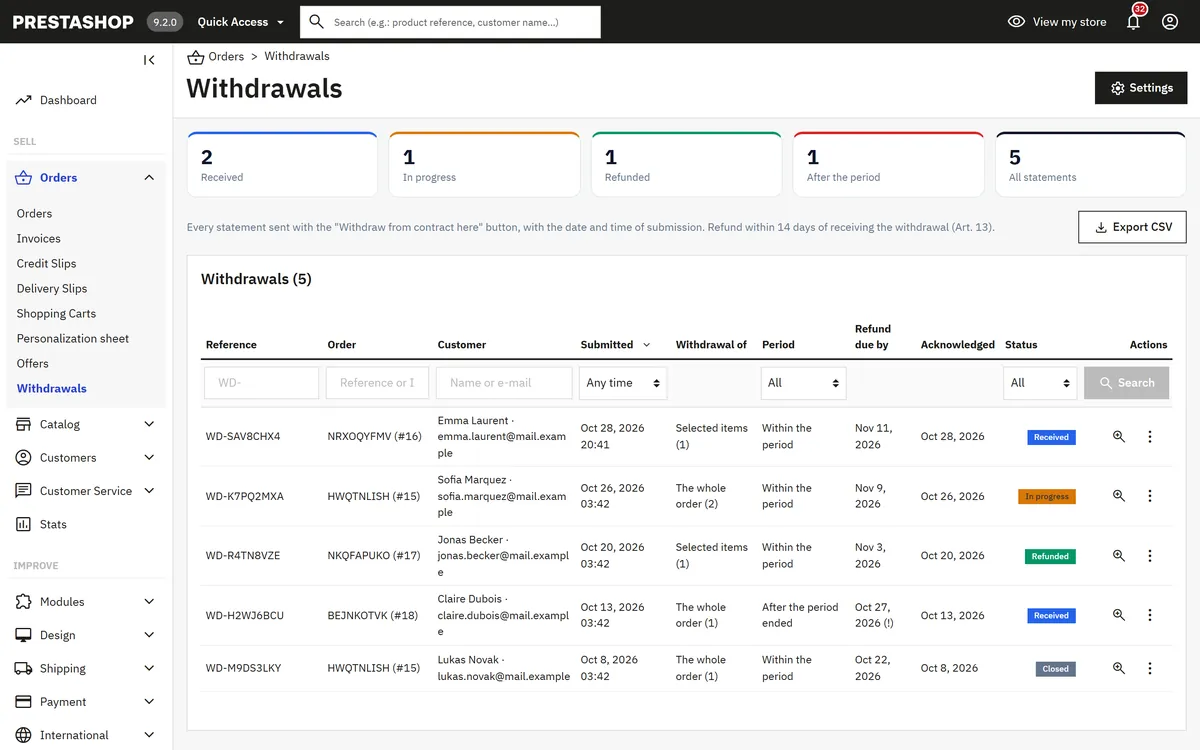
Orders > Withdrawals register: statuses, refund deadline, internal notes, resend acknowledgement, printable confirmation, CSV export; a card on the order page
Every button and notice text editable per store language (Texts tab), so you can use the exact wording of each country
Hooks only: no overrides, no core or theme file changes; Classic, Hummingbird and the 9.2 one-page checkout; multistore aware
Not legal advice. The module helps you display the information and provide the functions described in EU consumer law. All texts are templates you can change. Rules differ between countries (wording of the button, period lengths, longer national guarantees, exceptions); check them for the countries you sell to and ask a lawyer about your texts.
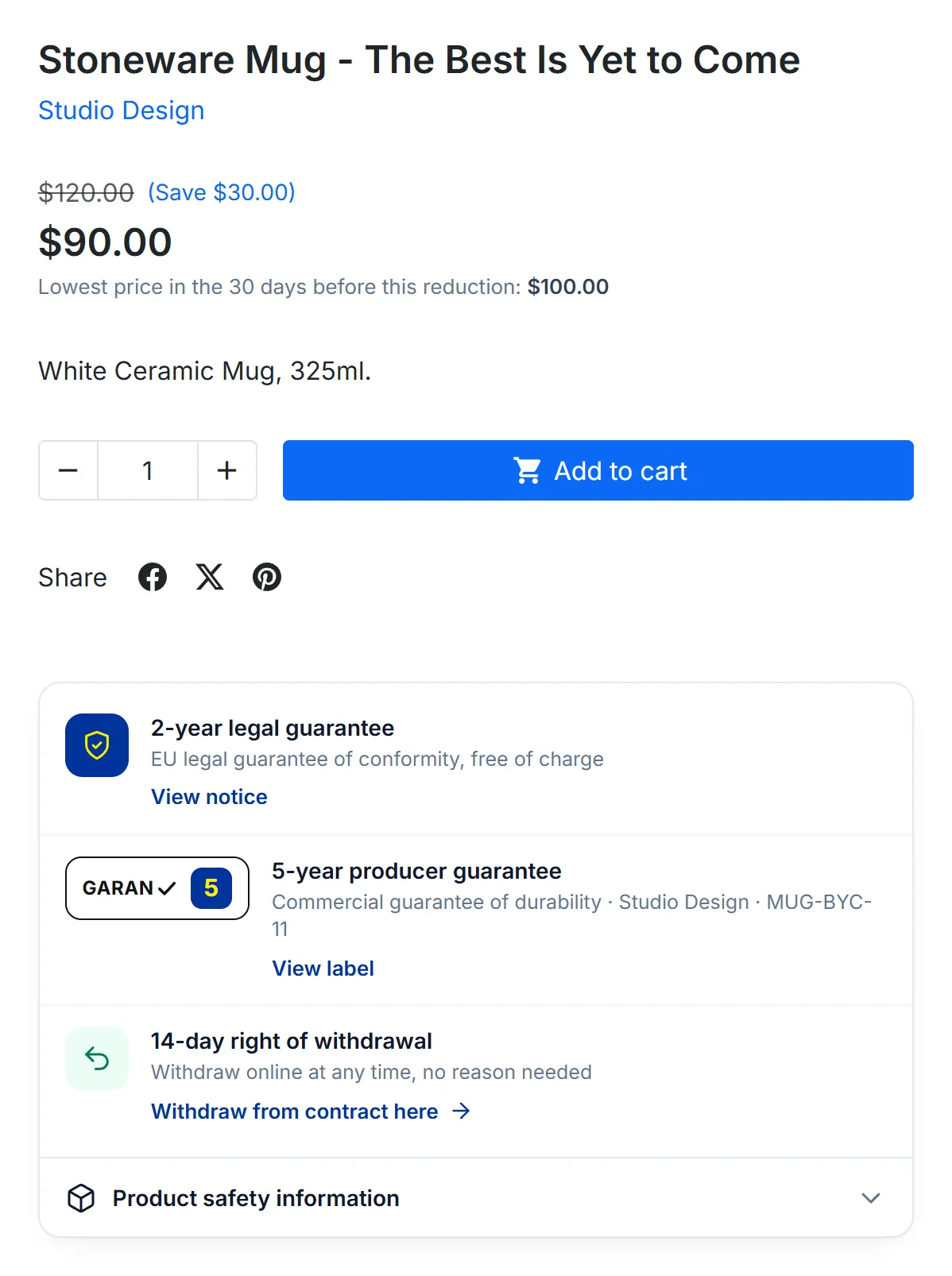
Product page with the lowest price and the legal guarantee, GARAN, withdrawal and product safety panel
Installation
Requirements
PrestaShop 8.2.0 – 9.x (tested on 8.2.8 and 9.2.0), PHP 7.2.5 or newer (PrestaShop 9 needs PHP 8.1+)
Classic, Hummingbird or a theme based on them; standard checkout or the 9.2 one-page checkout
A working e-mail setup (Advanced Parameters > E-mail): the acknowledgement must reach the customer straight away
Install
Modules > Module Manager > Upload a module: drop kveuconsumerkit-1.0.0.zip.
Click Configure. The Overview tab shows the module switches and a Setup checklist.
Kavio Labs package only: enter your licence key on the Licence tab and click Check now (14-day start period without a key).
The module adds Orders > Withdrawals, a Withdrawal card on the order page, an EU Consumer Law Kit section in the product page's Modules tab and product safety fields on the brand form.
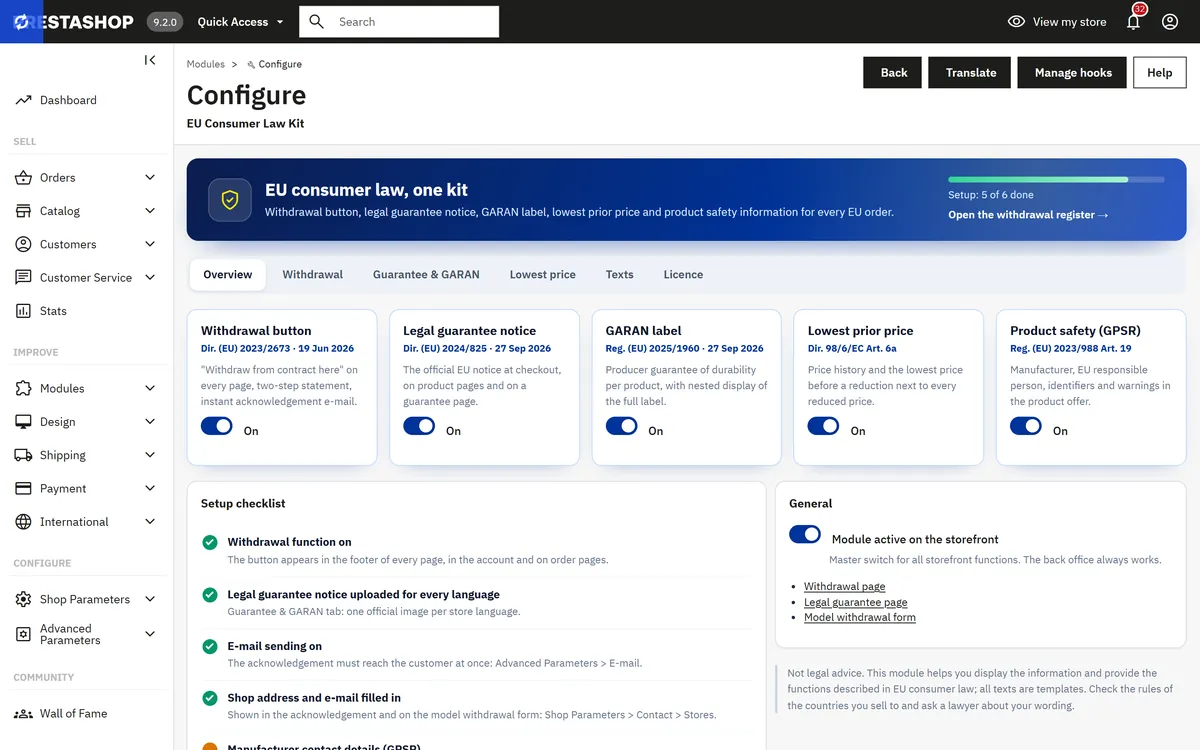
Settings overview with the setup checklist
First steps
Guarantee & GARAN tab: download the official harmonised notice for each store language (link on the tab) and upload it unchanged.
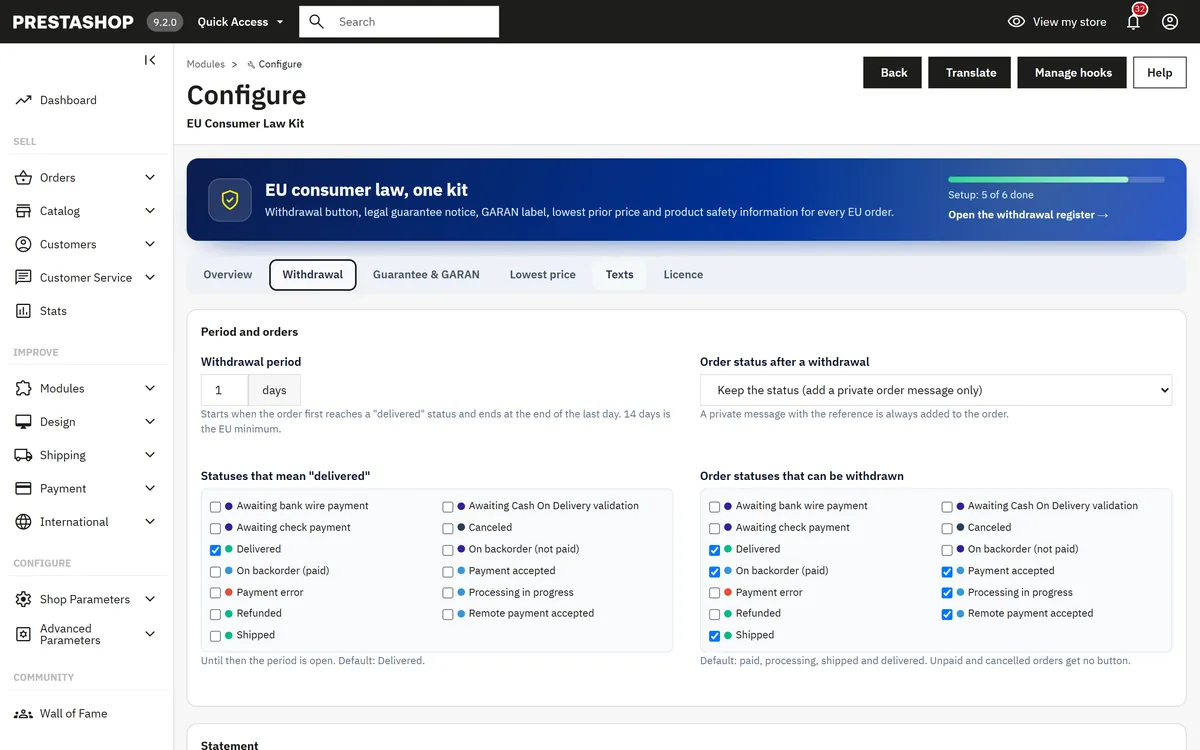
Withdrawal tab: check the period (14 days), the statuses that mean "delivered" (default: Delivered) and the statuses that can be withdrawn (default: paid, processing, shipped, delivered).
Texts tab: for every store language, enter the button labels and texts in the wording of that country.
Catalog > Brands & Suppliers > edit a brand: the product safety fields at the end of the form (legal name, postal address, e-mail, website; for brands outside the EU the responsible person in the EU).
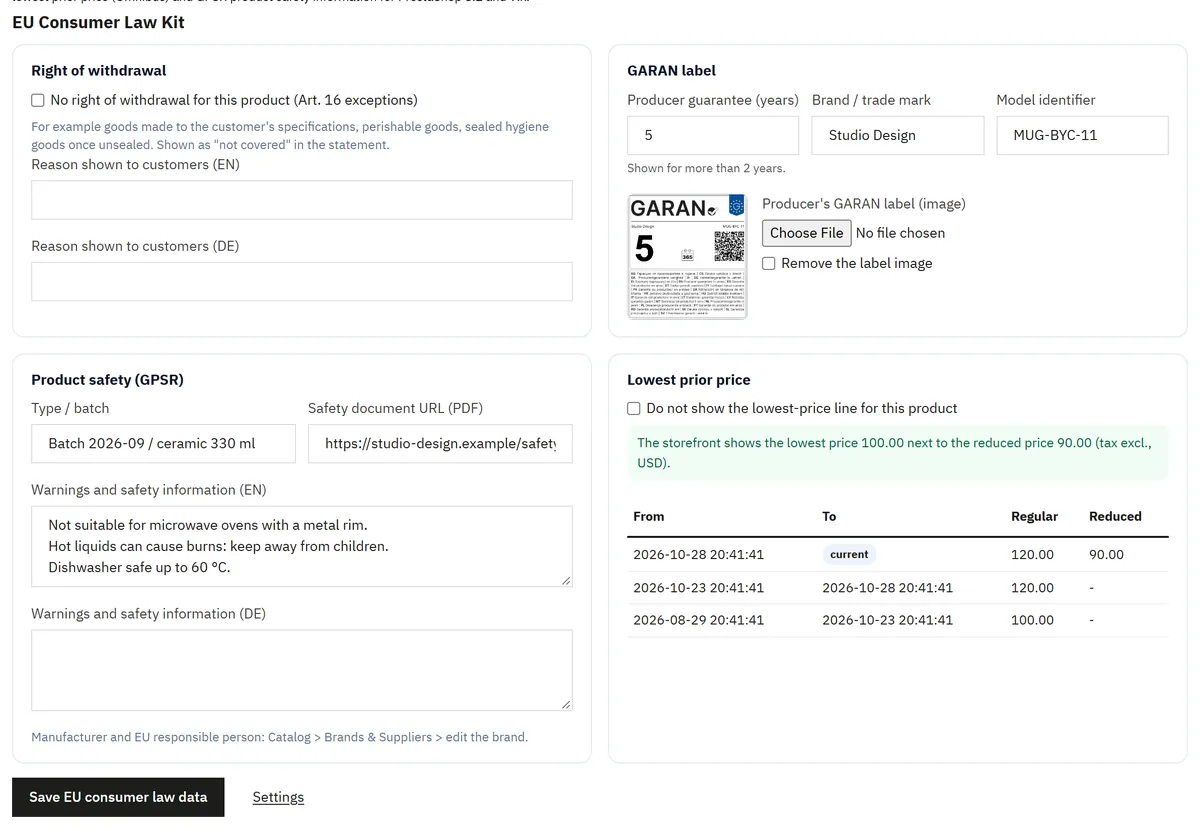
Catalog > Products > product > Modules > EU Consumer Law Kit > Configure: GARAN years and label, safety warnings, products without a right of withdrawal.
Optional: add the daily cron URL shown on the Lowest price tab to your server's cron jobs. Without it, the back office records scheduled price changes in small steps and every product view checks its own price.
Multistore
Settings follow the shop context selected at the top of the back office (all shops, a group or one shop). Price history and withdrawals are kept per shop; the register lists the shops of the current context.
Update
Upload the new package the same way (Module Manager > Upload a module). Settings, the register and the price history are kept.
Uninstall
Uninstalling removes the settings, hooks and the menu entry. The withdrawal register, price history and product / brand data stay in the database (statements may have to be kept as evidence) unless you switch on Withdrawal > Delete the register and product data when uninstalling first. Export the register as CSV before deleting it.
Configuration
Modules > Module Manager > EU Consumer Law Kit > Configure
Overview
Module switches: Withdrawal button, Legal guarantee notice, GARAN label, Lowest prior price, Product safety (GPSR). Each one can be switched off on its own.
Module active on the storefront: master switch for all storefront functions. The back office always works.
Setup checklist: notice images per language, e-mail sending, shop address, brand contact details, price history.
Withdrawal
Setting
Default
Notes
Withdrawal period
14 days
Starts when the order first reaches a "delivered" status; ends at the end of the last day
Statuses that mean "delivered"
Delivered
Until then the period is open
Order statuses that can be withdrawn
paid, processing, shipped, delivered
Unpaid or cancelled orders get no button
Order status after a withdrawal
keep
Otherwise the order moves to this status; a private order message with the reference is always added
Accept statements after the period
On
Late statements are stored and flagged "after the period"; Off = the form refuses them with the end date
Allow withdrawal of selected items
On
Whole order, or items and quantities
Footer strip on every page
On
"Withdraw from contract here" + "Legal guarantee" above the theme footer
Account and order pages
On
Link in My account and a button on orders that can still be withdrawn (also guest order tracking)
Optional reasons
5 reasons
Never required; empty = no question
Notify
shop e-mail
Staff notice for each statement (comma-separated addresses)
Delete data on uninstall
Off
Keeps the register by default
Withdrawal settings
Guarantee & GARAN
Notice image per language: the official harmonised notice (Commission Implementing Regulation (EU) 2025/1960, Annex I), PNG, JPG or WebP, at least 600 px wide. A language without an image falls back to the default language. The notice must not be edited and must be shown in colour online; the module shows your file as it is.
Checkout: card with the notice above the order button (pre-contract information), opens full size. Works in the standard and the one-page checkout.
Product pages: "2-year legal guarantee" row in the product panel.
Footer link to the guarantee page: a page with the full notice and your text.
Hide on virtual products: downloads and services.
GARAN chip on product lists: small "GARAN n" chip on product cards.
Lowest price
Setting
Default
Notes
Period
30 days
At least 30 days under Art. 6a
Calculation
before the reduction
Or a rolling period including today
Consecutive reductions count as one
On
Progressive reductions keep the price before the first reduction
Not enough history yet
regular price
Or show nothing; the history starts on installation
Show on product lists
On
Category, search, brand, prices drop and module lists
The history is recorded per shop for the default customer group, tax excluded in the default currency, and shown with the tax and currency of the visitor. Reductions are PrestaShop specific prices; ones that start or end on their own date are back-dated by the daily sweep.
Texts
One column per store language. Empty fields use the default English text (shown in grey). Placeholders: {email}, {price}, {days}, {years}.
Product page (Catalog > Products > Modules > EU Consumer Law Kit)
No right of withdrawal, with a reason per language
GARAN: years (shown for more than 2), brand (default: the product's brand), model identifier (default: the reference), the producer's label image
Product safety: type/batch, warnings per language, safety document URL
Lowest price: hide the line for this product; the recorded price history
Saved with its own Save EU consumer law data button (independent of the product form)
Product tab
Brand form (Catalog > Brands & Suppliers > edit a brand)
Product safety fields: legal name, postal address, e-mail or contact page, website, "manufacturer is established outside the EU" and the responsible person in the EU (name, address, e-mail).
Brand form
Licence (Kavio Labs package)
Enter the key from your Kavio Labs account. Without a valid licence the withdrawal button, statement, acknowledgement e-mail and register keep working; the guarantee notice, GARAN badge, lowest-price line and product-safety section are hidden on the storefront, and item-level withdrawal and CSV export are switched off.
Usage
What the customer sees
Every page: a strip above the footer with Withdraw from contract here and Legal guarantee.
Step 1, Your order: signed-in customers pick one of their orders; guests enter the order reference (from the confirmation e-mail) and the order e-mail. The order details page (account and guest tracking) has its own button.
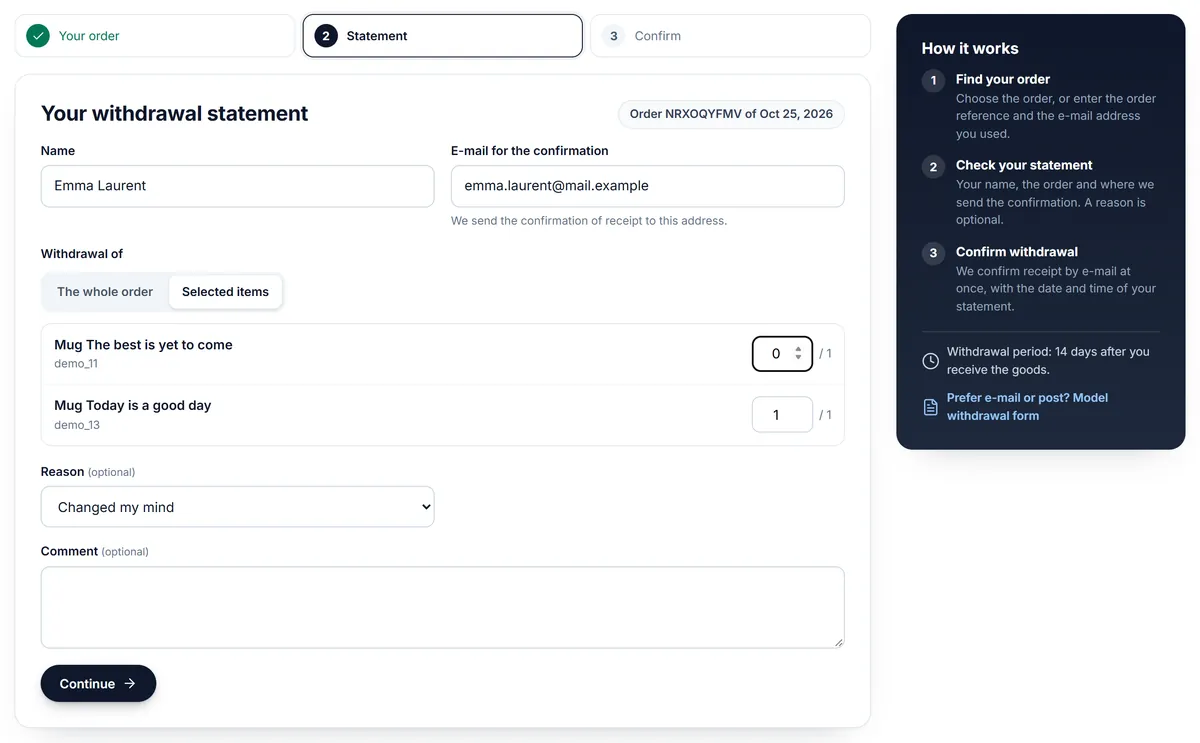
Step 2, Statement: name and e-mail for the confirmation (prefilled), the whole order or selected items, an optional reason and comment. Items without a right of withdrawal are listed as "not covered".
Step 3, Confirm: a summary and one button, Confirm withdrawal.
Withdrawal received: reference (WD-XXXXXXXX), date and time with time zone, the statement, next steps and Print or save as PDF. The same content goes out by e-mail at once (a copy goes to the order e-mail when the customer used another address).
Statement step
What you get
A staff e-mail for each statement with the refund deadline.
Orders > Withdrawals: counters (received, in progress, refunded, after the period), filters, refund due dates, CSV export.
The record page: statement, status (Received, In progress, Refunded, Closed, Declined), internal notes, Resend acknowledgement, Printable confirmation, a link to the order and a timeline.
A private message with the reference on the order, and a Withdrawal card on the order page.
Withdrawals register
Product pages
Under a reduced price: "Lowest price in the 30 days before this reduction: $100.00" (also on product lists).
A panel next to the add-to-cart button: 2-year legal guarantee (opens the notice), GARAN producer guarantee (opens the full label on the first click or hover), the right of withdrawal (or "No right of withdrawal" with your reason), and Product safety information with manufacturer, EU responsible person, identifiers, warnings and documents.
Checkout
A card above the order button with the legal guarantee notice (opens full size) and a reminder of the withdrawal button.
Checkout card
Model withdrawal form
Linked from the withdrawal pages: the Annex I(B) model form with your shop name, address and e-mail, for customers who prefer e-mail or post.
FAQ
Does this make my shop compliant?
No software can promise that. The module provides the functions and displays described in the EU rules and lets you adapt every text. Check the national rules of the countries you sell to and ask a lawyer about your wording. This is not legal advice.
Where do I get the legal guarantee notice?
From the European Commission ("Practical guidelines and high-resolution vector files for the EU notice and label", link on the Guarantee & GARAN tab), in every EU language. Upload it unchanged and in colour, one image per store language.
Who creates the GARAN label?
The producer offering the commercial guarantee of durability fills in the years, brand and model identifier. Ask your supplier for the file; if you sell your own brand, you are the producer. Upload it in the product page's Modules tab.
Can I change the button text?
Yes, per store language on the Texts tab. Keep it unambiguous; many countries publish an official wording for "Withdraw from contract here" and "Confirm withdrawal".
Does the withdrawal button stop working when my licence expires?
No. The withdrawal button, statement, acknowledgement e-mail and register always work, so customers are never left without the function. The other storefront displays need a valid licence.
What if a customer withdraws after the period?
By default the statement is accepted and flagged "after the period" so you can decide. You can switch this off; the form then says that the period has ended.
How is the start of the period known?
From the order history: the first time the order reached one of the "delivered" statuses. Until then the period is open.
Does it refund the order?
No. It records the statement, informs you and the customer and shows the refund deadline. Refund with PrestaShop as usual (partial refund / credit slip) and set the withdrawal to Refunded.
The lowest price shows the regular price on a new install. Why?
The history starts on installation. Until 30 days of history exist, the module shows the regular price before the reduction (or nothing, if you choose). Reductions that start or end on a date are back-dated to that date.
Which customer group does the lowest price use?
The default customer group of the shop. The line is shown to every visitor with their own tax display and currency.
Does it work with my theme?
It uses standard PrestaShop hooks (footer, product price block, product additional info, checkout, customer account, order details) and its own scoped styles. It is tested with Classic and Hummingbird, and with the 9.2 one-page checkout.
Does the acknowledgement need a mail server?
Yes. Configure Advanced Parameters > E-mail. A failed send is shown in the register with a Resend acknowledgement button; the statement is stored either way.
Sell by weight, length, area or volume on PrestaShop 8.2 and 9.x: amount field with quick amounts and live total, exact decimal stock and real shipping weight. No overrides.
Shoppers propose a price per item; the shop accepts, counters or declines, or rules answer at once. The agreed price is a one-time specific price for that customer's cart.