The multipurpose flagship theme for PrestaShop 8.2 and 9.x: five ready store styles (Fashion, Electronics, Home & furniture, Beauty, Grocery) switchable in one click from one settings page, three header and two footer layouts, four hero layouts, a mega menu with pictures and brands, live search with pictures, AJAX filters with Faceted search, quick view, wishlist and compare, one-tap add to cart, a sticky add-to-cart bar, frequently bought together and a mobile tab bar. A child theme of Classic, no core changes.
On saleVersion 1.0.0Compatible with PrestaShop 8.2 – 9.x No core file edits
Built forPrestaShop
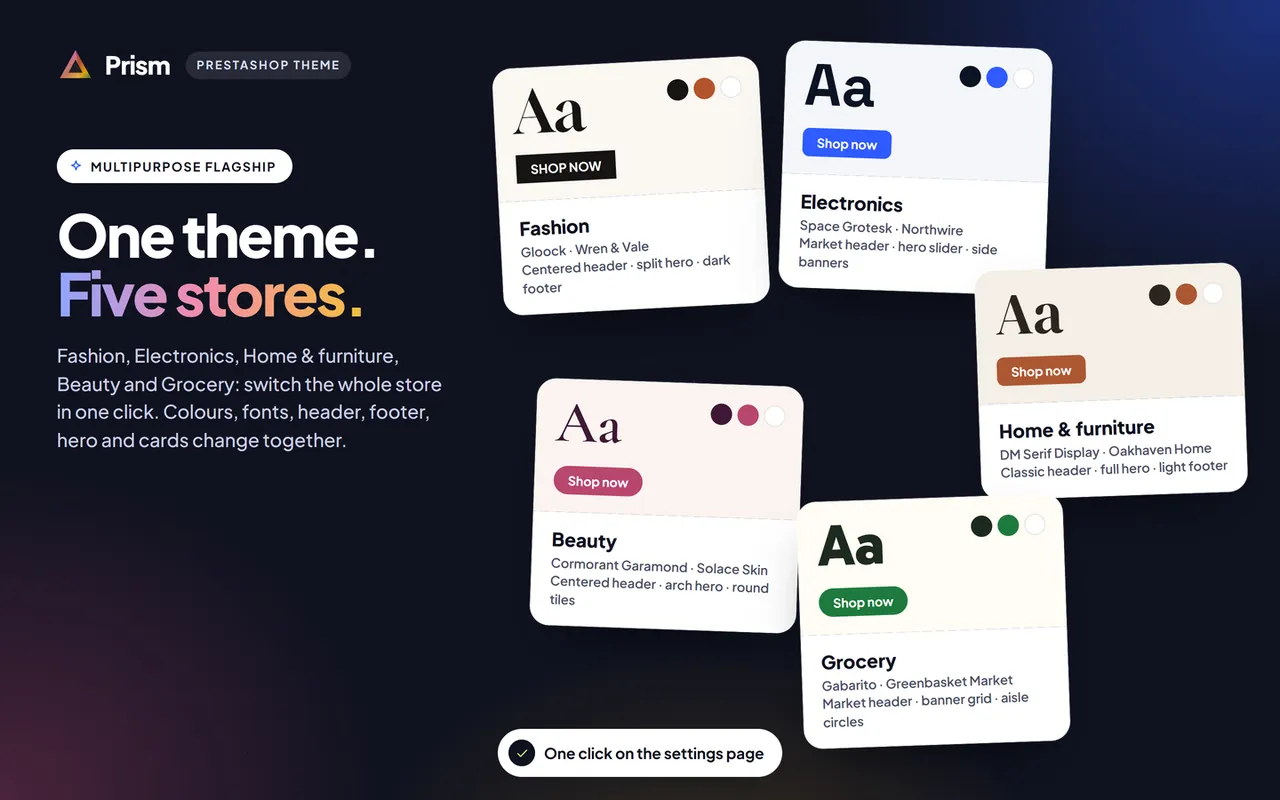
One theme, five ready stores: Fashion, Electronics, Home & furniture, Beauty and Grocery, switched in one click1 of 12
The multipurpose flagship theme for PrestaShop 8.2 and 9.x: five ready store styles (Fashion, Electronics, Home & furniture, Beauty, Grocery) switchable in one click from one settings page, three header and two footer layouts, four hero layouts, a mega menu with pictures and brands, live search with pictures, AJAX filters with Faceted search, quick view, wishlist and compare, one-tap add to cart, a sticky add-to-cart bar, frequently bought together and a mobile tab bar. A child theme of Classic, no core changes.
PrestaShop 8.2 - 9.x
Overview
Prism is the multipurpose flagship theme of Kavio Labs for PrestaShop 8.2 and 9.x: one theme with five ready store styles. Pick Fashion, Electronics, Home & furniture, Beauty or Grocery on the Prism settings page and the whole storefront changes in one click: colours, fonts, corner radius, header, footer, hero, product cards and the order of the home sections. Your products, texts and pictures stay as they are.
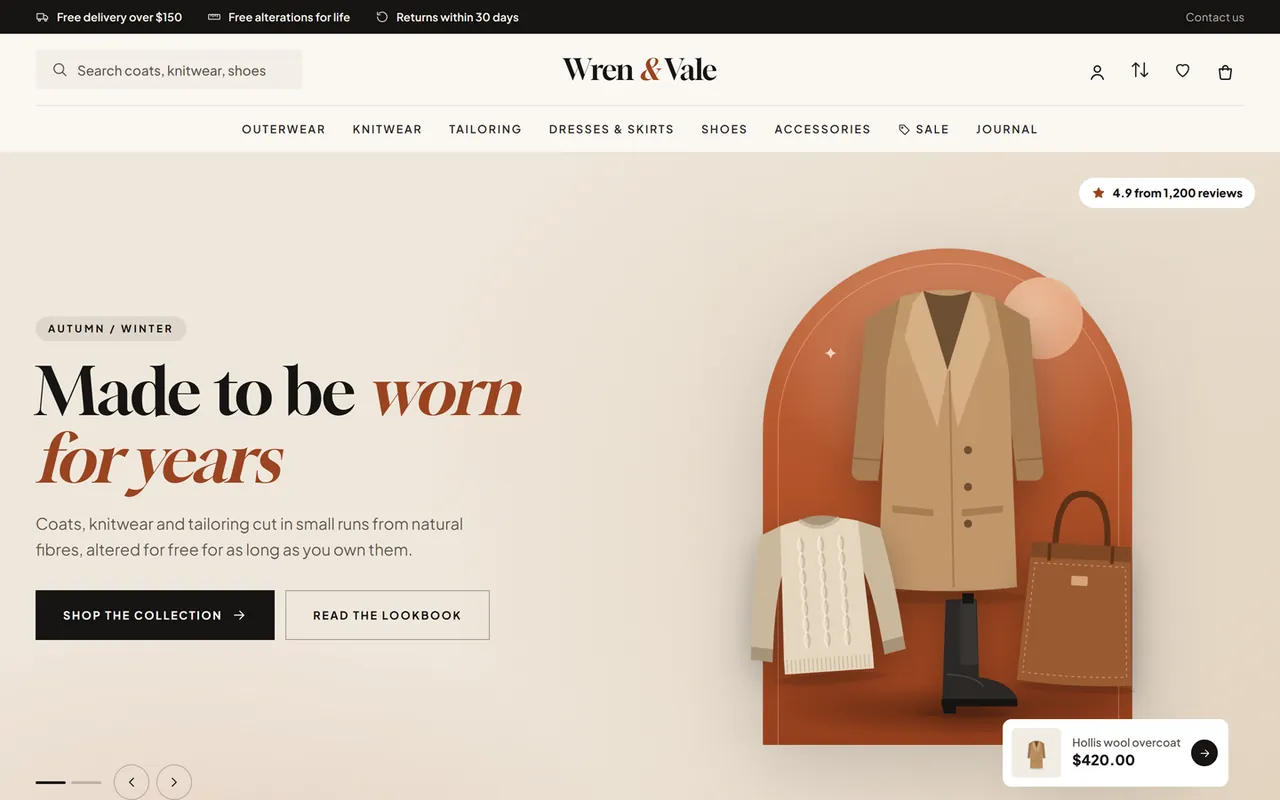
Prism home page, Fashion style
What you get
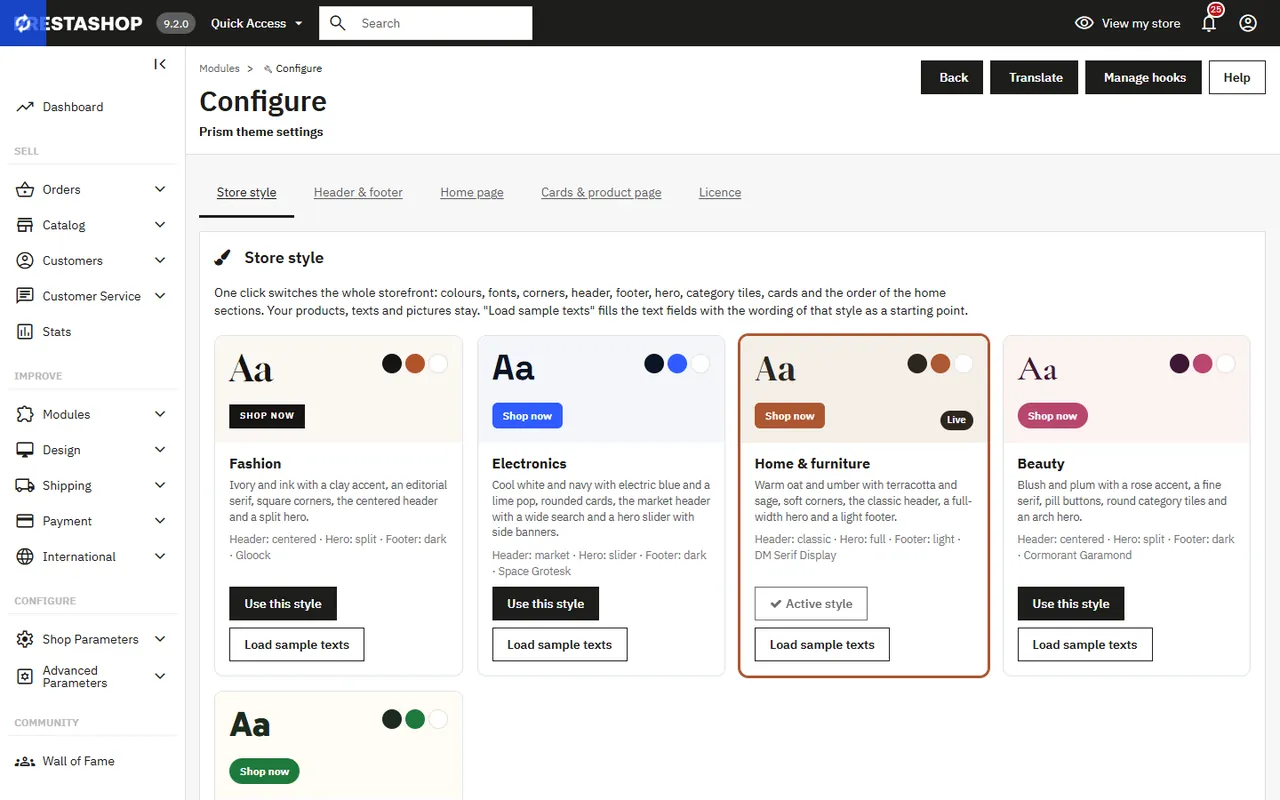
Five store styles. Fashion (ivory, ink and clay, an editorial serif, square corners), Electronics (cool white, navy and electric blue with a lime pop, rounded boxed cards), Home & furniture (oat, umber and terracotta, a warm serif), Beauty (blush, plum and rose, a fine serif and pill buttons) and Grocery (cream, market green and tomato, a bold display face). Each style has its own accent colour and sample texts you can load as a starting point; you can also set an accent colour of your own.
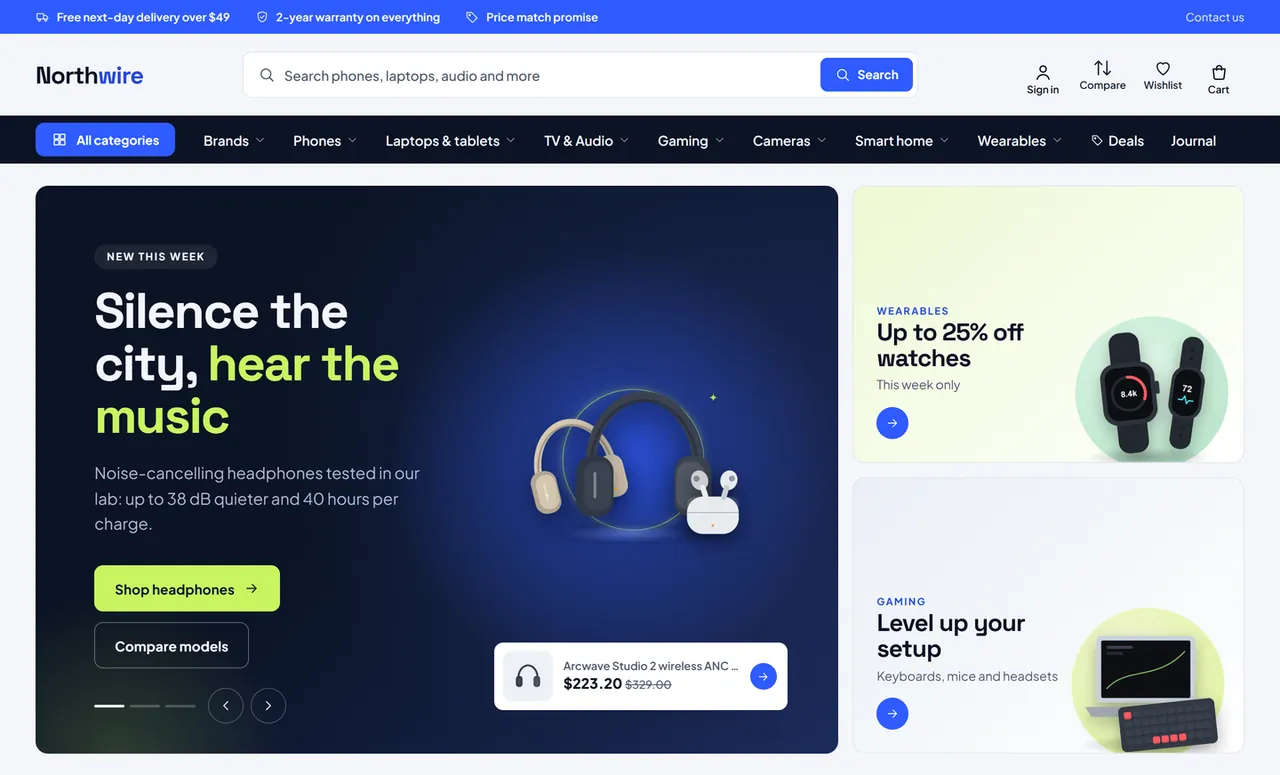
Three header layouts. Classic (logo, menu and icons in one row, search behind the search icon), Centered (logo in the middle, compact search on the left, menu below) and Market (wide search with a button, labelled account, compare, wishlist and cart icons, and a dark category bar with an All categories button). Sticky header and an announcement bar with up to three notes.
Two footers. Dark or light, with your about text, payment chips, the link columns of the PrestaShop link modules and a help card. The newsletter form of the Newsletter subscription module becomes a full-width band above it.
Mega menu. Built from your categories: sub-categories in columns with product counts, the top brands of the category, its best deal with the price and the category picture. An optional Brands menu item lists your biggest brands, plus a Sale and an extra link.
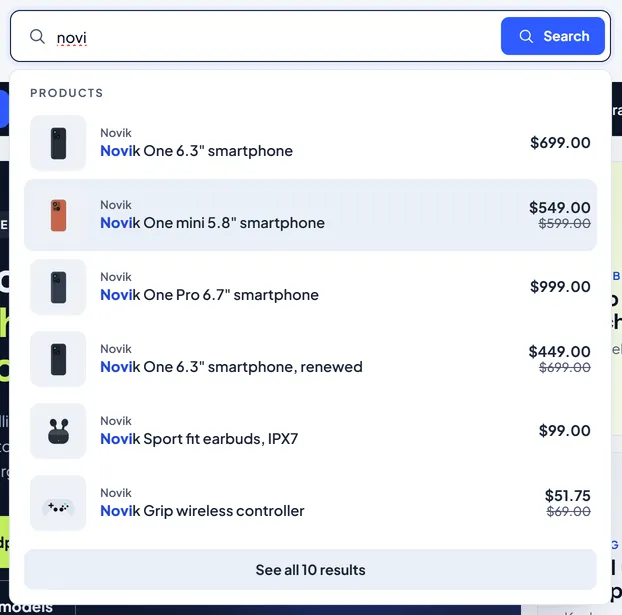
Live search. Product suggestions with picture, brand and price and the matching categories while the shopper types, with a link to all results. It is a keyboard friendly combobox (arrow keys, Enter, Escape) and uses the PrestaShop search index, so nothing extra has to be indexed.
Four hero layouts. Split (text and a large picture), Slider with two side banners, Full width with a text card and Banner grid. Up to three slides with autoplay, progress dots, arrows and a floating product sticker with its price.
Rich product cards. Second picture on hover, wishlist (the PrestaShop Wishlist module), compare, quick view and one-tap add to cart; products with combinations open the quick view to choose. Sale, new and pack labels, colour swatches, size chips, a deal countdown to the real end date and an "Only 3 left" note.
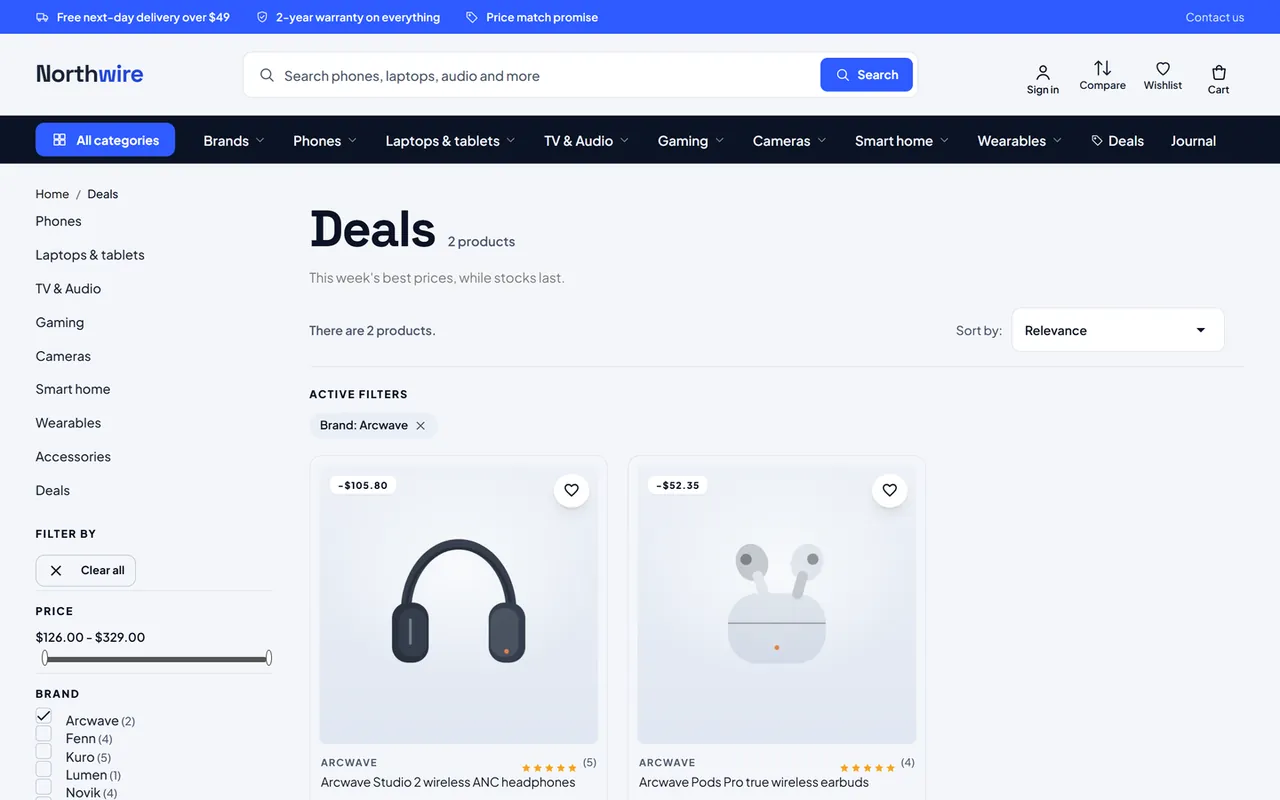
AJAX filters. The category pages work with the PrestaShop Faceted search module: tick a filter, sort or change page and the grid updates in place, the address keeps the state. Sub-categories show as picture chips.
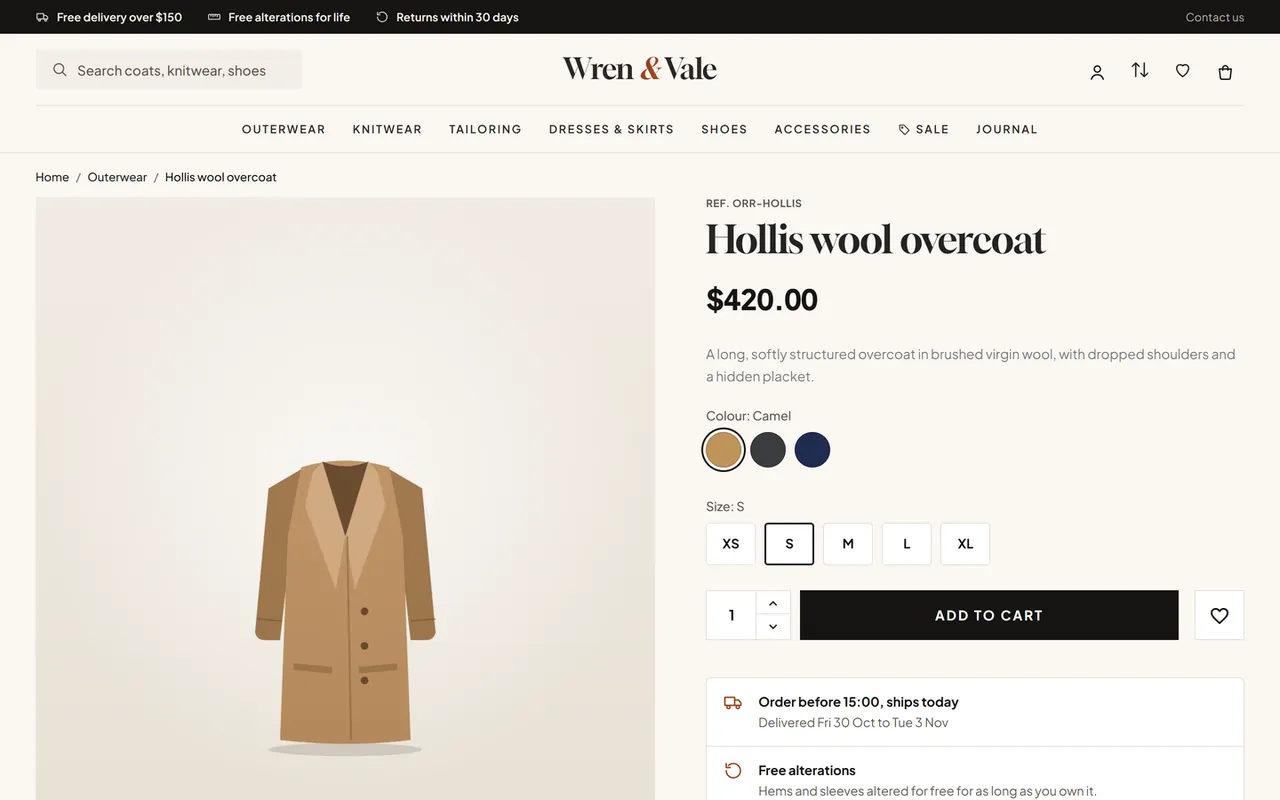
Product page. Colour swatches and size buttons, the deal timer under the price, a delivery panel with the dispatch cut-off, delivery dates and two promise lines, frequently bought together (the product and two companions with one button) and a sticky add-to-cart bar that follows the shopper down the page.
Compare. Up to four products, kept in the shopper's browser (no account, no cookie), on a comparison page with every feature and a "show only differences" switch.
Home builder. Promise row, category tiles (photo or round), three product tabs, deal countdown, promo banners, shop the set with one Add to cart, little extras under a price, brands, customer quotes and journal cards. Choose the order, switch any section off.
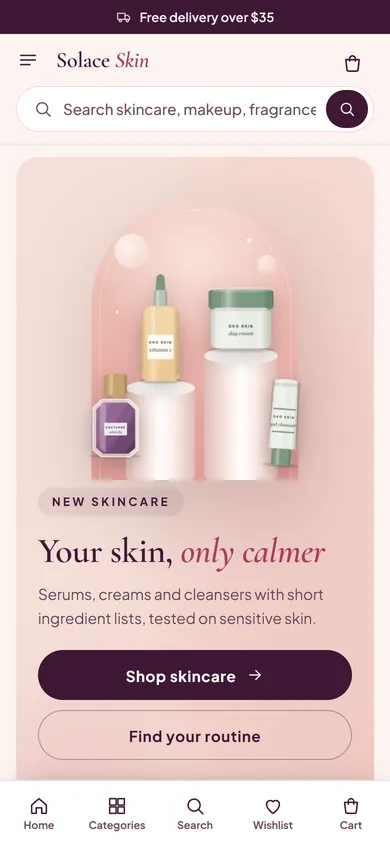
Mobile first. Drawer menu with category pictures, a bottom tab bar (Home, Categories, Search, Wishlist, Cart), round add buttons and no sideways scrolling down to 360 px.
Self-hosted fonts. Plus Jakarta Sans for text and one display face per style (Gloock, Space Grotesk, DM Serif Display, Cormorant Garamond, Gabarito), all SIL Open Font License 1.1. Only the faces the style uses are downloaded; no requests to font CDNs.
Safe to install. A child theme of Classic with a companion module: no core changes, no overrides. Works with the PrestaShop 9.2 one-page checkout.
The five store stylesElectronics style with the market header and the hero sliderCategory page with AJAX filtersLive search with pictures and pricesProduct page with swatches, size buttons and the delivery panel
On a phone the menu becomes a slide-in drawer, a bottom bar gives Home, Categories, Search, Wishlist and Cart, and cards get a round add button.
Prism on a phone
Works with
Prism is a child theme of Classic and keeps its classes, hooks and page structure, so modules written for Classic keep working: quick view, the cart dialog, Faceted search, Wishlist, Product Comments, the link list, contact and customer modules. Prism reads standard PrestaShop data only (categories, brands, features, combinations, specific prices, accessories, CMS pages) and never writes to your catalogue.
Versions
PrestaShop 8.2.x
PrestaShop 9.x
Package
kvprism-1.0.0.zip (the same file)
kvprism-1.0.0.zip
Parent theme
Classic 2.x
Classic 3.x (Hummingbird can stay installed)
PHP
7.2.5 to 8.1
8.1 to 8.5
Licence
One licence covers every store style. The first 14 days are a start period. Without a valid licence the shop keeps working in the Fashion style without the Prism sections and features, and the settings page shows a reminder; the back office is never blocked.
Installation
Requirements
PrestaShop 8.2.x or 9.x with the Classic theme present (it ships with PrestaShop; do not delete it, Prism is its child theme).
PHP 7.2.5 or newer (the PHP version your PrestaShop already runs on is fine).
Recommended modules (all ship with PrestaShop): Faceted search (filters), Wishlist (blockwishlist), Product Comments (ratings), Newsletter subscription (footer band), Link list (footer columns).
Install the theme
Go to Design > Theme & Logo and click Add new theme.
Choose Import from your computer, upload kvprism-1.0.0.zip and click Next. PrestaShop unpacks the theme into themes/kvprism and the companion module Prism theme settings into modules/kvprism.
Click Use this theme next to Prism. PrestaShop installs and enables the companion module, applies the Prism image sizes and puts the modules in the Prism positions (listed in the theme's config/theme.yml).
Go to Design > Image Settings and click Regenerate thumbnails so your product pictures get the new sizes (600 x 600 cards, 1000 x 1000 product page).
Go to Advanced Parameters > Performance and click Clear cache.
Licence key
Prism works for 14 days without a key. Open Modules > Module Manager > Prism theme settings > Configure, open the Licence tab, paste the key from your Kavio Labs account and click Save key. The licence is checked from this page (and once a day), never on a storefront request. Without a valid key the storefront keeps working in the Fashion style; the home sections, the mega menu, the live search, compare and the other store styles are switched off until the key is valid. (The PrestaShop Addons edition has no licence key and makes no outbound calls.)
First steps
Choose a style. On the Store style tab click Use this style on the card closest to your shop. Optional: Load sample texts fills the announcement bar, hero, banners, section titles, footer and product page lines with the wording of that style's demo store as a starting point. Pictures, product IDs and links keep their values.
Add your pictures. On the Home page tab upload a picture for each hero slide, the side banners (slider and grid heroes), the promo banners, the shop-the-set picture and the journal cards (JPG, PNG, WebP or GIF up to 6 MB; they are stored in img/cms/kvprism/). Transparent PNG cut-outs look best on the split and slider heroes, photos on the full hero.
Category pictures. Give your top categories a cover picture (Catalog > Categories): it is used by the category tiles, the mega menu and the drawer menu.
Brands. Assign brands to your products (Catalog > Brands & Suppliers): they fill the mega menu, the Brands menu item and the brand wall.
Deals. Create specific prices or catalogue price rules with an end date: the countdowns only use real end dates.
Frequently bought together uses the product's Related products (Catalog > Products > Options), else the best sellers of its default category.
Image sizes
Type
Size
Used for
home_default
600 x 600
product cards
large_default
1000 x 1000
product page
medium_default
452 x 452
quick view thumbnails
small_default
98 x 98
live search, mega menu, drawer
category_default
600 x 600
category tiles
One-page checkout (PrestaShop 9.2)
If you enable the one-page checkout of the PrestaShop module "One Page Checkout", Prism renders its page in the Prism look. Nothing else is needed.
Updating
Upload the new theme zip the same way (PrestaShop asks you to delete the old theme folder first, or replace the files by FTP). Your settings stay in the database.
Uninstalling
Switch to another theme in Design > Theme & Logo, then delete Prism there. Uninstall Prism theme settings in the Module Manager to remove its settings.
Configuration
Everything is on one page: Modules > Module Manager > Prism theme settings > Configure. The settings are stored per shop (multistore: pick the shop in the context selector first).
The Store style tab
Store style
Use this style switches the whole storefront in one click: palette, display face, corner radius, header, footer, hero, category tiles, card treatment and the default order of the home sections. It also resets the layout overrides below to "From the style".
Load sample texts writes the wording of that style's demo store into the text fields (announcement bar, search placeholder, hero, side banners, promo banners, section titles, footer, promise lines). Pictures, product IDs, links and switches keep their values.
Header layout, Footer and Hero layout: "From the style" or a fixed choice (Classic / Centered / Market headers, Dark / Light footers, Split / Slider / Full / Grid heroes). Mix them as you like.
Accent colour: replaces the accent of the style (buttons, links, highlights). The text colour on it is picked by contrast.
Text logo: shown in the display face of the style instead of the logo image. Put a word between asterisks to colour it (Green*basket*).
Home section order: comma separated keys hero, usp, cats, tabs, deal, promos, look, picks, brands, reviews, ideas. Empty = the order of the style. Leave a key out to hide the section.
Header & footer
Announcement bar and its three notes (they take turns on phones and tablets).
Sticky header, Live search and the search placeholder.
Menu: number of top categories, optional category IDs (in menu order), brands / top deal / category picture in the panels, an optional Brands item, the Sale item and one extra link.
Links accept a full URL, a path (/content/4-about-us) or a shortcut: cat:ID, cms:ID, brand:ID, product:ID.
Newsletter band: kicker, title and text above the form of the Newsletter subscription module.
About text, payment chips (Visa|Mastercard|PayPal) and the help card of the footer.
Phone tab bar and the back-to-top button.
Home page
Hero: up to three slides (eyebrow, title, text, two buttons with links, picture, product sticker ID) and two side banners for the Slider and Grid layouts, the seconds per slide and a rating badge.
Promise row: title|text items separated by ;.
Category tiles: title, text, category IDs (empty = the categories under Home) and the number of tiles.
Product tabs: three titles with optional product IDs. Without IDs: best sellers, newest products and products on sale.
Deal countdown: kicker, title, optional product IDs (empty = the discounts that end first) and the number of products.
Promo banners (up to three), Shop the set (picture, caption and two to six products, added to the cart with one button), Little extras (products under a price), Brands, Customer quotes (text|name|what they bought) and Journal cards (three cards linking to CMS pages or blog posts).
Cards & product page
One-tap add to cart, Quick view, Compare, Second picture on hover, Deal countdowns.
Size chip groups: attribute group names shown as chips on cards (colour groups always show as swatches).
"Only N left" from: the stock level under which cards show the note (0 = off).
Sticky add-to-cart bar, Delivery panel (dispatch cut-off hour and the two promise lines) and Frequently bought together with its title.
Licence
Paste the key and click Save key; Check now runs a check at once. See Installation.
FAQ
Can I switch the store style later?
Yes, any time, with one click on the settings page. The style only changes the look (colours, fonts, header, footer, hero, cards and the default section order). Your products, texts and pictures stay as they are. Use Load sample texts only if you want the wording of that style's demo store.
Does Prism import the demo stores?
No. The five demo stores in the screenshots (Wren & Vale, Northwire, Oakhaven Home, Solace Skin, Greenbasket Market) are fictional and use our own generated illustrations of invented brands; they are not part of the package. The styles, layouts and sample texts are.
Does it work with PrestaShop 9 and Hummingbird?
Prism works on PrestaShop 8.2 and 9.x. It is a child of the Classic theme (which ships with both versions); Hummingbird can stay installed, it is simply not the active theme.
Do the filters need a module?
The AJAX filters are those of the PrestaShop Faceted search module, restyled. Configure the filters in its settings (Modules > Faceted search) and rebuild its indexes after big catalogue imports.
Where is the wishlist?
Prism uses the PrestaShop Wishlist module (blockwishlist): the heart on cards and the product page, the header link and the account page. Shoppers sign in to save lists.
How does compare work?
The compare buttons keep up to four products in the shopper's browser (local storage, no cookie, nothing stored on the server). The comparison page lists the price, availability, summary and every feature, with a "show only differences" switch.
Why is there no countdown on my sale?
Countdowns only use real end dates: give the specific price or the catalogue price rule an end date.
Why does the mega menu show no brands or deal?
They come from the products in the category: assign brands, and create a discount on at least one product of the category. You can switch each part off on the Header & footer tab.
Can I change the order of the home sections?
Yes: Home section order on the Store style tab, for example hero, cats, tabs, deal, promos, brands. Sections you leave out are hidden.
Is anything changed in the PrestaShop core?
No. Prism is a theme plus a companion module using standard hooks; no core files and no overrides.
Which fonts are used and are they loaded from Google?
Plus Jakarta Sans plus one display face per style, all SIL Open Font License 1.1, self-hosted in the theme. No requests go to font CDNs.
Sell by weight, length, area or volume on PrestaShop 8.2 and 9.x: amount field with quick amounts and live total, exact decimal stock and real shipping weight. No overrides.
Shoppers propose a price per item; the shop accepts, counters or declines, or rules answer at once. The agreed price is a one-time specific price for that customer's cart.