Order fraud scoring for PrestaShop 8.2 and 9.x that runs on your store: a 0-100 score with every reason shown, block and allow lists, cash on delivery hidden for risky buyers, a review queue, and COD confirmation by link, code or phone. No outside service, no lookup limit, no overrides.
Tested on 9.2.0 & 8.2.8Updated Nov 2, 2026Version 1.0.0Compatible with PrestaShop 8.2 – 9.x No core file edits
Built forPrestaShop
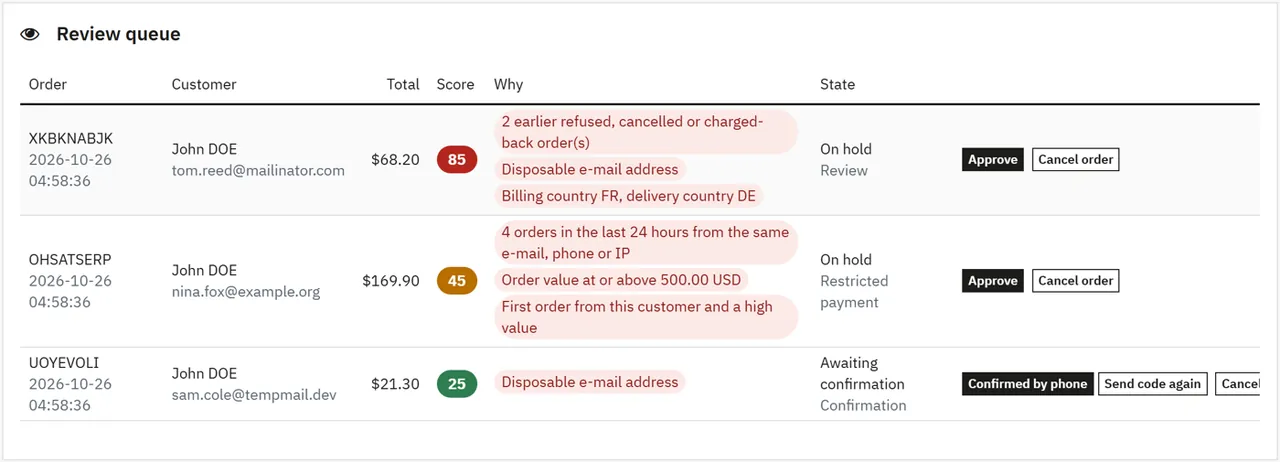
Every order scored, every reason shown (sample data)1 of 7
What it does
Order fraud scoring for PrestaShop 8.2 and 9.x that runs on your store: a 0-100 score with every reason shown, block and allow lists, cash on delivery hidden for risky buyers, a review queue, and COD confirmation by link, code or phone. No outside service, no lookup limit, no overrides.
What it changes for your store
Know which orders to ship. A fake cash-on-delivery order costs you shipping twice, and a chargeback customer comes back with a new e-mail address. Order Risk Guard scores every order from 0 to 100 and shows why, so you can decide in seconds.
Not a card fraud network. A paid fraud service sees data from many shops. This module knows your store, and it is made for fake COD orders, repeat offenders and orders a person should look at. It can run next to such a service.
Features
A score you can read
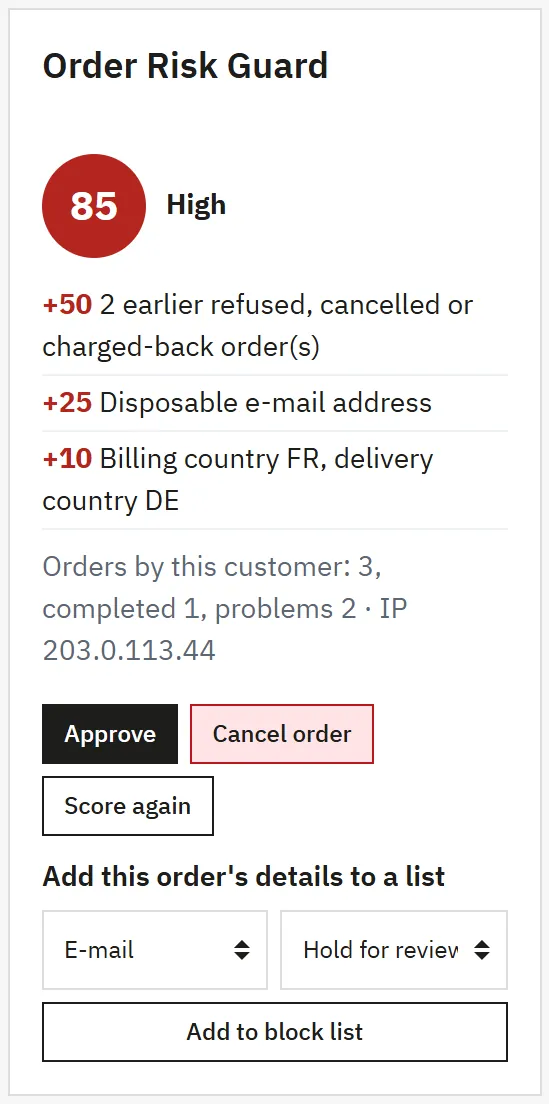
Every reason is listed with its points
Earlier refused or cancelled orders, found by e-mail, phone or account
Many orders in a short time from one e-mail, phone or IP
Disposable e-mail addresses, country mismatches, a high first order
You set the points and the thresholds
Block and allow lists
E-mail, domain, phone in any format, IP and ranges, address, customer
One action per entry: refuse, prepayment only, hold for review or add points
Entries can expire, CSV import and export
Add a customer from the order page in two clicks
Stops bad orders before you ship
Risky buyers do not see cash on delivery, and a forged request is held anyway
Held orders wait in a review queue with Approve and Cancel
Cancelled orders put their stock back
Online payments are never interrupted, only flagged
Cash-on-delivery confirmation
The buyer confirms with a link or a 6-digit code by e-mail
Optional SMS through your own gateway
Call the buyer and press Confirmed by phone
Unconfirmed orders are cancelled automatically
Runs on your store
No outside service, no account, no monthly fee, no lookup limit
No order data leaves your store
No overrides, no core changes
One license for PrestaShop 4 and 3, tested on 4.1.0.4 and 3.0.5.1
What you get
Download & installOne module .zip for PrestaShop 8.2 and 9.x, installed in Modules > Module Manager > Upload a module. Download it from My licenses right after payment.
12 months of updates & supportNew versions and help for 12 months (24 or 36 months at checkout). After that the module keeps working; renew anytime at 50%.
License for your storeOne production domain with all its subdomains; staging and local development hosts are free. How licensing works
30-day refundFull refund within 30 days of your first purchase, no reason needed. Refund policy
Tested buildsPrestaShop 8.2 – 9.x. Tested on PrestaShop 9.2.0 and PrestaShop 8.2.8.
Documentation & supportFull guide (Installation, Configuration, Usage, FAQ) on this page. Tickets from your account, first reply within 1 business day.
Compatibility
Order Risk Guard works with PrestaShop 8.2 – 9.x.
We list the builds we install and test on. “Tested” means the test plan ran on that build; “Supported” means the build is inside the supported range.
Compatibility
Version
Range
Runs on
Status
PrestaShop 9
9.0 – 9.2
PHP 8.1 – 8.4
Tested on 9.2.0
PrestaShop 8.2
8.2.0 – 8.2.x
PHP 7.2.5 – 8.1
Tested on 8.2.8
1.0.0
Nov 2, 2026
Latest
First release for PrestaShop 8.2.x and 9.x, one code base.
Risk score 0-100 on every order with each reason and its points; thresholds and points are yours.
Block and allow lists: e-mail, domain, phone, IP and range, address, customer; an action per entry, expiry, CSV import and export.
Require prepayment: restricted payment modules hidden for risky buyers, a forged request is held. Refuse the checkout.
Hold for review with approve and cancel, review queue, risk panel on the order page, Risk column in the order list.
COD confirmation by link and 6-digit code, optional SMS through your own gateway, Confirmed by phone, automatic cancel.
Works with the 9.2 one-page checkout.
How do I install the module?
Upload. Modules > Module Manager > Upload a module: drop the .zip from My licenses. One package for PrestaShop 8.2 and 9.x.
Configure. Click Configure. Settings follow the shop context, so in a multistore you set them for all shops or per shop.
Enter the license key. Paste the key from My licenses in the License panel and save. You have 14 days to do it; local and staging addresses are included.
PrestaShop 8.2 – 9.x. Tested on PrestaShop 9.2.0 and PrestaShop 8.2.8. The Compatibility tab lists every version range.
Do the modules use overrides?
No. They work through PrestaShop hooks, widgets and the core product customization system. Nothing is written to /override and no core file is changed, so PrestaShop updates and other modules keep working.
Which themes do they work with?
They are tested on Classic and Hummingbird, the two themes PrestaShop ships. Themes based on them work; a theme that removes the standard product page containers may need a small CSS adjustment, and support helps with that.
Do they work with multistore?
Yes. Settings follow the shop context, like PrestaShop's own modules. A license covers one production domain with its subdomains, so shops on other domains need a license each.
What does the license cover?
One production store domain with every subdomain (www, shop., staging.), plus local development hosts such as localhost, *.local and *.test. A store on another domain needs its own license; a second-store license is 40% off. You have 14 days after installing to enter the key. 12 months of updates and support are included; after that the module keeps working and renewals are 50% off. How licensing works
Can I get a refund?
Yes. Ask for a full refund within 30 days of your first purchase, no reason needed: open a ticket or write to [email protected] with your order number. The money goes back to the card or bank account you paid with within 5 business days of approval. Refund policy
How do I get help?
Open a ticket from your account, so your license details are attached. We answer Monday to Friday: bug reports within 1 business day, how-to questions within 2. Support policy. Not a customer yet? Ask a pre-sales question.
Order Risk Guard gives every new order a risk score from 0 to 100, shows every reason behind the number and acts on it. A fake cash-on-delivery order costs you shipping twice, and a chargeback customer comes back with a new e-mail address.
Everything runs on your store. No order data leaves it, there is no account to open, no monthly fee and no lookup limit.
Risk score with reasons: block-list entries, earlier refused or cancelled orders, many orders in a short time, billing and delivery country that differ, a disposable e-mail address, a high first order and, when your server knows the visitor's country, an IP from another country
Block list and allow list: e-mail, e-mail domain, phone, IP address or range, delivery address and customer. Each entry has its own action: refuse the checkout, require prepayment, hold for review or add points. Entries can expire. CSV import and export
Require prepayment: risky buyers do not see cash on delivery. They see a short, neutral note and the other methods. A forged request to the payment module is held
Hold for review: a risky order with an offline payment gets the status Risk review until you approve it. Online payments are never interrupted, only flagged
Cash-on-delivery confirmation: the buyer gets a link and a 6-digit code by e-mail, and by SMS if you connect your own gateway. The order waits and is cancelled automatically when nobody confirms it. You can also call the buyer and press Confirmed by phone
Risk panel on the order page, Risk column in the order list, review queue with one-click approve and cancel
Tested on
PrestaShop
9.2.0 and 8.2.8
Themes
Hummingbird and Classic
Checkout
Five-step checkout and the one-page checkout of 9.2, guest customers
Payment methods tested
Cash on delivery, bank wire
How it fits with other tools
Tool
What it does
With this module
Bot & Country Blocker (Kavio Labs)
Stops bots and countries before they reach the shop
Different job: this one looks at orders. If it is installed, its GeoIP database also supplies the IP country here
Paid fraud services
See data from many shops
Can run next to it. See the FAQ for what a local score cannot do
Review queue
Installation
Requirements
PrestaShop 8.2.0 to 9.x (tested on 8.2.8 and 9.2.0)
PHP 7.2.5 to 8.5, as your PrestaShop version allows
Go to Modules > Module Manager > Upload a module and choose kvorderriskguard-1.0.0.zip.
The module adds the order statuses Risk review and Awaiting confirmation, and the menu Orders > Order risk.
Open Settings, enter your license key and check that Restricted for risky buyers names your cash-on-delivery module.
Place a test order. Its score appears in the order page panel.
Scoring starts at once with these defaults: prepayment from 40, hold from 60, refusing off, confirmation for cash on delivery from 20.
Before you go live, you can use the Messages test mode: the module writes its messages to a file instead of sending them.
Update
Upload the new zip the same way. Lists, scores and settings stay.
Uninstall
Uninstall deletes the scores, the lists and the confirmations. Orders stay. An order status that orders still use stays too, so they keep their name; unused ones are removed. Before you uninstall, resolve the orders that wait.
Configuration
All settings are in Orders > Order risk > Settings.
Score thresholds
Setting
Default
What happens at or above it
Require prepayment from
40
The restricted methods are hidden
Hold for review from
60
An order with an offline method waits for you
Refuse the checkout from
0 (off)
The buyer cannot finish the order
Medium risk from
30
Colour and label only
High risk from
60
Colour and label only
A list entry works without a score: "hold for review" lifts the order to your hold threshold, "require prepayment" to the prepayment threshold and "refuse" to 100, so the number always matches what happened.
Payment methods
Restricted for risky buyers: hidden for buyers who must prepay. Normally cash on delivery.
Offline methods: orders with these can be held. Every other method counts as online: the money has already moved, so such an order is only flagged, with the score on the order page.
Cash-on-delivery confirmation
Setting
Default
Notes
Ask the buyer to confirm
From the score below
Or never, or every order with these methods
Ask from score
20
Methods that need it
Cash on delivery
Hours to confirm
48
The order is cancelled after this time
SMS gateway URL
empty
Optional, your own provider
SMS through your own gateway
Paste the GET address of your SMS provider with the placeholders {phone} and {text}:
The module calls it once for each code, with an 8-second limit. If the gateway fails, the e-mail still goes out and the order page shows which channels were used. Provider fees, if any, are between you and your provider.
Order statuses
Status while on hold and Status while waiting for the buyer: the two statuses made at install. Keep them unpaid and not logable, as they are made, so the order does not count as a sale while it waits.
Status when cancelled: used by Cancel, by the buyer's "I did not place this order" and by the time limit.
Problem statuses: an earlier order in one of these adds points to the next order of that customer. Canceled, payment error and refunded by default.
Settled statuses: earlier orders in these take points off. Delivered, shipped and payment accepted by default.
Signal points
Signal
Default points
Each earlier problem order, at most three
25
Earlier completed orders and no problem
-20
3 orders or more in 24 hours from the same e-mail, phone or public IP
20
Billing and delivery country differ
10
IP country differs from delivery country
15
Disposable e-mail address
25
Order at or above the high value (500 in the store currency)
10
First order of the customer and a high value
15
0 points switches a signal off. The order value is compared in your default currency.
IP country comes from your CDN or web server (Cloudflare CF-IPCountry, GEOIP_COUNTRY_CODE, X-Country-Code) or from the GeoIP database of Bot & Country Blocker. Without one of these the signal stays off.
PrestaShop does not store an IP address with an order, so the module keeps it from the checkout. Behind a proxy, PrestaShop's own setting decides which address it reports.
Notifications and data
E-mail me about risky orders: a message to the store address with the score and the reasons.
Keep scores for: e-mail, phone and IP in the risk tables are removed after this many days, 730 by default. Orders on hold are kept until they are resolved.
Messages: the test mode writes messages to var/modules/kvorderriskguard/mail/ and sends nothing. Switch back before you go live.
Your privacy notice should mention that orders are checked for fraud. The check stays on your store, but it is still processing of personal data.
Cron
The Cron URL under Settings cancels unconfirmed orders on time. Run it every 15 minutes. Without cron the same work runs on storefront visits, at most every 15 minutes.
Permissions
Employees need rights on Order risk in Advanced Parameters > Team > Permissions. With View only they can read every screen; every action is refused on the server.
License
Enter the key from your Kavio Labs account under Settings. A 14-day start period runs without a key. Without a valid license orders are not scored and nothing changes at checkout; orders flow normally and the back office with all your data stays open.
Usage
The review queue
Orders > Order risk > Overview shows what waits for you and what waits for the buyer, the value on hold, and the last refused checkouts.
Each row gives the score, the reasons and the buttons:
Approve moves the order to the status the payment method asked for and sends that status mail.
Cancel order moves it to the cancel status. PrestaShop puts the stock back.
Confirmed by phone is for orders that wait for the buyer: call the number, then press the button.
Send code again sends a new link and code. The old ones stop working.
Changing the status in the normal order page works too: the hold ends by itself.
Scored orders
The Scored orders tab lists every order with a filter for level and state, and a search by e-mail, phone, IP or order number.
The order page
A panel in the side column of the order page shows the score, the reasons with their points, the customer's history in your store, the IP address and the state of the confirmation.
Score again recalculates with today's lists. It only changes the numbers, never the order.
Score this order appears on orders placed before installation.
Add this order's details to a list: choose the e-mail, phone or IP and the action.
The order list under Orders has a Risk column with the score and the level.
Letters and digits of the street, postcode, country
Customer ID
152
The PrestaShop customer
A match on the allow list skips every check.
CSV
Export gives both lists. Import takes the columns list, type, value, action, points, note, expires. A plain file with one e-mail, phone or IP per line also works: these go to the block list with "add points". Lines that cannot be read are skipped and their numbers are shown.
Order page panel
What the buyer sees
Situation
At checkout
After the order
Must prepay
Cash on delivery is replaced by a short note
Normal order with another method
Refused
No payment options, a short message and a link to the contact page
No order
Held
Nothing
"We are checking a few details" on the order confirmation page
Confirmation
Nothing
A note on the order confirmation page, then a message with a link and a code
The texts never mention risk, fraud or a score.
The confirmation page has a confirm button, a code field, a new-code link and "I did not place this order". Opening the link changes nothing, so a mail scanner cannot confirm an order. A code allows five tries; three messages per order can be requested, one minute apart.
FAQ
Does it send order data anywhere?
No. Scoring uses your own orders and lists. The only outgoing messages are the e-mail to the buyer through your own mail settings, and an SMS if you enter your own gateway.
Is this as strong as a paid fraud service?
Not for card fraud networks. A paid service sees data from many shops, including proxies and known devices. This module knows your store: your refused orders, your lists and the patterns in each order. It is made for fake cash-on-delivery orders, repeat offenders and orders you want a person to look at. It can run next to such a service.
Does it interrupt online payments?
No. An order paid online is only flagged, because the money has already moved. Holding applies to the methods you mark as offline.
Is stock reduced while an order waits?
Yes. PrestaShop reduces stock when the order is created. The item stays reserved while the order waits, and comes back when the order is cancelled, by you, by the buyer or by the time limit.
Why was a good customer flagged?
The panel shows each reason with its points. Lower the points of that signal in Settings, or add the customer to the allow list.
Does it work with the one-page checkout of PrestaShop 9.2?
Yes, tested. Other checkout modules are not tested: scoring and holding run on every order placed through a payment module, hiding payment options needs the standard payment options list.
Do orders placed by staff in the back office get held?
No. They are scored and show the panel, but they are never held or sent to confirmation.
I use multiple shops. Lists and settings are shared by all shops of one installation. A real multistore setup is not part of our tests.
What happens to held orders if the license ends?
They stay as they are and you can approve or cancel them. New orders are no longer scored.
Does the buyer get the normal order mail?
Yes. PrestaShop sends its order confirmation as usual, also for an order that waits. The texts of this module never mention risk, fraud or a score.
The department store theme for PrestaShop 8.2 and 9.x: colour-coded departments, a department list beside the hero slider with two side promos, a big search with a department picker, tabbed product grids, a 2 + 1 + 2 offer grid, deals of the day with real countdowns, a department showcase, a promotions band and a three-column product page with a sticky buy box. Four styles (Meridian, Harbor, Citrus, Night), every colour editable. A child theme of Classic, no core changes.
Stop AI crawlers, scrapers, vulnerability scanners and unwanted countries before PrestaShop 8.2 or 9.x builds a page. Googlebot and Bingbot are verified by DNS and always allowed; 50+ bots get one switch each; country rules use free GeoIP databases and can close only the checkout; IP and network lists, rate limits for search, filters and forms, honeypots and the add to cart flood fix; a one-second challenge instead of a captcha; learning mode, dashboard, log, IP tester and Cloudflare export. Two hooks, no overrides.
Import and update products from supplier CSV, XML and JSON feeds in PrestaShop 8.2 or 9.x on a schedule: URL, FTP, SFTP or upload; field mapping with real sample values; match by reference, EAN-13, supplier reference or MPN; markup by price band and category with .99 rounding; a price guard that holds back big drops and below-cost prices; combinations from feed rows; stock-only syncs; products missing for N runs set to stock 0 with a safety limit; a dry-run preview with old and new values, run history with a row log and undo. No overrides, no storefront hooks.