Thousands of unique voucher codes behind one PrestaShop cart rule for 8.2 and 9.x: single use or N uses per code, an end date and an optional e-mail lock per code, a link that puts the code in the cart, CSV import and export, bulk changes, and a report of orders, revenue and discount per batch and per code. Catalog > Discounts stays clean. No overrides.
On saleVersion 1.0.0Compatible with PrestaShop 8.2 – 9.x No core file edits
Built forPrestaShop
Thousands of codes behind one cart rule (sample data)1 of 7
Thousands of unique voucher codes behind one PrestaShop cart rule for 8.2 and 9.x: single use or N uses per code, an end date and an optional e-mail lock per code, a link that puts the code in the cart, CSV import and export, bulk changes, and a report of orders, revenue and discount per batch and per code. Catalog > Discounts stays clean. No overrides.
PrestaShop 8.2 - 9.x
Overview
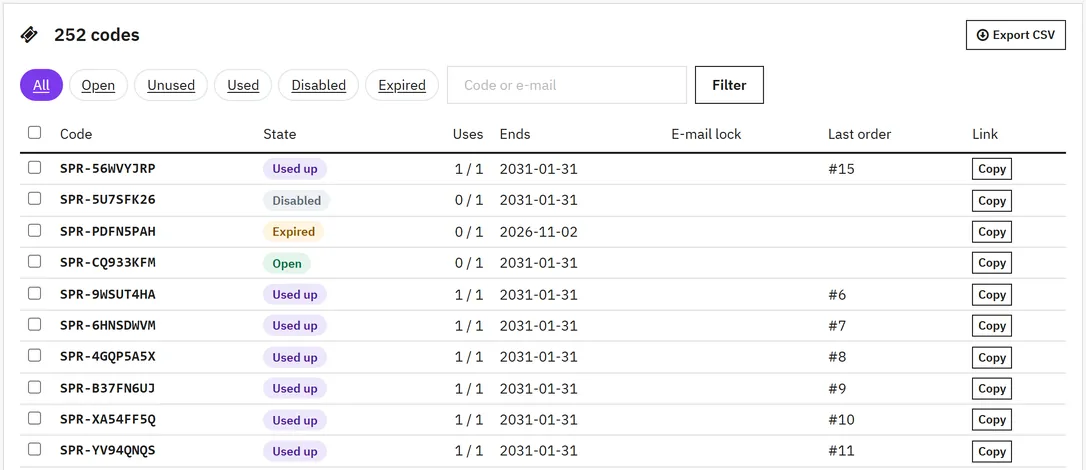
A PrestaShop cart rule has one code. For a newsletter, a partner or a printed flyer you want thousands of unique codes, each used once, and you want to know which ones brought orders. The usual way is one cart rule per code: 5,000 codes become 5,000 rules in Catalog > Discounts. Coupon Codes Pro puts thousands of codes behind one cart rule.
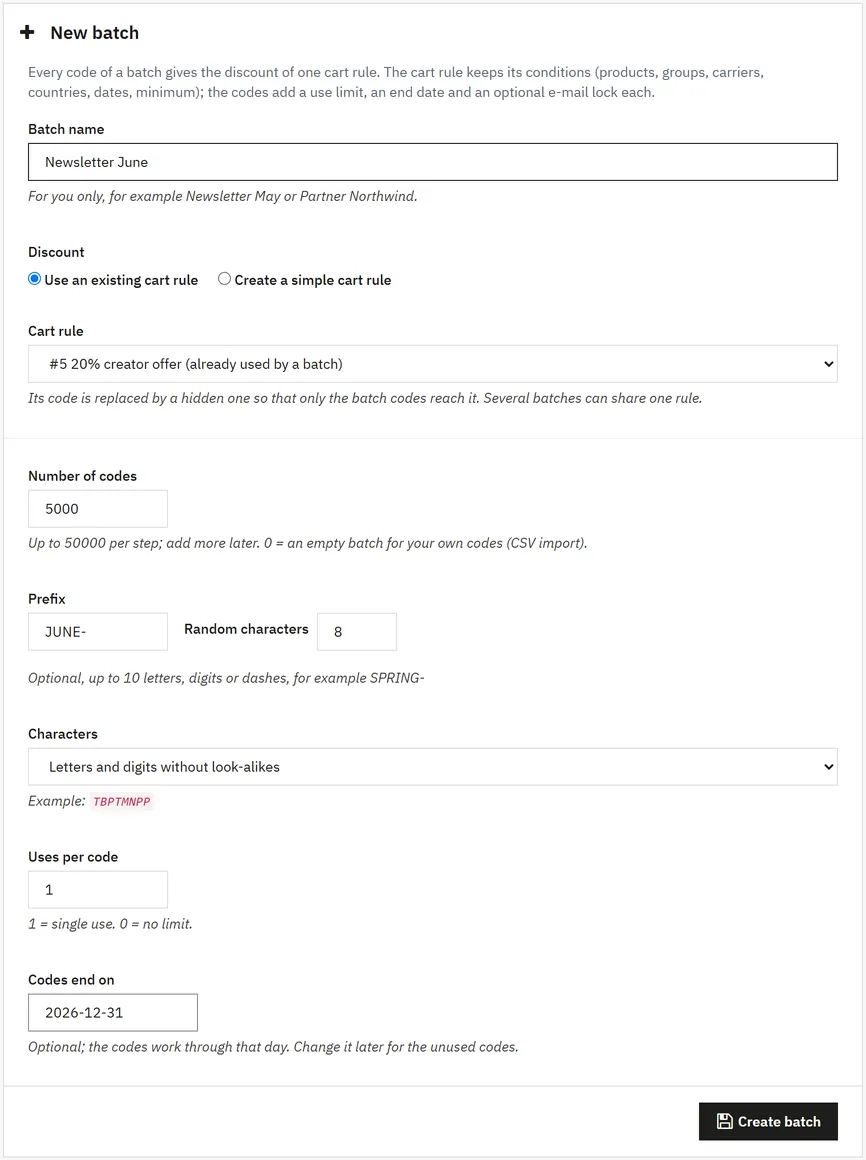
Batches: up to 50,000 codes per step, add more at any time. Prefix, length, and characters without look-alikes (no 0/O, 1/I)
One cart rule: pick an existing rule with all its conditions (products, groups, carriers, countries, minimum), or create a simple one in the same form
Per code: uses (single use or N), an end date and an optional e-mail lock
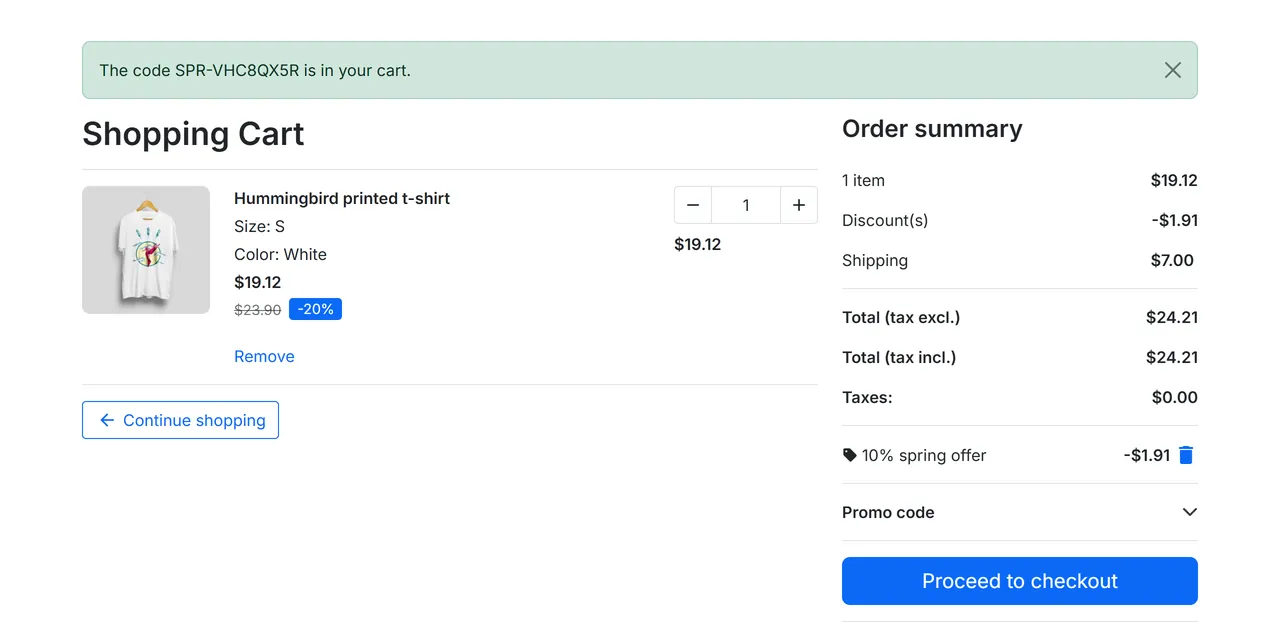
Link:?coupon=CODE on any page of the shop puts the code in the cart. For e-mails, QR codes and ads
CSV: import your own codes (code, uses, end date, e-mail), export every code with its link, state and uses
Bulk changes: disable, enable, new end date, new number of uses, delete unused codes, for the selected codes or the whole filter
Report: codes used, orders, revenue and discount per batch and per code; latest orders; a panel on the order page
Fair counting: a use comes back when the order is canceled (statuses of your choice) and counts again if the order comes back
The cart rule gets a hidden code, so only batch codes reach it. No overrides, no outside service.
Tested on
PrestaShop
9.2.0 and 8.2.8
Themes
Hummingbird and Classic, with the standard checkout and the 9.2 one-page checkout
Volume
50,000 codes per step
Batch
Installation
Requirements
PrestaShop 8.2.0 to 9.x (tested on 8.2.8 and 9.2.0)
PHP 7.2.5 to 8.5, as your PrestaShop version allows
Install
Go to Modules > Module Manager > Upload a module and choose kvcouponcodespro-1.0.0.zip.
Open Catalog > Discounts > Coupon codes > Settings and enter your licence key. The module runs for 14 days without a key.
Click New batch.
Update
Upload the new zip the same way. Batches, codes and reports stay.
Uninstall
Uninstall deletes the batches, codes and reports. Each cart rule used by a batch gets its old code back and is switched off, so no hidden discount stays open. Orders are not touched.
Settings
Catalog > Discounts > Coupon codes > Settings
Setting
Meaning
Accept batch codes in the storefront
Off: every batch code is refused in the cart. Codes and reports stay
Link parameter
The name in the link, coupon by default: https://your-shop/?coupon=SPRING-7KQ2MX. Lowercase letters, digits and _; names that PrestaShop uses itself (such as controller) are refused
Show a short message when a code arrives by link
A small note tells the shopper that the code is waiting for the cart
Statuses that give the use back
Canceled by default. When an order moves to one of these statuses, its code can be used again; when it moves back, the use counts again
Licence key
Your key from the order e-mail
Usage
Create a batch
Catalog > Discounts > Coupon codes > New batch
Batch name: for you only, such as Newsletter May.
Discount: use an existing cart rule, or create a simple one here (percent, amount or free shipping, minimum order, dates, uses per customer). For products, groups, carriers or countries, edit the rule in Catalog > Discounts after saving.
Codes: number (up to 50,000 per step; 0 for an empty batch you fill by CSV), prefix, random characters and character set. The form shows an example.
Uses per code: 1 = single use, 0 = no limit. Codes end on: optional.
The cart rule gets a hidden code. Its old code no longer works, so only batch codes reach the discount. Several batches may share one rule.
New batch
Give codes out
Export CSV: code, link, state, uses, end date, e-mail lock. Paste it into your mailing tool.
Link: add ?coupon=CODE to any page. The code waits until the cart has products and goes in on the next page.
Own codes: import a CSV with code, uses_max, expires, email. Only the code is required. Lines with a bad code, date or e-mail, or a code that a cart rule already uses, are listed and skipped.
In the cart
Shoppers type the code in the usual voucher field of the theme. A used, disabled, expired or e-mail locked code gets a clear message. The cart is checked again before the order, so a code used up in another tab is removed.
Cart
Follow the results
The batch page shows codes, codes used, orders, revenue and discount given, the latest orders with a code, and every code with its state. The order page shows which code and batch the order used.
Change codes
Select codes, or apply to the whole filter: disable, enable, new end date, new number of uses, or delete unused codes.
FAQ
Why one cart rule and not one rule per code?
Catalog > Discounts stays readable, the conditions are set once, and the report counts the whole batch.
Can a shopper use the old code of the cart rule?
No. The rule gets a hidden code that is never shown. The batch page warns you if someone gives the rule a public code again.
What happens when two shoppers take the last use of a code at the same time?
Both orders go through; the second is marked "over the limit" in the report, with a private note on the order.
Does the code come back when an order is canceled?
Yes, for the statuses you choose in the settings.
Can I limit a code to one customer?
Yes: the e-mail column of the CSV import locks the code to that e-mail address.
Does it work with the one-page checkout of PrestaShop 9.2?
Yes. Tested with Hummingbird and Classic, with the standard checkout and the one-page checkout.
Does it send e-mails?
No. Export the codes and send them with your mailing tool.
Does it send data anywhere?
No, apart from the licence check from the back office.
The department store theme for PrestaShop 8.2 and 9.x: colour-coded departments, a department list beside the hero slider with two side promos, a big search with a department picker, tabbed product grids, a 2 + 1 + 2 offer grid, deals of the day with real countdowns, a department showcase, a promotions band and a three-column product page with a sticky buy box. Four styles (Meridian, Harbor, Citrus, Night), every colour editable. A child theme of Classic, no core changes.
Stop AI crawlers, scrapers, vulnerability scanners and unwanted countries before PrestaShop 8.2 or 9.x builds a page. Googlebot and Bingbot are verified by DNS and always allowed; 50+ bots get one switch each; country rules use free GeoIP databases and can close only the checkout; IP and network lists, rate limits for search, filters and forms, honeypots and the add to cart flood fix; a one-second challenge instead of a captcha; learning mode, dashboard, log, IP tester and Cloudflare export. Two hooks, no overrides.
Import and update products from supplier CSV, XML and JSON feeds in PrestaShop 8.2 or 9.x on a schedule: URL, FTP, SFTP or upload; field mapping with real sample values; match by reference, EAN-13, supplier reference or MPN; markup by price band and category with .99 rounding; a price guard that holds back big drops and below-cost prices; combinations from feed rows; stock-only syncs; products missing for N runs set to stock 0 with a safety limit; a dry-run preview with old and new values, run history with a row log and undo. No overrides, no storefront hooks.