1.0.0
Nov 3, 2026
Latest- First release.
by Kavio Labs · for PrestaShop 8.2 and 9.x
Drop a folder of product photos on PrestaShop 8.2 and 9.x: every file finds its product or combination by reference, EAN13, supplier reference or ID, you check the preview (matched, not matched, conflicts), and hundreds of images go up at once through PrestaShop's own image service. Add, new cover, replace all or only products without images; alt text from the product name; undo any upload. No overrides.
Drop a folder of product photos on PrestaShop 8.2 and 9.x: every file finds its product or combination by reference, EAN13, supplier reference or ID, you check the preview (matched, not matched, conflicts), and hundreds of images go up at once through PrestaShop's own image service. Add, new cover, replace all or only products without images; alt text from the product name; undo any upload. No overrides.
Bulk Image Uploader works with PrestaShop 8.2 – 9.x.
We list the builds we install and test on. “Tested” means the test plan ran on that build; “Supported” means the build is inside the supported range.
| Version | Range | Runs on | Status |
|---|---|---|---|
| PrestaShop 9 | 9.0 – 9.2 | PHP 8.1 – 8.4 | Tested on 9.2.0 |
| PrestaShop 8.2 | 8.2.0 – 8.2.x | PHP 7.2.5 – 8.1 | Tested on 8.2.8 |
The Documentation tab covers the settings and every screen.
PrestaShop 8.2 – 9.x. Tested on PrestaShop 9.2.0 and PrestaShop 8.2.8. The Compatibility tab lists every version range.
No. They work through PrestaShop hooks, widgets and the core product customization system. Nothing is written to /override and no core file is changed, so PrestaShop updates and other modules keep working.
They are tested on Classic and Hummingbird, the two themes PrestaShop ships. Themes based on them work; a theme that removes the standard product page containers may need a small CSS adjustment, and support helps with that.
Yes. Settings follow the shop context, like PrestaShop's own modules. A license covers one production domain with its subdomains, so shops on other domains need a license each.
One production store domain with every subdomain (www, shop., staging.), plus local development hosts such as localhost, *.local and *.test. A store on another domain needs its own license; a second-store license is 40% off. You have 14 days after installing to enter the key. 12 months of updates and support are included; after that the module keeps working and renewals are 50% off. How licensing works
Yes. Ask for a full refund within 30 days of your first purchase, no reason needed: open a ticket or write to [email protected] with your order number. The money goes back to the card or bank account you paid with within 5 business days of approval. Refund policy
Open a ticket from your account, so your license details are attached. We answer Monday to Friday: bug reports within 1 business day, how-to questions within 2. Support policy. Not a customer yet? Ask a pre-sales question.
6 more answers about setup and daily use in the Documentation tab.
Adding photos one product at a time takes an afternoon. Bulk Image Uploader takes the whole folder from your photographer or supplier: every file finds its product or combination by its code, you check the preview, and hundreds of images go up at once.
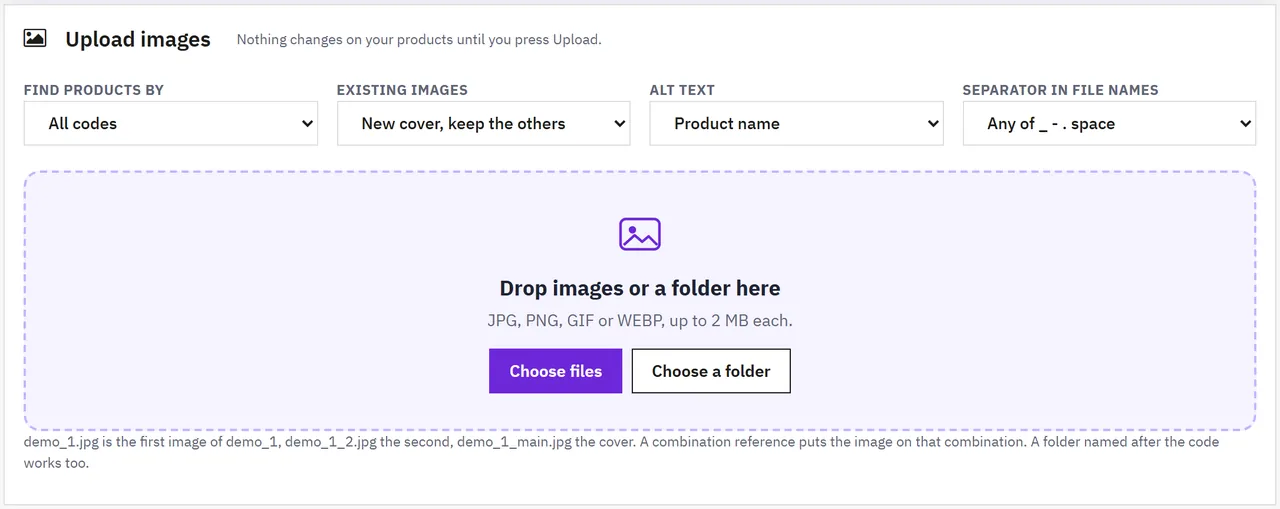
CODE.jpg is the first image, CODE_2.jpg the second, CODE_main.jpg the coverBack office only. No overrides, no outside service.
| PrestaShop | 9.2.0 and 8.2.8 |
| Back office | PrestaShop 9 and 8 admin themes |
| Storefront | Hummingbird and Classic (the images are PrestaShop's own) |
upload/ folder for the copies of replaced images (Undo)kvbulkimageuploader-1.0.0.zip.Upload the new zip the same way. The history stays.
Uninstall deletes the upload history and the undo data. The images stay on your products.
Catalog > Bulk image upload > Settings
| Setting | What it does |
|---|---|
| Find products by, Existing images, Alt text, Separator | What the Upload page starts with. You can change them before each upload |
| Keep undo data | After this many days an upload is kept and can no longer be undone; the copies of replaced images are deleted (default 60) |
| Largest file | The smallest of 20 MB, the PHP upload limits of your server and the product image limit in Shop Parameters > Product Settings |
| Copies of replaced images | upload/kvbiu-backup/: originals of images a "Replace all images" upload removed, until the upload is kept or undone |
Thumbnail sizes and image formats come from Design > Image Settings, as for images added on the product page.
Employees with view access to Bulk image upload see the history and reports; uploading, Undo and the settings need edit access.
Enter the key from your Kavio Labs account. Without a key the module runs for 14 days. When the licence is not active new uploads are off; the history, reports and Undo still work.
Catalog > Bulk image upload
| File | Goes to |
|---|---|
TS-100.jpg | first image of the product with reference TS-100 |
TS-100_2.jpg, TS-100-3.jpg | second and third image |
TS-100_main.jpg (also cover, front) | the cover |
TS-100_back.jpg | after the numbered images |
TS-100-WHITE-S.jpg | the combination with that reference: added to the product and linked to the combination |
4006381333931.jpg | the product or combination with that EAN13 |
TS-100/1.jpg, TS-100/2.jpg | a folder named after the code: the numbers set the order |
Upper and lower case do not matter. When several combinations of one product share a code (copied from the product), the code names the product.
_ - . space, or only one of themDrop the files or a whole folder on the drop zone, or use Choose files / Choose a folder. The preview shows every file:
| Status | Meaning | What to do |
|---|---|---|
| Matched | the product (and combination) it goes to, with the role: cover, additional image, combination image | nothing |
| Conflict | several products have this code | choose the product in the row |
| Not matched | no product has this code | type the code in the row |
| Skipped | "Only products without images" and the product already has images | nothing |
| Not valid | not an image type we take, empty, or too large | remove it |
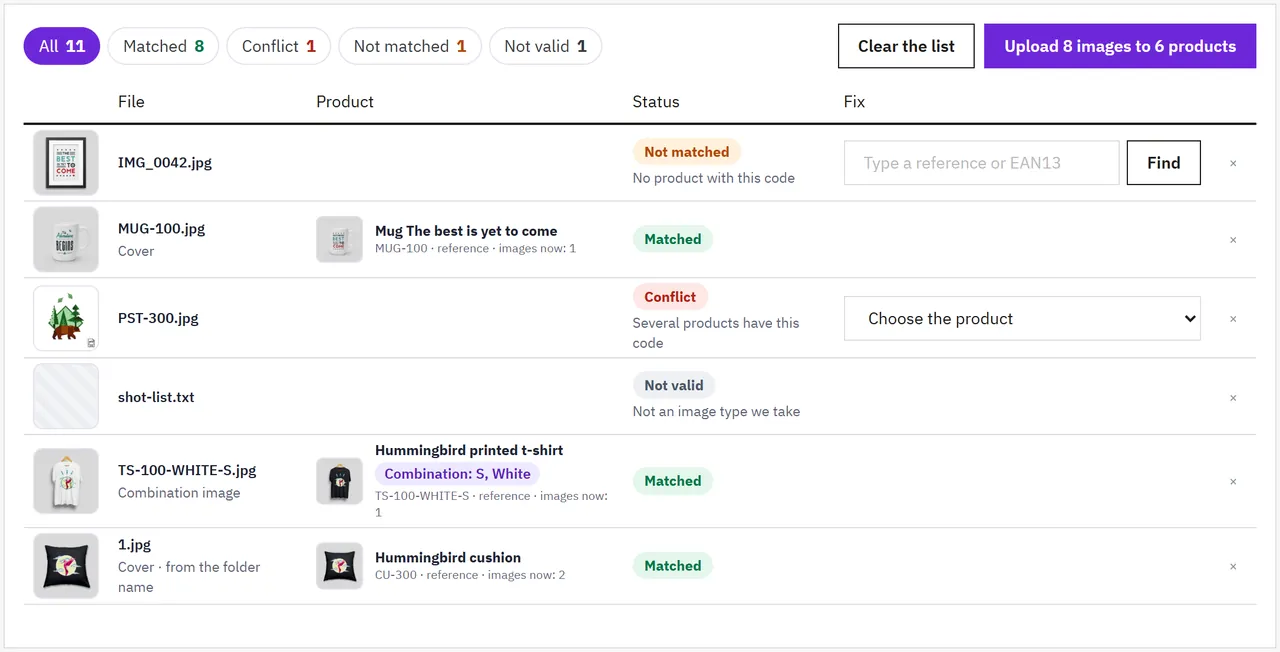
Upload N images to M products sends the files, three products at a time, and puts them in order. A lost connection is retried. When it is done you see how many images reached how many products and which files failed (for example a renamed file that is not a real picture).
History lists every upload with a CSV report (file, product, combination, role, status). Undo puts the products back as they were before that upload: the new images are deleted, replaced images come back, with their cover, alt texts and combination links. Undo the latest upload first when two uploads touched the same products.
An upload that was not finished (browser closed) shows on the Upload page with Finish it and Discard.

No. Name the photos after the product codes and drop them.
My combinations have the product's reference. Then the code names the product. Give a combination its own reference (or use its EAN13) to put an image on it.
Two products have the same reference. The preview shows a conflict; choose the product in the row.
Yes. Images go through PrestaShop's own image service, the same as on the product page: every image size of your theme, the image formats set in Design > Image Settings, and the watermark module if you use one.
Yes, with Undo in History, until the upload is older than the "Keep undo data" setting.
The type is read from the file itself on the server. A text file, script or SVG named .jpg is refused and listed as failed in the report.
Up to 5,000 in one list. Each file can be as large as your server allows (see Settings > Largest file).
New images go to every shop of the product. Not tested on a real multistore setup.
Buy with confidence
This product was tested on these builds. Builds we did not test are not listed.
Updates and support are included in the price. The product keeps working afterwards; renewing is optional.
How licensing worksIf it is not what you expected, tell us within 30 days and we refund the order.
Refund policyCard payments are processed by Stripe. Your card number never reaches our server.
Ask a pre-sales questionSold by Kavio Labs Software Limited, registered in England and Wales No. 17532441. About us
More for PrestaShop
The department store theme for PrestaShop 8.2 and 9.x: colour-coded departments, a department list beside the hero slider with two side promos, a big search with a department picker, tabbed product grids, a 2 + 1 + 2 offer grid, deals of the day with real countdowns, a department showcase, a promotions band and a three-column product page with a sticky buy box. Four styles (Meridian, Harbor, Citrus, Night), every colour editable. A child theme of Classic, no core changes.
Stop AI crawlers, scrapers, vulnerability scanners and unwanted countries before PrestaShop 8.2 or 9.x builds a page. Googlebot and Bingbot are verified by DNS and always allowed; 50+ bots get one switch each; country rules use free GeoIP databases and can close only the checkout; IP and network lists, rate limits for search, filters and forms, honeypots and the add to cart flood fix; a one-second challenge instead of a captcha; learning mode, dashboard, log, IP tester and Cloudflare export. Two hooks, no overrides.
Import and update products from supplier CSV, XML and JSON feeds in PrestaShop 8.2 or 9.x on a schedule: URL, FTP, SFTP or upload; field mapping with real sample values; match by reference, EAN-13, supplier reference or MPN; markup by price band and category with .99 rounding; a price guard that holds back big drops and below-cost prices; combinations from feed rows; stock-only syncs; products missing for N runs set to stock 0 with a safety limit; a dry-run preview with old and new values, run history with a row log and undo. No overrides, no storefront hooks.


