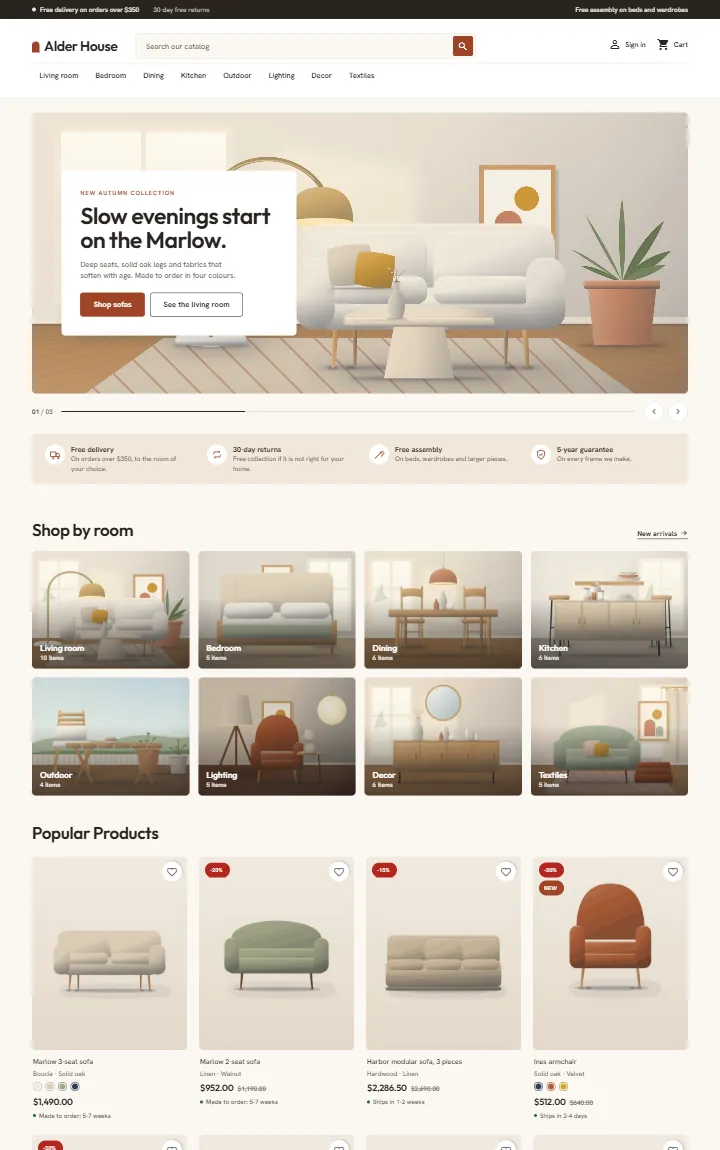
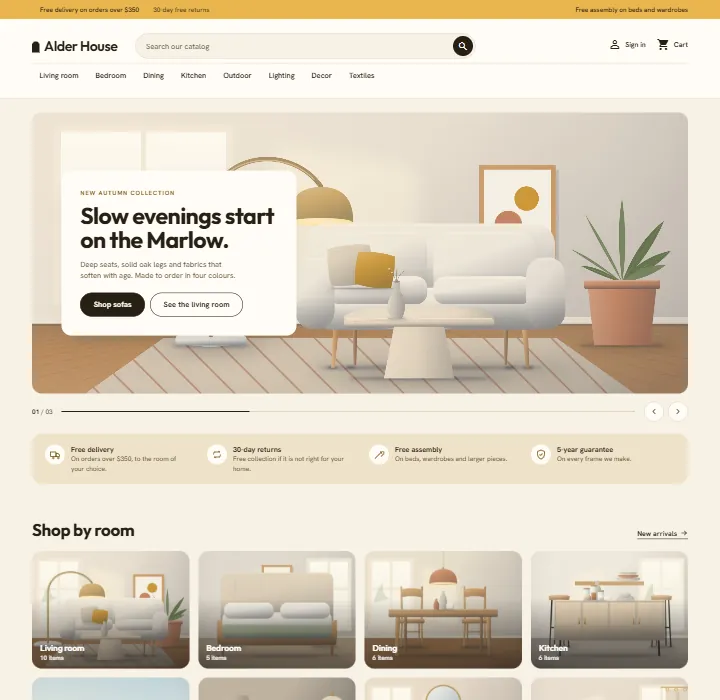
Home, kitchen and furniture theme for PrestaShop 8.2 and 9.x: a room hero with a floating card, shop by room tiles, studio-light product cards with material, colour swatches and delivery lines, a Complete the look checklist with one Add to cart, and product pages with dimensions and a delivery panel. A child theme of Classic with four presets, one-click demo content and the 9.2 one-page checkout, no overrides.
AvailableVersion 1.0.0Compatible with PrestaShop 8.2 – 9.x No core file edits
Built forPrestaShop
Home page: room hero with a floating card, shop by room tiles and promo tiles1 of 6
Home, kitchen and furniture theme for PrestaShop 8.2 and 9.x: a room hero with a floating card, shop by room tiles, studio-light product cards with material, colour swatches and delivery lines, a Complete the look checklist with one Add to cart, and product pages with dimensions and a delivery panel. A child theme of Classic with four presets, one-click demo content and the 9.2 one-page checkout, no overrides.
PrestaShop 8.2 - 9.x
Overview
Hearth is a home, kitchen and furniture theme for PrestaShop 8.2 and 9.x by Kavio Labs. It is built for furniture, lighting, rugs, textiles, tableware and homeware stores, where shoppers browse by room, compare materials and colours, and want to know when a piece arrives.
Hearth home page, Clay preset
What you get
Room hero. Up to three slides with a floating text card on a wide room picture, one or two buttons, a counter, previous and next buttons and optional autoplay. Without your own picture Hearth shows a built-in illustrated room.
Shop by room. Room tiles with the category picture, the name and the item count.
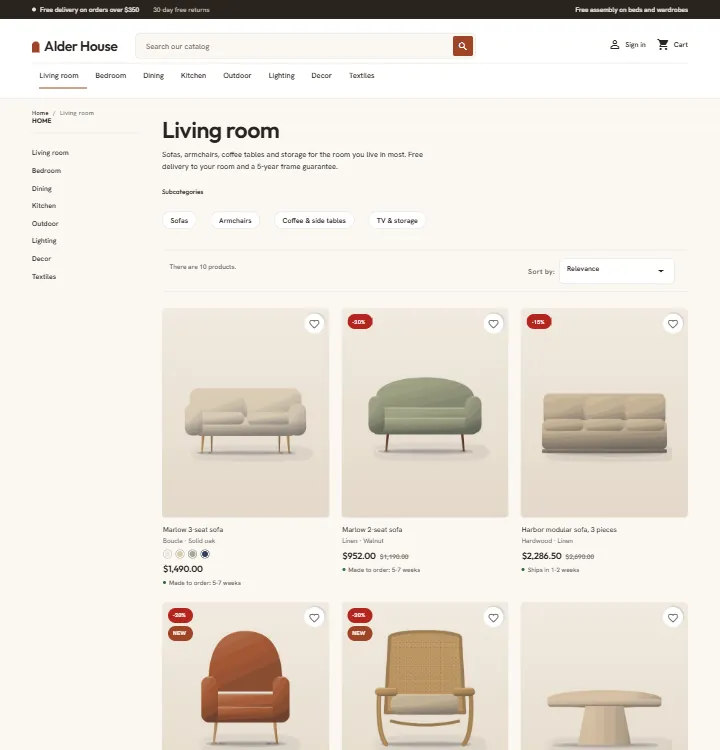
Studio cards. 4:5 product wells with a soft studio light, the material line ("Boucle · Solid oak"), colour swatches, a delivery line ("Made to order: 5-7 weeks"), a wish list heart and flags (New, saving percentage).
Colourways. Sell one product in several colours with a Colour attribute: every colour shows as a swatch on the card and the product page, and the gallery picture changes with the colour.
Complete the look. A room picture beside a checklist of products with a live total and one Add to cart button. Shoppers untick what they already have.
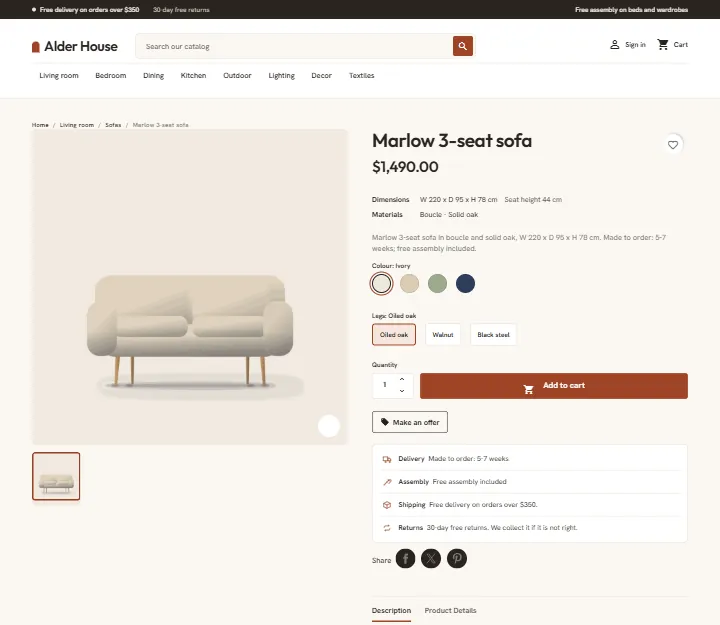
Product page. A large gallery, a dimensions line ("W 220 x D 95 x H 78 cm"), the materials, colour swatches and option chips, and a delivery panel (delivery time, assembly, shipping, returns) under the Add to cart button.
Home sections. Promise strip, two promo tiles, makers strip, reviews and quotes, a samples band. Each one is switched on or off and written on the settings page.
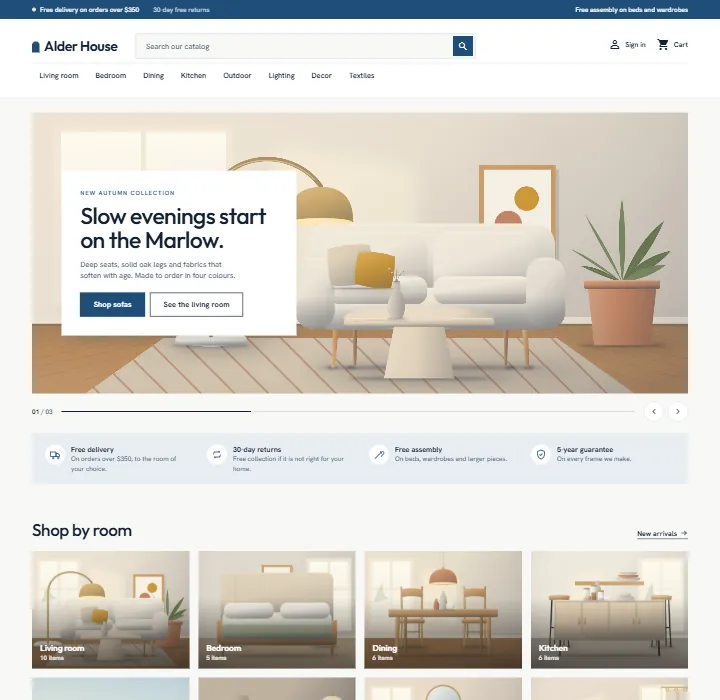
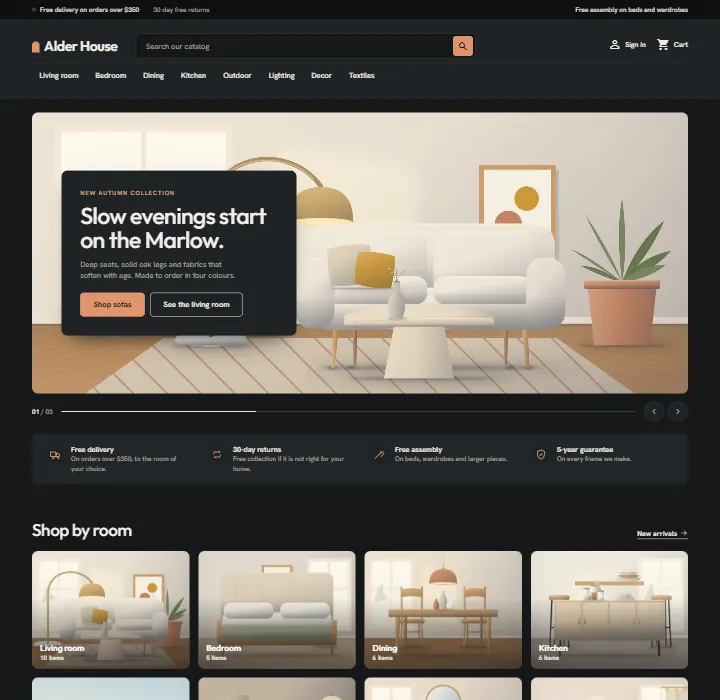
Four presets.Clay (warm white, terracotta), Coast (cool white, sea blue, square corners), Rattan (cream and honey, pill buttons) and Evening (dark graphite, copper). They change corners, buttons, menu case and tone, not only colour.
One-page checkout ready. Works with the classic five-step checkout and with the PrestaShop 9.2 one-page checkout.
Self-hosted fonts. Outfit and Hanken Grotesk (SIL Open Font License 1.1). Hearth makes no requests to font CDNs.
Demo content. One button imports "Alder House": eight rooms with sub-categories, forty-seven home and kitchen products with materials, sizes, delivery times, colours and options, and a timed sale.
Hearth category pageHearth product page
Coast
Rattan
Evening
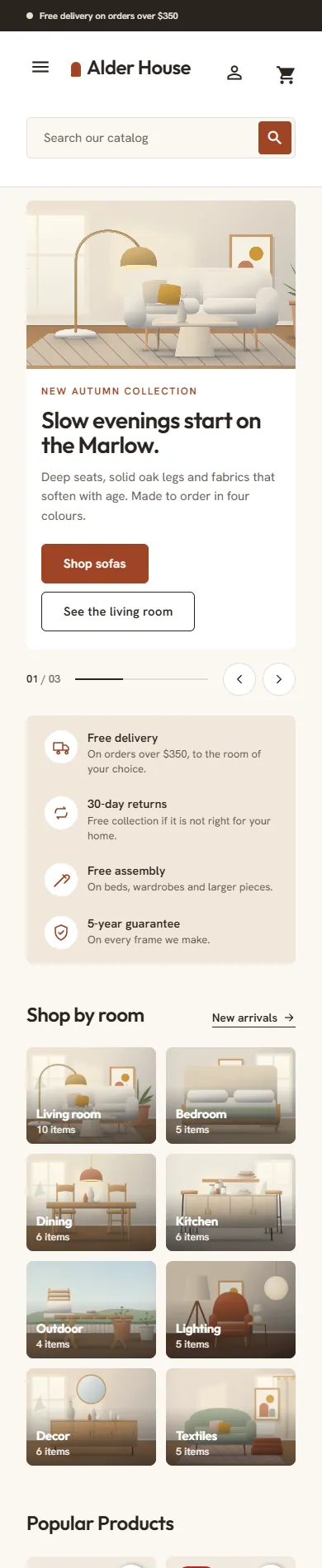
On a phone the menu opens as a slide-in drawer, the hero card sits under the picture and product cards show two per row.
Hearth home page on a phone
Works with
Make an Offer (Kavio Labs): the offer button appears next to Add to cart; its dialog uses the theme colours. Handy for negotiated prices on furniture.
Product Personalizer (Kavio Labs): its form sits above the quantity row and its live preview is drawn on the large product picture (for example an engraving on a vase or board).
Sell by Weight & Length (Kavio Labs): the amount field replaces the quantity field and the live total shows in the buy box (for example rugs and fabric by the metre).
EU e-Invoicing and Order Risk Guard (Kavio Labs) work in the back office and are not changed by the theme.
The PrestaShop core modules (wishlist, product comments, faceted search, social sharing, email subscription) keep working; Hearth only restyles them.
How it is built
Hearth is a child theme of Classic. Classic ships with PrestaShop 8.2 and 9.x, so one theme runs on both. Hearth overrides only a few templates (header, footer, product card, checkout header), adds one stylesheet and one small script, and sets image sizes. The theme comes with a small companion module, Hearth theme settings, for the presets, the home page sections, the material, delivery and dimensions lines and the demo content.
Versions
PrestaShop 8.2.x
PrestaShop 9.0 - 9.2
Parent theme
Classic 2.2
Classic 3.x
Checkout
classic five steps
classic five steps or one-page checkout (9.2)
PHP
7.2.5 to 8.1
8.1 to 8.5
One licence covers one shop domain and includes 12 months of updates and support.
Pages
Installation
Requirements
PrestaShop 8.2.x or 9.x with the Classic theme present (it ships with PrestaShop; do not delete it, Hearth is its child theme).
PHP 7.2.5 or newer (the PHP version your PrestaShop already runs on is fine).
Install the theme
Go to Design > Theme & Logo and click Add new theme.
Choose Import from your computer, upload kvhearth-1.0.0.zip and click Next. PrestaShop unpacks the theme into themes/kvhearth and copies the companion module Hearth theme settings into modules/kvhearth.
Click Use this theme next to Hearth. PrestaShop installs and enables the companion module, applies the Hearth image sizes and puts the modules in the Hearth positions.
Go to Design > Image Settings and click Regenerate thumbnails (all types) so your existing product pictures get the Hearth sizes. On PrestaShop 9 you can also run bin/console prestashop:thumbnails:regenerate.
Go to Advanced Parameters > Performance and click Clear cache.
The default PrestaShop home page blocks (image slider, banner, custom text) are still positioned on the home page. Open Design > Positions, find the hook displayHome and unhook Image slider, Banner and Custom text (or import the demo content, which does it for you and puts them back when you remove the demo).
Licence key
Hearth works for 14 days without a key. Open Modules > Module Manager > Hearth theme settings > Configure, scroll to Licence, paste the key from your Kavio Labs account and click Save key. The licence is checked from this page (and once a day), never on a storefront request. Without a valid key the theme itself keeps working; the home page sections, the top bar notes, the text logo, the material, delivery and dimension lines and the presets other than Clay are switched off until the key is valid.
Import the demo content (optional)
On the same configuration page, click Import demo content. It adds eight rooms with sub-categories, forty-seven products and four makers, hides the default sample products, categories, brands and home page blocks, and sets the shop name to "Alder House". Click Remove demo content to delete everything it created and to bring your previous settings back. Enable the Hearth theme before you import, so the pictures are cut in the Hearth sizes.
Recommended settings
Product pictures: at least 800 x 800 px, the product on a white or very light background. Cards and the gallery blend the picture into a soft well.
Materials, sizes and delivery: create Features (Catalog > Product Settings > Features) named exactly Material, Width, Depth, Height, Seat height, Delivery time and Assembly. Hearth shows Material and Delivery time on cards, and builds the dimensions line ("W 220 x D 95 x H 78 cm") and the delivery panel on the product page from them. Give a product several Material values and they are joined with a dot.
Colours: use an attribute group of type Colour (dots on cards, swatches on the product page) and give each colour its own product picture in the combination. Other choices (legs, size, fabric) work as Radio buttons groups and show as chips.
Makers: assign each product a brand (Catalog > Brands & Suppliers). The brands fill the makers strip.
Sales: create a specific price on the product; the card shows the saving flag and the old price.
Home page product lists: in Modules > Featured products and New products set the number of products to 8 (the demo import does this for you).
One-page checkout (PrestaShop 9.2)
If you enable the one-page checkout in the settings of the PrestaShop module "One Page Checkout", Hearth takes over its page template and renders it in the Hearth look. Nothing else is needed.
Updating
Upload the new theme zip the same way (PrestaShop asks you to delete the old theme folder first, or replace the files by FTP). Your settings stay in the database.
Uninstalling
Switch to another theme in Design > Theme & Logo, then delete Hearth there. Uninstall Hearth theme settings in the Module Manager to remove its settings. Remove the demo content first if you imported it.
Preset. Clay, Coast, Rattan or Evening. The preset changes colours, corner radius, button shape and the header and band colours. The choice applies to the whole storefront.
Text logo. A wordmark with a small arch mark. Leave it empty to use the logo image from Design > Theme & Logo.
Top bar notes. Up to three short notes in the bar above the header. Leave all empty to hide the bar.
Material line on cards and Delivery line on cards. Show the product features named "Material" and "Delivery time" on every card.
Product page extras. The dimensions line, the materials line and the delivery panel on the product page, plus the two lines you can write: shipping and returns.
Home page: room hero
Show the hero slider and Autoplay (every six seconds; it stops on hover and focus and for visitors who prefer reduced motion).
Slides 1 to 3. Eyebrow, title (put *one word* between asterisks to show it in the accent colour), text, two buttons with links, and a picture address. Slide 1 is always shown; slides 2 and 3 only when their title is filled.
Picture URL. A full https:// address, a path that starts with /, or a path below the shop folder such as modules/kvhearth/demo/images/n-marlow.jpg. Empty: a built-in illustrated room. Use a wide picture, about 1920 x 860 px.
Links are a full https:// address or a path that starts with /. Empty links go to "New products" and "Prices drop".
Home page: more sections
Promise strip. One promise per line, title|text, up to four.
Shop by room. Title, text and up to eight category IDs. Empty: the first eight categories under Home. The tiles use the category pictures.
Two promo tiles. Eyebrow, title, text, link label, link and picture for each.
Complete the look. Eyebrow, title, text, a picture and up to six product IDs (at least two). Products with options are added with their default option. The button adds every ticked product to the cart and opens the cart.
Makers strip. Title. It lists the brands that have products.
Reviews and quotes. Title, score, a note under the score and up to four quotes, one per line, name|stars (1-5)|text. These are texts you write; they are not read from the product comments module.
Samples band. Eyebrow, title, text, button label and link. Empty link: the contact page.
The product lists on the home page (Featured, On sale, New, Best sellers) come from the PrestaShop modules of the same names; configure them there.
Demo content
Import demo content and Remove demo content, see Installation.
Licence
Paste your Kavio Labs licence key and click Save key. Check now asks the licence server again. The card shows the state: start period (14 days), active (with the licensed domain and the date until which you get updates), or the reason why the theme extras are switched off.
The check sends the licence key, the product ID and version, the shop's host names and the PrestaShop version, and receives a signed answer. Nothing else leaves your shop. Local and development hosts are covered by every licence.
Menu, columns and layouts
Hearth keeps Classic's layouts. Change them in Design > Theme & Logo > Choose layouts. The category pages use the two-column layout with the filter column; the product page and the home page use the full-width layout. The main menu appears under the logo and search; sub-categories open in a full-width panel.
Where Hearth puts the modules
When you enable the theme, these module positions are applied: top bar notes (displayBanner), main menu and search (displayTop), account and cart (displayNav2), hero, promise strip and shop by room first on the home page (displayHome), then the promo tiles, complete the look, makers, reviews and samples band and the newsletter above the footer (displayFooterBefore), the dimensions line under the price (displayProductPriceBlock) and the delivery panel under the Add to cart button (displayProductAdditionalInfo). You can move modules in Design > Positions as usual.
FAQ
Does Hearth change PrestaShop files?
No. It is a child theme of Classic plus a small module. It does not edit core files, other modules or Classic, and it uses no overrides.
Why a Classic child theme and not a Hummingbird child theme?
PrestaShop 8.2 only has Classic, and Hummingbird 2.1 is built for PrestaShop 9.2 only. A Classic child theme runs on 8.2 and on every 9.x release with one code base. For the PrestaShop 9.2 one-page checkout, which is written for Hummingbird's layout, Hearth ships its own version of the page template, so the checkout works in the Hearth look.
Do I need to regenerate the pictures?
Yes, once, after enabling the theme, if you already have products: Design > Image Settings > Regenerate thumbnails.
The product pictures have a visible box around them. Hearth blends the picture into a soft well with a multiply effect, so pictures on a white background look clean. Pictures with a grey or coloured background show that background; use white backgrounds.
Why do some cards have no material or delivery line?
They come from product features named Material and Delivery time. Add them to the product (Catalog > Products > Features) or switch the lines off in the configuration.
Why does the product page show no dimensions?
The dimensions line is built from the features Width, Depth and Height with values such as "220 cm". Add them to the product.
How do I show several colours of one sofa?
Create one product with a Colour attribute group and one combination per colour, each with its own picture. The card shows the colour dots and the gallery follows the colour.
Does Complete the look work with products that have options?
Yes. The product is added with its default option. Shoppers who want another option open the product page from the item name.
Are the reviews on the home page real reviews?
They are quotes you type on the settings page. The product comments module shows the real reviews on the product pages.
Can I use my own logo image?
Yes. Leave Text logo empty and upload the logo in Design > Theme & Logo. The logo is shown at up to 46 px height.
Is Hearth translated?
Hearth is English only. Texts you type in the settings are shown as you typed them. The shop's own front office strings follow the language packs you installed in PrestaShop.
Can I change the fonts?
The fonts are files in themes/kvhearth/assets/fonts (Outfit and Hanken Grotesk). Replace the @font-face rules at the top of assets/css/hearth.css to use others.
Does it work with the faceted search, wishlist, product comments?
Yes; they are styled by the theme. Register the faceted search filters for your categories as usual.
Which hooks does the theme use?
It uses the standard Classic hooks. The companion module uses displayBanner, displayHome, displayFooterBefore, displayProductPriceBlock, displayProductAdditionalInfo, actionPresentProduct, actionPresentProductListing, actionFrontControllerSetMedia and actionFrontControllerSetVariables.
What happens when the licence is not valid?
The shop keeps working. The theme templates and styles stay; the home page sections, the top bar notes, the text logo, the material, delivery and dimension lines and the presets other than Clay are switched off until the licence is valid again.
Where do I get help?
Through the support form on kaviolabs.com. Updates and support are included for 12 months.
Sell by weight, length, area or volume on PrestaShop 8.2 and 9.x: amount field with quick amounts and live total, exact decimal stock and real shipping weight. No overrides.
Shoppers propose a price per item; the shop accepts, counters or declines, or rules answer at once. The agreed price is a one-time specific price for that customer's cart.