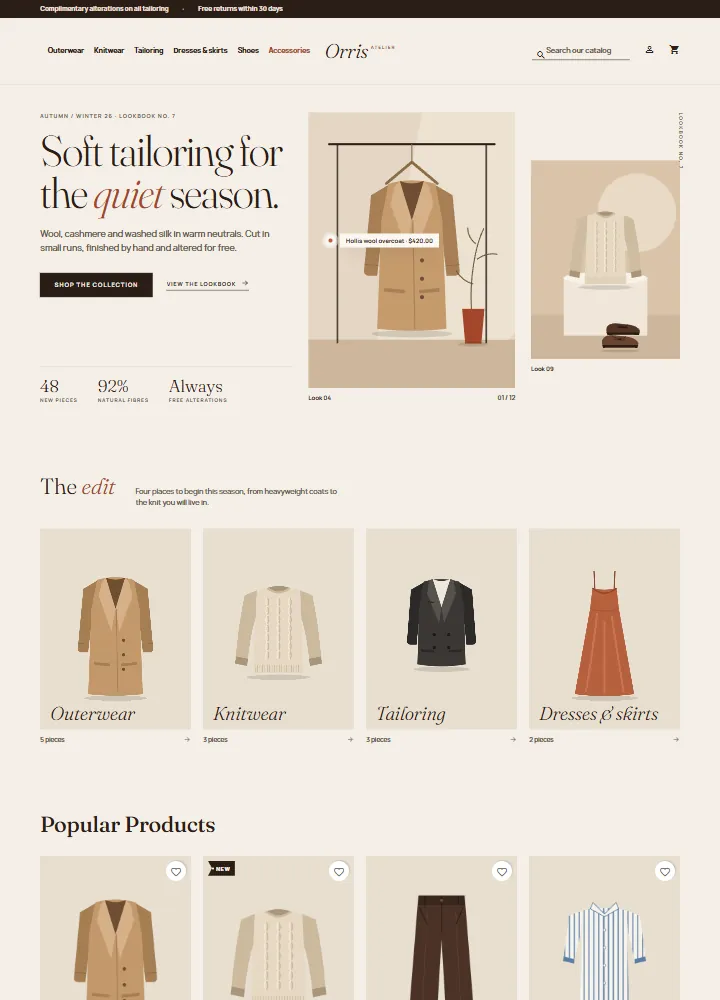
Fashion and apparel theme for PrestaShop 8.2 and 9.x that reads like a printed lookbook: split lookbook hero with a shop-the-look pin, tall 3:4 cards with a second image on hover, colour dots and size chips, hang-tag labels. A child theme of Classic with four presets, one-click demo content and the 9.2 one-page checkout, no overrides.
AvailableVersion 1.0.0Compatible with PrestaShop 8.2 – 9.x No core file edits
Built forPrestaShop
Home page: split lookbook hero with a shop-the-look pin1 of 6
Fashion and apparel theme for PrestaShop 8.2 and 9.x that reads like a printed lookbook: split lookbook hero with a shop-the-look pin, tall 3:4 cards with a second image on hover, colour dots and size chips, hang-tag labels. A child theme of Classic with four presets, one-click demo content and the 9.2 one-page checkout, no overrides.
PrestaShop 8.2 - 9.x
Overview
Atelier is a fashion and apparel theme for PrestaShop 8.2 and 9.x by Kavio Labs. It is built for independent labels, boutiques and concept stores selling clothing, shoes and accessories. The idea: your shop reads like a printed lookbook, not a catalogue.
Atelier home page, Bone preset
What you get
Split lookbook hero. An editorial serif headline with one italic word, a lead, a button and a text link, three big facts, a tall 3:4 image with a shop-the-look pin (product name and price) and a second image set lower, with captions.
Category tiles. Four 3:4 category images with oversized italic names and the number of pieces.
Lookbook cards. Tall 3:4 product cards. Hovering shows the second product image and slides in a Quick view bar. Cards also carry colour swatches (one dot per colour), hang-tag labels (New, -12%, your own discount flags) and a wishlist heart.
Journal story and promises. One big story with a pull quote, plus three numbered promises. All texts are your own.
Product page. A large 3:4 gallery with thumbnails, colour swatches, a size chip grid, a big Add to cart button and the tabs for description and details. Choosing a colour switches the gallery to that colour's pictures.
Category page. A huge title, a sort menu, the filter column on desktop and a two-column grid on phones.
Header and footer. A top bar with two notes, the menu on the left, a centred text logo, search, account and bag on the right. On phones the menu becomes a slide-in drawer. A newsletter band sits above the footer, and the footer ends in a giant italic wordmark.
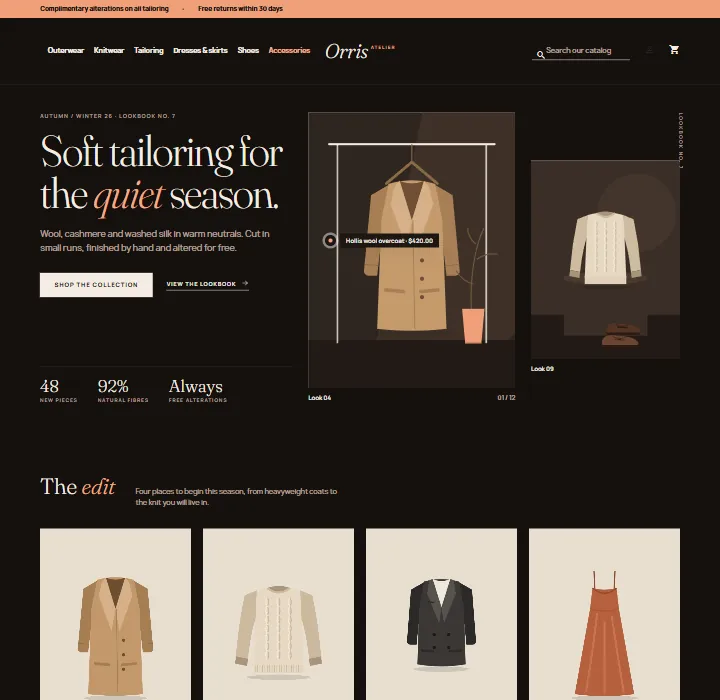
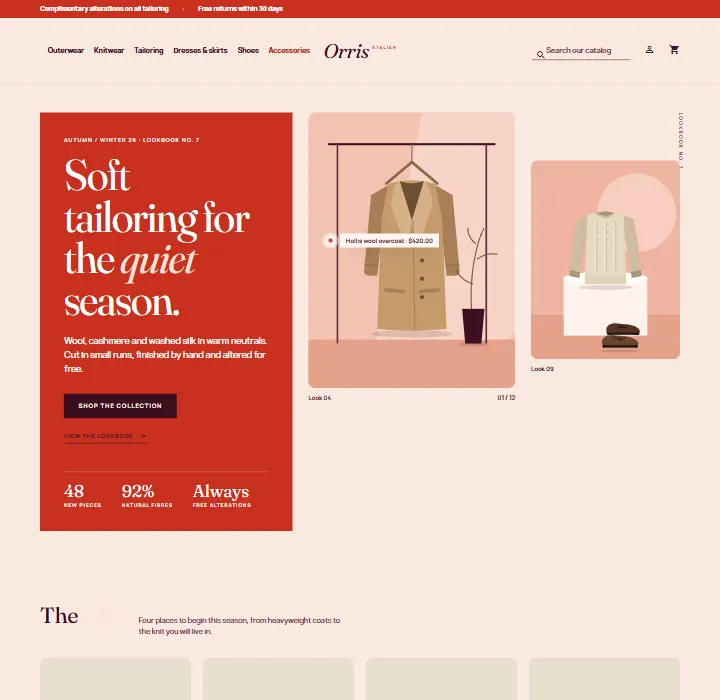
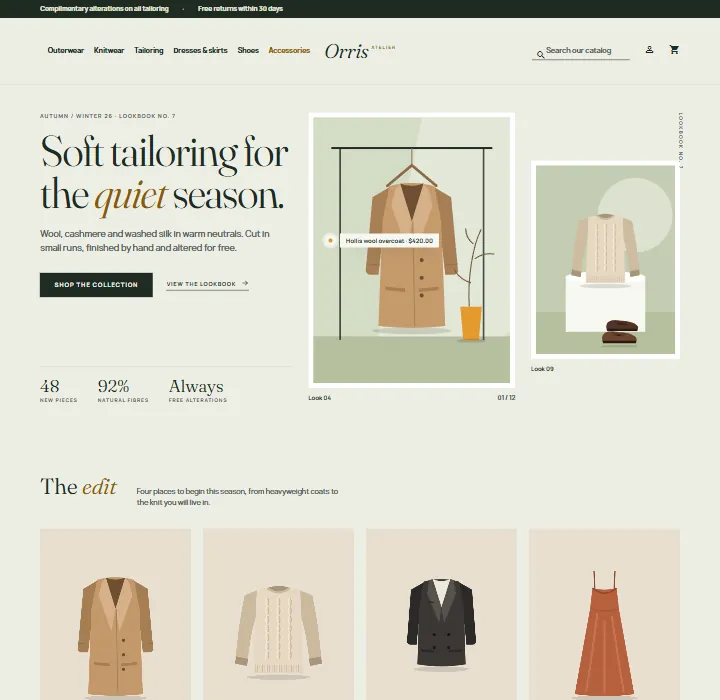
Four presets that change the mood.Bone (bone paper, espresso, clay), Noir (evening edition: dark ground, apricot accent, tracked capitals), Sorbet (blush and oxblood, hero copy on a solid tomato panel, rounded images) and Sage (linen sage, forest ink, framed images).
One-page checkout ready. Works with the classic five-step checkout and with the PrestaShop 9.2 one-page checkout.
Self-hosted fonts. Fraunces (with italics) and Manrope, both under the SIL Open Font License 1.1. Atelier makes no requests to font CDNs.
Demo content. One button imports "Orris Atelier": six categories and eighteen styles with colours and sizes, so you can see the theme working before you add your own products.
Noir
Sorbet
Sage
Works with
Make an Offer (Kavio Labs): the offer button appears next to Add to cart; its dialog uses the theme colours.
Product Personalizer (Kavio Labs): its form sits above the quantity row and its live preview is drawn on the large product picture.
Sell by Weight & Length (Kavio Labs): the amount field replaces the quantity field and the live total shows in the buy box.
The PrestaShop core modules (wishlist, product comments, reassurance, faceted search, social sharing, email subscription) keep working; Atelier only restyles them.
How it is built
Atelier is a child theme of Classic. Classic ships with PrestaShop 8.2 and 9.x, so one theme runs on both. Atelier overrides only a few templates (header, footer, product card, checkout header) and adds one stylesheet and one small script. Because everything else comes from Classic, PrestaShop updates to Classic keep reaching your shop. The theme comes with a small companion module, Atelier theme settings, for the presets, the home page sections and the demo content.
Versions
PrestaShop 8.2.x
PrestaShop 9.0 - 9.2
Parent theme
Classic 2.2
Classic 3.x
Checkout
classic five steps
classic five steps or one-page checkout (9.2)
PHP
7.2.5 to 8.1
8.1 to 8.5
One licence covers one shop domain and includes 12 months of updates and support.
Pages
Installation
Requirements
PrestaShop 8.2.x or 9.x with the Classic theme present (it ships with PrestaShop; do not delete it, Atelier is its child theme).
PHP 7.2.5 or newer (the PHP version your PrestaShop already runs on is fine).
Install the theme
Go to Design > Theme & Logo and click Add new theme.
Choose Import from your computer, upload kvatelier-1.0.0.zip and click Next. PrestaShop unpacks the theme into themes/kvatelier and copies the companion module Atelier theme settings into modules/kvatelier.
Click Use this theme next to Atelier. PrestaShop installs and enables the companion module, applies the Atelier image sizes (3:4) and puts the modules in the Atelier positions.
Go to Design > Image Settings and click Regenerate thumbnails (all types) so your existing product pictures get the new 3:4 sizes. On PrestaShop 9 you can also run bin/console prestashop:thumbnails:regenerate.
Go to Advanced Parameters > Performance and click Clear cache.
Licence key
Atelier works for 14 days without a key. Open Modules > Module Manager > Atelier theme settings > Configure, scroll to Licence, paste the key from your Kavio Labs account and click Save key. The licence is checked from this page (and once a day), never on a storefront request. Without a valid key the theme itself keeps working; the home page sections, the top bar notes, the text logo and the presets other than Bone are switched off until the key is valid.
Import the demo content (optional)
On the same configuration page, click Import demo content. It adds six categories and eighteen products, hides the default sample products, categories and home page blocks, and sets the shop name to "Orris Atelier". Click Remove demo content to delete everything it created and to bring your previous settings back.
Recommended settings
Product pictures: 3:4 portraits, at least 900 x 1200 px. Other ratios are cropped to 3:4 on cards and in the gallery.
Home page product lists: in Modules > Featured products and New products set the number of products to 8 (the demo import does this for you).
Colours: create the product attribute group of type Colour (with colour values) and give your combinations a colour. Atelier shows the colours as dots on cards and as swatches on the product page. A combination with its own pictures switches the gallery when the colour is chosen.
Sizes: use an attribute group of type Radio buttons for sizes. They are shown as chips.
One-page checkout (PrestaShop 9.2)
If you enable the one-page checkout in the settings of the PrestaShop module "One Page Checkout", Atelier takes over its page template and renders it in the Atelier look. Nothing else is needed.
Updating
Upload the new theme zip the same way (PrestaShop asks you to delete the old theme folder first, or replace the files by FTP). Your settings stay in the database.
Uninstalling
Switch to another theme in Design > Theme & Logo, then delete Atelier there. Uninstall Atelier theme settings in the Module Manager to remove its settings. Remove the demo content first if you imported it.
Preset. Bone, Noir, Sorbet or Sage. The preset changes colours, the hero style and the roundness of images. The choice applies to the whole storefront.
Text logo. A wordmark in italic serif, with an optional small word next to it (for example "Atelier"). Leave it empty to use the logo image from Design > Theme & Logo.
Top bar notes. Two short notes in the dark bar above the header. Leave both empty to hide the bar.
Home page: hero
Show the hero, Eyebrow, Title (put *one word* between asterisks to set it in italics), Text.
Button and Text link: a label and a link (a full https:// address or a path that starts with /). Empty links go to the "New products" page.
Three facts: one per line, value|label.
Large image and Second image: upload 3:4 portraits (JPG, PNG or WebP, up to 4 MB). Without an upload the theme shows its own illustrations. Caption: left text|right text.
Shop-the-look product ID: the ID of a product (Catalog > Products). A pin with its name and price appears on the large image and links to the product. Empty: no pin.
Home page: more sections
Category tiles: switch, title, text and up to four category IDs. Empty: the first four categories under Home. The tiles use the category images, so upload a 3:4 image to each category (Catalog > Categories).
Journal story: eyebrow, title, text, pull quote with author and a link.
Three promises: one per line, title|text.
The product lists on the home page (Featured, On sale, New, Best sellers) come from the PrestaShop modules of the same names; configure them there.
Demo content
Import demo content and Remove demo content, see Installation.
Licence
Paste your Kavio Labs licence key and click Save key. Check now asks the licence server again. The card shows the state: start period (14 days), active (with the licensed domain and the date until which you get updates), or the reason why the theme extras are switched off.
The check sends the licence key, the product ID and version, the shop's host names and the PrestaShop version, and receives a signed answer. Nothing else leaves your shop. Local and development hosts are covered by every licence.
Menu, columns and layouts
Atelier keeps Classic's layouts. Change them in Design > Theme & Logo > Choose layouts. The category pages use the two-column layout with the filter column; the product page and the home page use the full-width layout.
Where Atelier puts the modules
When you enable the theme, these module positions are applied: top bar notes (displayBanner), main menu and search (displayTop), account and cart (displayNav2), hero and category tiles first on the home page (displayHome), story and promises, then the newsletter, above the footer (displayFooterBefore). You can move modules in Design > Positions as usual.
FAQ
Does Atelier change PrestaShop files?
No. It is a child theme of Classic plus a small module. It does not edit core files, other modules or Classic, and it uses no overrides.
Why a Classic child theme and not a Hummingbird child theme?
PrestaShop 8.2 only has Classic, and Hummingbird 2.1 is built for PrestaShop 9.2 only. A Classic child theme runs on 8.2 and on every 9.x release with one code base. For the PrestaShop 9.2 one-page checkout, which is written for Hummingbird's layout, Atelier ships its own version of the page template, so the checkout works in the Atelier look.
Do I need to regenerate the pictures?
Yes, once, after enabling the theme: Atelier uses 3:4 picture sizes. Use Design > Image Settings > Regenerate thumbnails.
The colour dots on the cards are missing. They come from the attribute group of type Colour. Give the colour values a colour (or a texture) and make sure the combinations use them. Radio and select groups (like Size) do not show on cards.
Product pictures do not change when I pick a colour. In the product page, Combinations tab, associate each combination with its pictures. The first associated picture becomes the gallery picture for that colour.
Can I use my own logo image?
Yes. Leave Text logo empty and upload the logo in Design > Theme & Logo. The logo is shown at up to 44 px height.
Where do the hero and story illustrations come from?
They are drawings shipped with the module, with no photos, people or real brands. Replace the hero images with uploads; the story illustration can be replaced by a theme override (themes/kvatelier/modules/kvatelier/views/templates/hook/story.tpl).
Is Atelier translated?
Atelier is English only. Texts you type in the settings are shown as you typed them. The shop's own front office strings follow the language packs you installed in PrestaShop.
Can I change the fonts?
The fonts are files in themes/kvatelier/assets/fonts (Fraunces and Manrope). Replace the @font-face rules at the top of assets/css/atelier.css to use others.
Does it work with the faceted search, wishlist, product comments?
Yes; they are styled by the theme. Register the faceted search filters for your categories as usual.
Which hooks does the theme use?
It uses the standard Classic hooks. The companion module uses displayBanner, displayHome, displayFooterBefore, actionFrontControllerSetMedia and actionFrontControllerSetVariables.
What happens when the licence is not valid?
The shop keeps working. The theme templates and styles stay; the home page sections, the top bar notes, the text logo and the presets other than Bone are switched off until the licence is valid again.
Where do I get help?
Through the support form on kaviolabs.com. Updates and support are included for 12 months.
Sell by weight, length, area or volume on PrestaShop 8.2 and 9.x: amount field with quick amounts and live total, exact decimal stock and real shipping weight. No overrides.
Shoppers propose a price per item; the shop accepts, counters or declines, or rules answer at once. The agreed price is a one-time specific price for that customer's cart.